In iOS 16, Apple has brought several personalization features to the iPhone Lock Screen that enable you to get just the wallpaper you want, including options to add widgets and change the font and style of the digital clock.
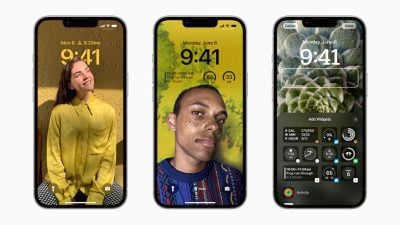
ios 16 lock screen customization
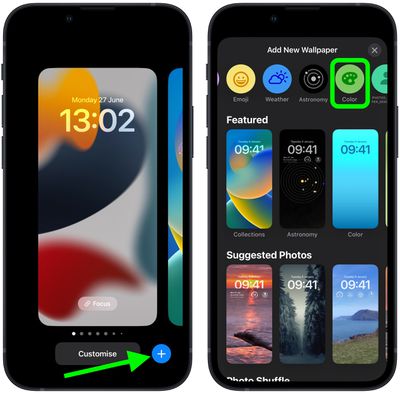
Of course, if all you want is a minimal colored wallpaper with nothing else going on, Apple has included this option too. The following steps show you how to change the color of your Lock Screen on an ‌iPhone‌ running iOS 16.

  1. Unlock your ‌‌‌‌iPhone‌‌‌‌ with Face ID or Touch ID, then press and hold the Lock Screen.
  2. Tap the blue + button, or swipe leftwards all the way to the end and then tap Add New.
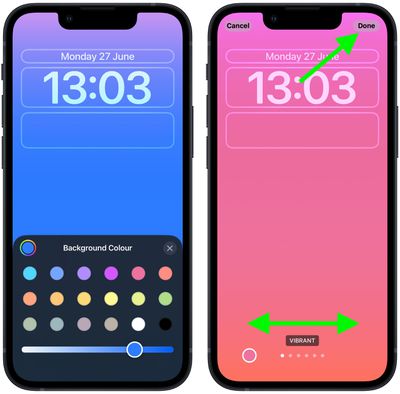
  3. Tap the Color button in the top row of options.
    Lock Screen

  4. Use the color switches to select a color for your Lock Screen. You can also use the slider to change the hue.
  5. Swipe left and right to preview the color styles available. They include Vibrant, Tone, Deep, Vapor, Bright, and Solid.
  6. When you're happy with the look and have added any widgets, tap Done in the top-right corner of the screen.
  7. To make the dynamic wallpaper appear on both your Lock Screen and Home Screen, tap Set as Wallpaper Pair in the pop-up. Otherwise, tap Customize Home Screen to do so separately.
  8. Tap the Lock Screen you just created in the wallpaper gallery to activate it.
    Lock Screen

You can customize the current Lock Screen at any time by invoking the gallery view from the Lock Screen with a long press, or by going into Settings -> Wallpapers.
Popular Stories

2024 iPhone Boxes Feature

Apple Adjusts Trade-In Values for iPhones, iPads, Macs, and More

Thursday November 6, 2025 11:12 am PST by
Apple today updated its trade-in values for select iPhone, iPad, Mac, and Apple Watch models. Trade-ins can be completed on Apple's website, or at an Apple Store. The charts below provide an overview of Apple's current and previous trade-in values in the U.S., according to its website. Maximum values for most devices either decreased or saw no change, but the iPad Air received a slight bump. ...
Liquid Glass General Feature

Apple Shares Liquid Glass Design Gallery

Thursday November 6, 2025 2:45 pm PST by
Apple is promoting the new Liquid Glass design in iOS 26, showing off the ways that third-party developers are embracing the aesthetic in their apps. On its developer website, Apple is featuring a visual gallery that demonstrates how "teams of all sizes" are creating Liquid Glass experiences. The gallery features examples of Liquid Glass in apps for iPhone, iPad, Apple Watch, and Mac. Apple...
airtag purple

Apple's Website Lists AirTag 4-Pack at Shockingly Low Price [Updated]

Friday November 7, 2025 6:40 am PST by
Apple's online store in the U.S. is suddenly offering a pack of four AirTags for just $29, which is the same price as a single AirTag. This is likely a pricing error, and it is unclear if orders will be fulfilled. Apple has not discounted the AirTag four-pack in any other countries that we checked. Delivery estimates are already pushing into late November to early December, suggesting...
iOS 26

iOS 26.1 Available Now With These 8 New Features

Monday November 3, 2025 5:54 am PST by
Following more than a month of beta testing, Apple released iOS 26.1 on Monday, November 3. The update includes a handful of new features and changes, including the ability to adjust the look of Liquid Glass and more. Below, we outline iOS 26.1's key new features. Liquid Glass Toggle iOS 26.1 lets you choose your preferred look for Liquid Glass. In the Settings app, under Display...
ikea smart home devices

IKEA Debuts 21 HomeKit-Compatible Smart Bulbs, Sensors, and Controls

Thursday November 6, 2025 4:08 pm PST by
IKEA today announced the upcoming launch of 21 new Matter-compatible smart home products that will be able to interface with HomeKit and the Apple Home app. There are sensors, lights, and control options, all of which will be reasonably priced. Some of the products are new, while some are updates to existing lines that IKEA previously offered. There are a series of new smart bulbs that are...
Early Black Friday Deals 1

The Best Early Black Friday Apple Deals on MacBook, Apple Watch, iPad, and More

Saturday November 8, 2025 6:16 am PST by
We're officially in the month of Black Friday, which will take place on Friday, November 28 in 2025. As always, this will be the best time of the year to shop for great deals, including popular Apple products like AirPods, iPad, Apple Watch, and more. In this article, the majority of the discounts will be found on Amazon. Note: MacRumors is an affiliate partner with some of these vendors. When ...
Apple fitness plus feature

Future of Apple Fitness+ 'Under Review'

Sunday November 9, 2025 5:30 am PST by
The future of Apple Fitness+ is "under review" amid a reorganization of the service, according to Bloomberg's Mark Gurman. In the latest edition of his "Power On" newsletter, Gurman said that Apple Fitness+ remains one of the company's "weakest digital offerings." The service apparently suffers from high churn and little revenue. Nevertheless, Fitness+ has a small, loyal fanbase that...
maxresdefault

In-Depth iPhone Battery Experiment Pits Slow Charging Against Fast Charging

Friday November 7, 2025 1:19 pm PST by
HTX Studio this week shared the results from a six-month battery test that compared how fast charging and slow charging can affect battery life over time. Using six iPhone 12 models, the channel set up a system to drain the batteries from five percent and charge them to 100 percent over and over again. Three were fast charged, and three were slow charged. Another set of iPhones underwent...
apple watch se 3 always on

Apple to Remove iPhone-Apple Watch Wi-Fi Sync in EU With iOS 26.2

Thursday November 6, 2025 4:37 am PST by
Apple in iOS 26.2 will disable automatic Wi-Fi network syncing between iPhone and Apple Watch in the European Union to comply with the bloc's regulations, suggests a new report. Normally, when an iPhone connects to a new Wi-Fi network, it automatically shares the network credentials with the paired Apple Watch. This allows the watch to connect to the same network independently – for...