Which Apple Watch Models Are Compatible With My iPhone?
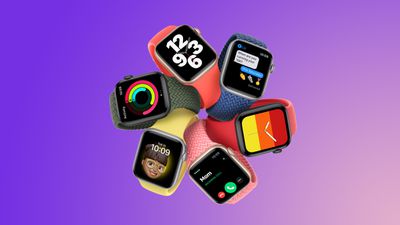
If you're thinking of buying an Apple Watch but you're not sure if your iPhone is compatible with the one you want, you've come to the right place. This article lists each iPhone model and the Apple Watch models that are compatible with each device.
iPhone 5
- Apple Watch (1st generation)
- Series 1
- Series 2
iPhone 5s
- Apple Watch (1st generation)
- Series 1
- Series 2
- Series 4 (GPS)
iPhone 6 / iPhone 6 Plus
- Apple Watch (1st generation)
- Series 1
- Series 2
- Series 4 (GPS)
- Series 4 (GPS + Cellular)
iPhone 6s / iPhone 6s Plus
- Apple Watch (1st generation)
- Series 1
- Series 2
- Series 3
- Series 4 (GPS)
- Series 4 (GPS + Cellular)
- Series 5
- Series 6
- SE (1st generation)
- Series 7
iPhone 7 / iPhone 7 Plus
- Apple Watch (1st generation)
- Series 1
- Series 2
- Series 3
- Series 4 (GPS)
- Series 4 (GPS + Cellular)
- Series 5
- Series 6
- SE (1st generation)
- Series 7
iPhone 8 / iPhone 8 Plus
- Apple Watch (1st generation)
- Series 1
- Series 2
- Series 3
- Series 4 (GPS)
- Series 4 (GPS + Cellular)
- Series 5
- Series 6
- SE (1st generation)
- Series 7
- Series 8
- SE (2nd generation)
- Ultra
iPhone X
- Apple Watch (1st generation)
- Series 1
- Series 2
- Series 3
- Series 4 (GPS)
- Series 4 (GPS + Cellular)
- Series 5
- Series 6
- SE (1st generation)
- Series 7
- Series 8
- SE (2nd generation)
- Ultra
iPhone XS or Later
- Apple Watch (1st generation)
- Series 1
- Series 2
- Series 3
- Series 4 (GPS)
- Series 4 (GPS + Cellular)
- Series 5
- Series 6
- SE (1st generation)
- Series 7
- Series 8
- SE (2nd generation)
- Ultra
- Series 9
- Ultra 2
Always keep your iPhone's software up-to-date with the latest supported version of iOS, otherwise it may not pair with a compatible Apple Watch. You can do this in your iPhone's Settings app (General ➝ Software Update). The same goes for the Apple Watch you choose. You can check the version of watchOS that it is running by going to the Watch app on your iPhone (My Watch ➝ General ➝ Software Update).
Popular Stories
Apple hasn't updated the AirPods Pro since 2022, and the earbuds are due for a refresh. We're counting on a new model this year, and we've seen several hints of new AirPods tucked away in Apple's code. Rumors suggest that Apple has some exciting new features planned that will make it worthwhile to upgrade to the latest model.
Subscribe to the MacRumors YouTube channel for more videos.
Heal...
Popular accessory maker Anker this month launched two separate recalls for its power banks, some of which may be a fire risk.
The first recall affects Anker PowerCore 10000 Power Banks sold between June 1, 2016 and December 31, 2022 in the United States. Anker says that these power banks have a "potential issue" with the battery inside, which can lead to overheating, melting of plastic...
Chase this week announced a series of new perks for its premium Sapphire Reserve credit card, and one of them is for a pair of Apple services.
Specifically, the credit card now offers complimentary annual subscriptions to Apple TV+ and Apple Music, a value of up to $250 per year.
If you are already paying for Apple TV+ and/or Apple Music directly through Apple, those subscriptions will...
In 2020, Apple added a digital car key feature to its Wallet app, allowing users to lock, unlock, and start a compatible vehicle with an iPhone or Apple Watch. The feature is currently offered by select automakers, including Audi, BMW, Hyundai, Kia, Genesis, Mercedes-Benz, Volvo, and a handful of others, and it is set to expand further.
During its WWDC 2025 keynote, Apple said that 13...
Apple's next-generation iPhone 17 Pro and iPhone 17 Pro Max are around three months away, and there are plenty of rumors about the devices.
Apple is expected to launch the iPhone 17, iPhone 17 Air, iPhone 17 Pro, and iPhone 17 Pro Max in September this year.
Below, we recap key changes rumored for the iPhone 17 Pro models:Aluminum frame: iPhone 17 Pro models are rumored to have an...
Apple last month announced the launch of CarPlay Ultra, the long-awaited next-generation version of its CarPlay software system for vehicles.
There was news this week about which automakers will and won't offer CarPlay Ultra, and we have provided an updated list below.
CarPlay Ultra is currently limited to newer Aston Martin vehicles in the U.S. and Canada. Fortunately, if you cannot...
Apple will finally deliver the Apple Watch Ultra 3 sometime this year, according to analyst Jeff Pu of GF Securities Hong Kong (via @jukanlosreve).
The analyst expects both the Apple Watch Series 11 and Apple Watch Ultra 3 to arrive this year (likely alongside the new iPhone 17 lineup, if previous launches are anything to go by), according to his latest product roadmap shared with...
A screen protector that is allegedly designed for Apple's rumored ultra-thin iPhone 17 Air model has revealed a potential design difference.
Based on an image shared today by a leaker known as Majin Bu, the iPhone 17 Air's front camera may be positioned to the left of the Dynamic Island, rather than to the right of it like on iPhone models released over the past few years.
It is unclear...