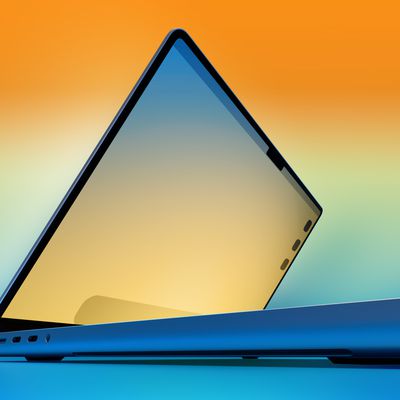
Apple announced a major update for its high-end MacBook Pro models last year, with the new machines featuring a complete redesign, the M1 Pro and M1 Max chips, larger mini-LED displays with ProMotion, an HDMI port and SD card slot, full-sized function keys, and more.
In November 2020, Apple updated its popular 13-inch MacBook Pro with the first Apple silicon chip for the Mac, the M1 chip. This model has now been replaced with an M2-based model, but the M1 version remains available from some third-party resellers.
Despite both being MacBook Pros, the M1 models and the high-end models are very different machines, so should you consider purchasing the lower-cost MacBook Pro, which starts at $1,299, to save money, or do you need the higher-end 14- or 16-inch MacBook Pro, which costs at least $700 more? Our guide helps to answer the question of how to decide which of these two Apple silicon MacBooks is best for you.
Comparing the 13-Inch MacBook Pro and 14- and 16-Inch MacBook Pro
The 13-inch MacBook Pro and high-end MacBook Pro share a large number of important features such as an Apple silicon chip, wide stereo sound, and Touch ID. Apple lists these same features of the two devices:
Similarities
- Display with P3 wide color and True Tone
- Apple silicon System on Chip (SoC)
- 16-core Neural Engine
- 16GB unified memory option
- 512GB, 1TB, and 2TB storage options
- Ambient light sensor
- FaceTime HD camera with advanced image signal processor with computational video
- Wide stereo sound
- Studio-quality three-mic array with high signal-to-noise ratio and directional beamforming
- Touch ID
- Backlit Magic Keyboard
- Force Touch trackpad
- 3.5mm headphone jack
- At least two Thunderbolt 4 ports
- 802.11ax Wi-Fi 6 and Bluetooth 5.0
- Available in Space Gray and Silver
Apple's breakdown shows that the two MacBooks share a large number of key features. Even so, there are some meaningful differences between the M1 MacBook Pro and the 14- and 16-inch models that are worth highlighting, including design, chip options, battery life, and display brightness.
Differences
13-Inch MacBook Pro
- 13.3-inch display
- LCD Retina display
- 500 nits brightness
- Apple M1 chip
- 8-core CPU
- 8-core GPU
- 8GB or 16GB of unified memory
- 256GB, 512GB, 1TB, or 2TB of storage
- 720p FaceTime HD camera
- Stereo speakers with high dynamic range
- Support for Dolby Atmos playback
- 3.5 mm headphone jack
- Two Thunderbolt 4 ports
- Supports one external display with up to 6K resolution at 60Hz
- Touch Bar
- Integrated 58.2-watt-hour lithium-polymer battery
- Up to 20 hours battery life when playing back video
- 61W USB-C Power Adapter
14-Inch and 16-Inch MacBook Pro
- 14.2-inch or 16.2-inch display
- Mini-LED Liquid Retina XDR display with ProMotion
- Up to 1000 nits sustained (full-screen) brightness, 1600 nits peak brightness
- Apple M1 Pro chip or Apple M1 Max chip
- Up to 10-core CPU
- Up to 32-core GPU
- Media engine with hardware-accelerated H.264, HEVC, ProRes, and ProRes RAW, video decode engine, up to two video encode engines, and up to two ProRes encode and decode engines
- 16GB, 32GB, or 64GB of unified memory
- 512GB, 1TB, 2TB, 4TB, or 8TB of storage
- 1080p FaceTime HD camera
- High-fidelity six-speaker sound system with force-cancelling woofers
- Support for spatial audio when playing music or video with Dolby Atmos on built-in speakers
- 3.5 mm headphone jack with advanced support for high-impedance headphones
- Three Thunderbolt 4 ports, HDMI port, and SDXC card slot
- Supports two external displays with up to 6K resolution at 60Hz (M1 Pro) or three external displays with up to 6K resolution and one external display with up to 4K resolution at 60Hz (M1 Max)
- Full-size function keys
- Integrated 70 or 100-watt-hour lithium-polymer battery
- Up to 17 or 21 hours battery life when playing back video
- 67W, 96W, or 140W USB-C Power Adapter
- MagSafe 3 and fast charging
Design
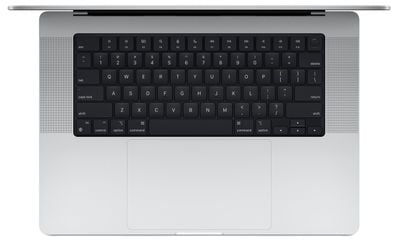
Both the entry-level and high-end MacBook Pro models are available in Silver and Space Gray, but their designs vary. Although the machines are around the same thickness, the 14-inch and 16-inch models do not feature tapered edges, making them appear thicker and bulkier. The keyboard area of the high-end MacBook Pro is also all-black. The dimensions of the three machines are listed below:
13-Inch MacBook Pro
- Height: 0.61 inch (1.56 cm)
- Width: 11.97 inches (30.41 cm)
- Depth: 8.36 inches (21.24 cm)
- Weight: 3.0 pounds (1.4 kg)
14-Inch and 16-Inch MacBook Pro
- Height: 0.61 inch (1.55 cm)/0.66 inch (1.68 cm)
- Width: 12.31 inches (31.26 cm)/14.01 inches (35.57 cm)
- Depth: 8.71 inches (22.12 cm)/9.77 inches (24.81 cm)
- Weight: 3.5 pounds (1.6 kg)/4.7 pounds (2.1 kg)
The 13-inch and 14-inch MacBook Pro are very similar in size, so the dimensions of these two machines should not heavily influence your decision. Instead, you may wish to consider that the 13-inch MacBook Pro features a much older design with a tapered look, compared to the rounder appearance of the high-end models. The high-end MacBook Pro's design has since spread to the M2 MacBook Air and offers a more modern look, while the 13-inch MacBook Pro uses a design from 2016.
Touch Bar
The Touch Bar is an OLED Retina multi-touch display strip built into the keyboard where the function keys traditionally go. It is contextual and can perform a range of different functions on the Mac depending on which app is in use.
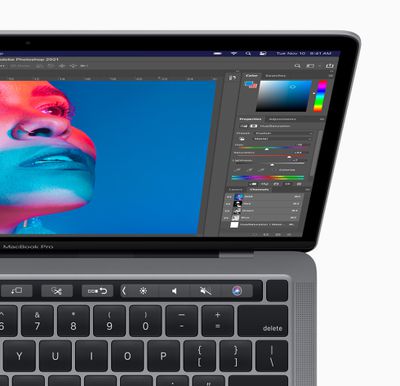
The Touch Bar is a matte-style display that blends in with the rest of the keys on the keyboard and it supports True Tone, allowing the white balance to be adjusted to match the ambient lighting conditions. Interacting with the Touch Bar is done through taps, swipes, and other multi-touch gestures, with support for up to 10 fingers at a time.
The 13-inch MacBook Pro features the Touch Bar, while the 14- and 16-inch models simply have full-sized function keys. The 13-inch MacBook Pro is now the only remaining device with the feature, but if you enjoy the experience of the Touch Bar, you may prefer the 13-inch MacBook Pro.
Ports and Connectivity
The selection of available ports is an area of major difference between the two machines. The 13-inch MacBook Pro features just two Thunderbolt 4 ports. The 14-inch and 16-inch models have three Thunderbolt 4 ports, an HDMI port, and an SDXC card slot.
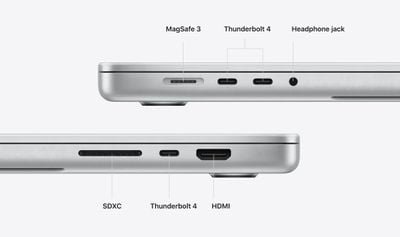
While both machines feature a 3.5mm headphone jack, the high-end model's version is a 3.5mm headphone jack with support for high-impedance headphones. In addition, the 13-inch MacBook Pro can support only one external display, while the high-end model can support up to four displays in total with the M1 Max chip. This all makes the high-end models much more versatile in terms of connectivity, and will be of particular value to professionals who use digital cameras or need to connect to external displays.
Display Size
The entry-level MacBook Pro's display is exactly 13.3-inches in size, which is considerably smaller than the 14.2-inches and 16.2-inches of the high-end models. 13.3-inches is still bigger than the largest iPad Pro model, which comes in at 12.9 inches, and will be adequate for most users.
The 16.2-inch display will be a better replacement for a desktop machine and provide much more screen space to arrange multiple windows and use professional applications that benefit from additional display area. The 14.2-inch display is still larger than the 13.3-inch MacBook Air and MacBook Pro models from recent years, but still adds to the overall size of the machine. The larger MacBook Pros also feature slimmer bezels, a notch, and rounded top corners.
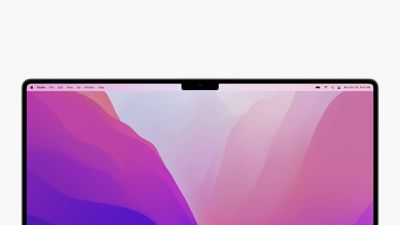
While the notch containing the webcam does eat into the display space very slightly, both high-end MacBook Pro displays are larger than previous models, so there is still more display area overall. In addition, the display area below the notch has an aspect ratio of exactly 16:10, just like previous MacBook Pro models, to ensure that the notch does not impede normal display views or watching media.
On this basis, if you are concerned about the notch, you should not necessarily feel obliged to get the larger, 16-inch MacBook Pro. That being said, since the notch is the same size on both models, it may be slightly less noticeable on the 16-inch model. If you strongly dislike the notch, it may simply be easier to opt for the 13-inch MacBook Pro.
Display Technology
The display technologies of both machines are also significantly different. Like most MacBooks in recent years, the 13-inch model has an LCD Retina display. The 14- and 16-inch models feature Apple's newer mini-LED Liquid Retina XDR technology for deeper blacks, better dynamic range, and improved color accuracy.
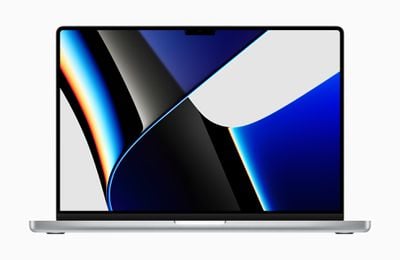
The XDR display can get much brighter, reaching as high as 1,600 nits of brightness at its peak when showing HDR content. The 14-inch and 16-inch MacBook Pro models also have ProMotion displays, allowing them to vary their refresh rate up to 120Hz. The 13-inch model does not have a display with a variable refresh rate.
It will be worth getting the high-end MacBook Pro models for viewing and editing HDR content, as well as watching high-framerate video such as sports. The display of the 13-inch MacBook Pro will still be more than adequate for normal daily use, but the high-end model, offering deeper blacks and smoother on-screen motion, simply offers a better experience.
Chip
The 13-inch MacBook Pro has the M1 chip, while with the 14-inch and 16-inch models, you can choose between the M1 Pro or M1 Max chip. The M1 Pro and M1 Max are scaled-up versions of the M1.
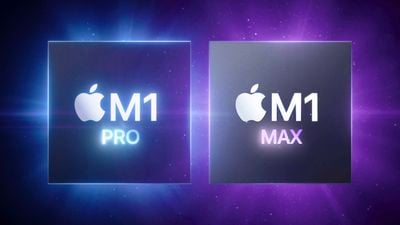
The M1 Pro and M1 Max allow for a CPU with up to two additional CPU cores, 24 additional GPU cores, 56GB more memory, and 6TB more storage, compared to the M1 chip. The M1 Pro and M1 Max also have dedicated media engines for hardware-accelerated H.264, HEVC, ProRes, and ProRes RAW, video decode engine, up to two video encode engines, and up to two ProRes encode and decode engines. For more detailed information about each of Apple's custom silicon chips for the Mac, take a look at our helpful guides:
- Apple M1 Chip: Everything You Need to Know
- Apple's M1 Pro Chip: Everything You Need to Know
- Apple's M1 Max Chip: Everything You Need to Know
There are clear performance differences between the M1 and M1 Pro when it comes to Geekbench scores. The M1 MacBook Pro earned a single-core score of 1705 and a multi-core score of 7385, along with an OpenCL score of 18480. By comparison, the 14-inch MacBook Pro earned a single-core score of 1763, a multi-core score of 9823, and an OpenCL score of 30569, which is a moderate improvement in multi-core and graphics performance.
This translates to real-world usage as well. Rendering a 4K timeline in Final Cut Pro took the M1 Pro MacBook Pro about 2 minutes and 55 seconds, but the M1 MacBook Pro took 3 minutes and 40 seconds, which is a noticeable difference. The M1 Pro MacBook Pro was able to handle 8K footage with no problem, but the M1 MacBook Pro struggled.
For daily tasks such as reading emails and browsing the web, the M1 chip is more than sufficient, but for serious professional workflows, the M1 Pro and M1 Max give meaningful performance improvements.
Camera
The high-end MacBook Pro has a considerably better 1080p webcam compared to the 13-inch model's 720p camera. If you frequently use the built-in webcam for video calls, you will have a noticeably better experience with the 14-inch and 16-inch MacBook Pro.
Speakers
The 13-inch MacBook Pro has high dynamic range stereo speakers. With the 14- and 16-inch MacBook Pros, Apple completely redesigned its speakers with a new six-speaker system that supports spatial audio when playing music or video with Dolby Atmos.
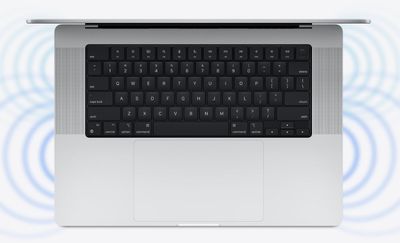
Both speaker setups are very capable for a laptop, but if you rely heavily on the built-in speakers, you will have a better experience with the high-end MacBook Pro models.
Battery Life
The 13-inch MacBook Pro offers three extra hours of battery life over the 14-inch MacBook Pro, but one hour less than the 16-inch MacBook Pro. According to Apple, the 13-inch MacBook Pro can deliver up to 20 hours of battery life during video playback. One the other hand, the 14-inch MacBook Pro can deliver 17 hours of battery life and the 16-inch model can deliver 21 hours of battery life.
Charging
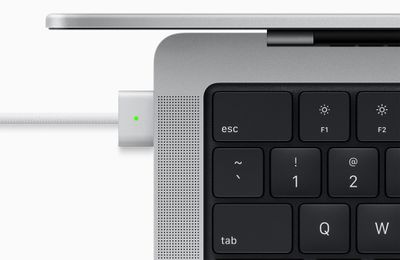
The high-end MacBook Pros feature MagSafe 3 for easily connecting and disconnecting the charging cable from the machine using magnets. The 14- and 16-inch MacBook Pros are also capable of fast charging.
Other MacBook Options
If you are looking for a more affordable Apple silicon MacBook Pro, there is the M1 MacBook Air, which sports the same processor as the M1 MacBook Pro, a 13.3-inch display, Touch ID, and ports, as well as most other hardware features, for a price starting at $999. For casual users, this means that the additional $300 to get the M1 MacBook Pro may be difficult to justify. It is a more consumer-oriented and slightly less capable machine compared to the MacBook Pro, but is more than adequate for most users.
M1 MacBook Pro still has a number of improvements over the MacBook Air, offering slightly better performance, a brighter display, the Touch Bar, improved microphone and speaker quality, two extra hours of battery life, and an active cooling system. If you want slightly better performance than the M1 MacBook Air, as well as better battery life, display brightness, and speaker and microphone quality, the MacBook Pro is the better option.
Likewise, users who intend to perform a lot of graphics-based tasks should skip the MacBook Air entirely and buy the M1 MacBook Pro because the eight-core GPU MacBook Air configuration is only $50 less than the MacBook Pro, but this is only the case if you don't need more than 256GB of storage, because a storage upgrade would further push up the MacBook Pro's price.
Final Thoughts
Overall, the 13-inch MacBook Pro is the best option for normal consumers. The 13-inch MacBook Pro is actually more akin to a MacBook Air than its high-end siblings, being more than good enough for the needs of casual users. It is lighter, smaller, and more portable than the 14-inch MacBook Pro. Starting at $1,299, the 13-inch MacBook Pro should be the default choice for the average consumer who is looking for something that is a little more than the MacBook Air.
- 14-Inch MacBook Pro vs. 16-Inch MacBook Pro Buyer's Guide
- M1 Pro vs. M1 Max Buyer's Guide
- 16GB vs. 32GB MacBook Pro: How Much is Enough?
Professionals who require larger and more accurate displays, additional ports, more memory and storage, hardware acceleration for media, and a very high level of performance should look to the 14- and 16-inch MacBook Pro, and the $1,999 and $2,499 price points of these machines reflects this. These high-end MacBook Pros are not targeted at everyday consumers, being clearly tailored for creatives and professionals who rely heavily on the capabilities of their machines.
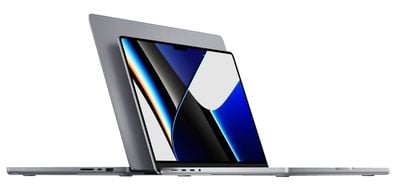
If you want the best possible performance, connectivity, display technology, and speakers, the high-end MacBook Pro is the best option. The 16-inch MacBook Pro in particular is also potentially a good desktop replacement machine due to its large display.
The 14-inch MacBook Pro starts at $1,999, which is $700 more than the $1,299 starting price of the 13-inch MacBook Pro. That being said, if you are looking to configure the 13-inch MacBook Pro with 16GB of memory and at least 512GB of storage, which also brings it closer to parity with the 14-inch base-level model, it costs $1,699. For the additional $300, it will be worthwhile for these users to get the 14-inch MacBook Pro instead.