

Ask MacRumors
iOS 26
Contents
- iOS 26
- Current Version
- iOS 18 to iOS 26
- Design Changes
- Home Screen and Lock Screen
- Messages
- Phone
- Apple Music
- Shortcuts
- Other New App Features
- CarPlay
- Battery and Adaptive Power Mode
- Apple Intelligence Updates
- New AirPods Features
- Faster Qi Charging
- Smaller Changes
- Accessibility
- Compatibility
- What's Next for iOS
- iOS 26 Timeline
iOS 26 is the newest version of iOS, the operating system that runs on the iPhone. If you were expecting iOS 19 after iOS 18, you might be a little surprised to see Apple jump to iOS 26, but the new number reflects the 2025-2026 release season for the software update. It also lets Apple use the same number across all of its updates, so there's no more confusion since you're no longer downloading iOS, macOS, visionOS, and watchOS all with different numbers.
iOS 26 brings the first new major design change that Apple has brought to iOS since iOS 7. Apple says that the new "Liquid Glass" look will be the basis of the next decade of iOS design. Liquid Glass reflects and refracts its surroundings, while putting more focus on content. Many interface elements are almost entirely translucent, and the design extends to controls, navigation, app icons, menus, buttons, and widgets.
Liquid Glass is meant to transform depending on content or context, and it behaves like glass in the real world, so color is informed by its surroundings, and it is meant to adapt between light and dark elements. Liquid Glass uses real-time rendering and can dynamically react to movement to change the way that light reflects off of buttons, switches, sliders, side bars, tab bars, and more.
You'll see Liquid Glass throughout iOS 26, in all of Apple's apps, in notifications, on the Lock Screen, in Control Center, and on the Home Screen. Apple is also providing developers with tools to bring the new material to their own apps for a cohesive look. Liquid Glass also extends to iPadOS 26, macOS Tahoe, visionOS 26, tvOS 26, and watchOS 26.
The Liquid Glass design overhaul isn't just a glossy finish, it also brings updates to the design of controls, toolbars, and navigation throughout iOS 26. App windows, menu bars, and other interface elements have more rounded corners, and controls feature a distinct functional layer designed to sit above apps. These kinds of menus can dynamically morph to provide users with more options in an app.
When scrolling, tab bars shrink down to bring attention to content, but scrolling up brings them right back for fluid navigation. When tab bars are active, they refract the content around them. There are major Liquid Glass design updates for Camera, Photos, Safari, FaceTime, Apple Music, and Apple Podcasts. On the Lock Screen, the Liquid Glass time expands and shrinks to fit behind the subject of a wallpaper, and on the Home Screen, app icons and widgets are made from multiple layers of Liquid Glass that gives the appearance of depth.
The Lock Screen features a spatial scene option for photo wallpapers, giving them a 3D look and a sense of movement. The Home Screen might look different with an option for translucent icons and widgets, but it is functionally the same.
Apple streamlined the Camera app layout with simpler navigation. It has Photo and Video toggles, with other options tucked away behind menus that expand out with a tap. You can swipe to get to more photo and video options. Apple also updated the Photos app to re-add separate tabs for the Library and Collections views. In Photos, you can also activate Spatial Scene for any image, getting a unique 3D view of the image.
Safari has a whole new look, and Apple has updated navigation. By default, Safari adopts the more rounded Liquid Glass buttons and nixes the settings at the bottom of the app, but there's an option to bring them back with a floating tab bar if you prefer a more feature rich menu. Apple Music, News, and Podcasts all have a new tab bar that floats above the content in the app and dynamically shrinks when users are browsing, so the interface options take up less space on the display.
Along with a new design, Apple is expanding the Apple Intelligence features that are available on the iPhone. Messages, FaceTime, and Phone all support Live Translation for automatically translating conversations when you're conversing with someone who speaks another language.
Visual Intelligence now understands what's on your screen, and can answer questions about what you're looking at using ChatGPT integration. The feature can help you find products, add events to your calendar, and more. Image Playground supports ChatGPT image generation so you can create images in more styles. Genmoji has a new feature for mixing multiple emoji characters to make a new one, and adding descriptions to create an all-new emoji character.
In the Wallet app, there's a new Apple Intelligence feature that can scan your emails to summarize order tracking details from merchants, even if you didn't make the purchase with Apple Pay. It lets you see all your purchases and their tracking info in one spot. Wallet also now supports paying with installments in stores and getting rewards on in-store purchases. Boarding passes in Wallet support Live Activities for real-time flight tracking, and include access to Maps and Find My.
The Shortcuts app supports intelligent actions that can summarize text, create images, or tap into Apple Intelligence models, making it easier than ever to create automations. Reminders is able to suggest tasks, grocery items and follow-ups based on emails, and it can automatically categorize related reminders into sections.
For developers, Apple is debuting a new Foundation Models framework that allows developers to tap into the AI model that's at the core of Apple Intelligence, so developers can add new AI features to their apps.
The Phone app has a whole slew of new features. There's a unified layout that combines Favorites, Recents, and Voicemails. A new Call Screening feature asks unknown callers for their name and reason for calling before sending the call to you, stopping unwanted calls. When you're stuck on hold, there's a Hold Assist option that stays on the line for you, so you don't have to listen to irritating hold music. It lets you know when a live agent is available.
Messages can screen texts from unknown senders, sending them silently to a dedicated folder where users can ask for more information or delete them. Group texts now have typing indicators and support for sending and receiving Apple Cash, plus Messages adds customizable backgrounds for each conversation and polls.
In Apple Music, there's a Lyrics Translation feature that translates lyrics that aren't in your language, and Lyrics Pronunciation helps you pronounce those lyrics. A new AutoMix feature uses intelligence to transition from one song to another, using time stretching and beat matching for a seamless shift between songs.
Apple Maps supports Visited Places so you can remember where you've been, and on-device intelligence can understand your daily route, popping up your preferred routes and letting you know about potential delays and alternate route options.
Apple added a new Apple Games app that's an all-in-one destination for discovering and playing games. It supports recommendations, leaderboards, competitions with friends, and more.
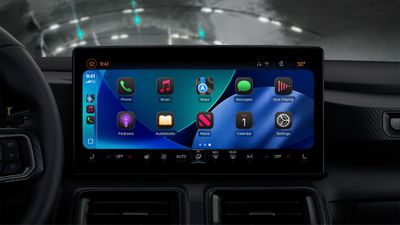
CarPlay is getting the same Liquid Glass design overhaul, along with widgets and Live Activities that sync from the iPhone. There are Tapback options, important conversations can be pinned, and Apple added a new compact view for incoming calls so directions aren't blocked.
In iOS 26, AirPods 4 and AirPods Pro 2 support studio-quality sound recording and improved sound for calls and videos. The AirPods can also be used to take a photo or record a video with a press on the stem. For battery management, there's a new Adaptive Power setting on the iPhone that intelligently determines when you're using more battery than normal and adjusts things like screen brightness to preserve battery life.
Apple released iOS 26 on Monday, September 15, and it is available to download now.
Note: See an error in this roundup or want to offer feedback? Send us an email here.
Current Version
The current version of iOS 26 is iOS 26.6, released in July. iOS 26.6 added dozens of security fixes and also optimized Spotlight in preparation for iOS 27.
iOS 27, the next-generation version of iOS, is in development and is set to launch this fall. All of the new features in iOS 27 are outlined in our iOS 27 roundup.
iOS 18 to iOS 26
If you're wondering why Apple went from iOS 18 to iOS 26, it was to streamline operating system naming. Apple is numbering all of its operating systems with the year going forward, so the "26" in iOS 26 represents the release season between September 2025 and September 2026.
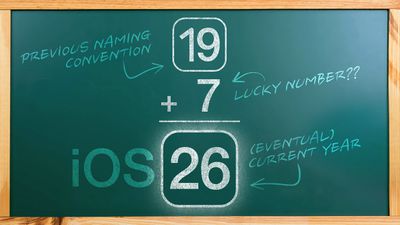
Everything released this year uses the same number, so iPadOS 26, macOS 26, watchOS 26, and so on. It will help keep numbering more straightforward in the future, even if it seems strange to skip iOS 19 to iOS 26.
Design Changes
The biggest single change in iOS 26 is the design overhaul. Apple is using a new Liquid Glass material throughout the operating system, and it has transformed the look of the iPhone's software.
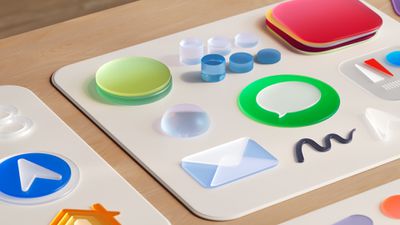
Liquid Glass is translucent, and like real glass, it allows light and color to shine through to put the focus on the content that's on your iPhone's display. Apple designed Liquid Glass to behave like it does in the real world, so it can subtly reflect light when you move your iPhone. It uses real-time rendering to dynamically react to movement with reflective highlights.
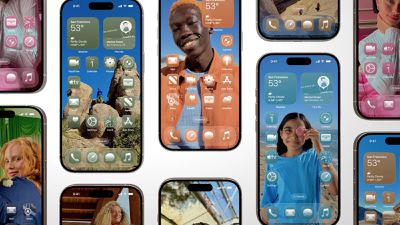
App icons are meant to look like several layers of glass, which gives them a subtle depth. Liquid Glass works well for the standard color icons, but Apple also added a translucent app icon option that makes your iPhone look even more like a sheet of glass.
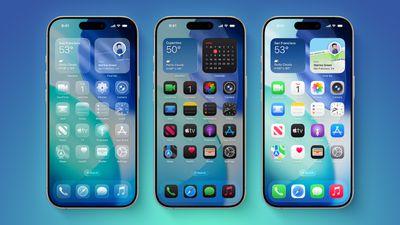
There are actually two main aspects to the iOS 26 redesign: the Liquid Glass look, and simplified navigation that highlights the Liquid Glass material. There are too many cosmetic changes in iOS 26 to go through each one, but there is an overarching design language that Apple adopted.
It is worth noting that while iOS 26 looks different, it still feels like prior versions of iOS. Apple wanted it to be familiar to iOS users despite the changes, so menus, bars, and buttons look different and do have some different functions, but they are functions that iPhone users are already familiar with.
Pop Out Menus
In several places, Apple streamlined navigation and moved extra settings into pop out menus. In the Camera app, for example, Apple shows just the two main modes: photo and video. But if you tap on one of the buttons, you'll see a pop out menu with a range of photo settings that you can activate.
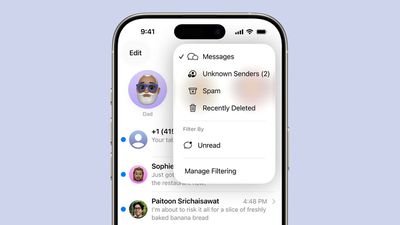
Apple says it wanted controls, toolbars, and navigation to have a distinct functional layer that sits above apps, morphing and dynamically changing as users need more options.
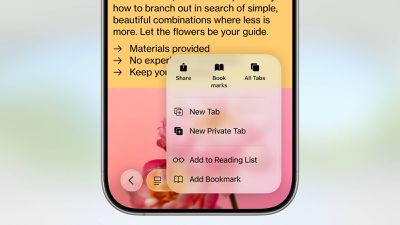
This kind of menu is common in iOS 26, so if there's something that you can't find, tap on one of the small icons on the screen, because chances are the menu expands out with more options.
Disappearing Navigation
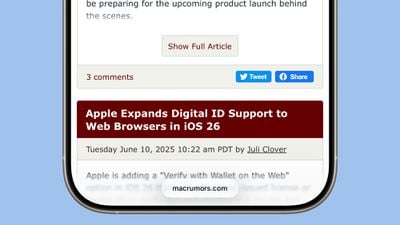
In several places, navigation elements disappear when they're not needed, and appear when they are. An example of this is in Safari. When you scroll down, the tab bar will collapse down into a small bar that shows just the name of the website. Scrolling back up brings back the full Safari tab bar so you can use the interface buttons that you need.
In Photos and Apple Music, there's an expanding search bar. Tapping it unfurls into a full search menu and collapses the other navigation bar menu options. Tapping out of search and on one of the other icons collapses search again and the menu bar returns to how it was. This is similar to the pop out menus, with an emphasis on putting things you don't need out of sight until you want to use them.
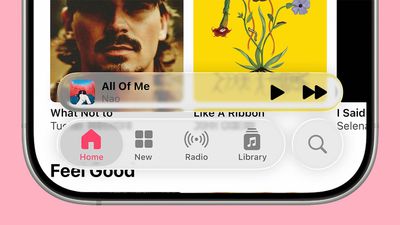
There are other examples of this, too. In the Health app, you won't see Health categories anymore until you tap on the search icon. That swaps to the search and categories interface, and a swap back is done by tapping on the heart to get back to your pinned items.
Corners and Spacing
In areas with a long list of options or categories, such as the Settings app, Apple has increased spacing and padding for a less cluttered look. You will need to scroll longer to get through settings now, but there's more space to tap and it can be more readable with the additional spacing.
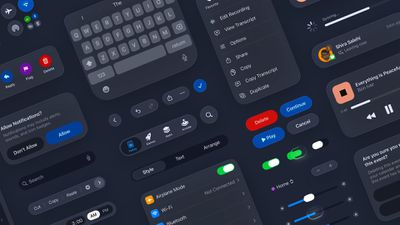
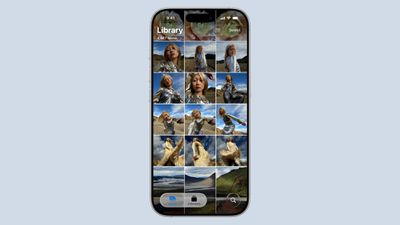
Apple shrunk navigation bars at the bottom of apps, so they take up less display space. A good example of this is in the Photos app, where the editing options have been condensed down into a smaller bar.
Navigation bars, side bars, card-style menus, notifications, buttons, toggles, search bars, and other interface elements have a more rounded look. Single buttons are entirely circular, such as those in Control Center, while navigation bars are pill-shaped with distinctly round corners. Toggles and notifications have an elongated pill-shape too, and cards are also more rounded in appearance at the corners. The keyboard has round edges at the top.
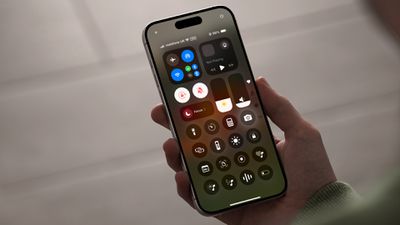
iOS 18 had more of a squircle (rounded square) shape for much of the interface, but almost everything in iOS 26 is round. An exception is app icons, which have not changed in shape.
Cross-Platform Cohesiveness
Liquid Glass is not exclusive to iOS 26. The new design extends to all of Apple's operating systems, including iPadOS 26, macOS 26, tvOS 26, watchOS 26, and of course, visionOS 26, which is the OS that inspired the overhaul.

With the same design available across all of Apple's operating systems, everything feels more cohesive, which was one of Apple's main goals with Liquid Glass.
Design Summary
- Everything looks different in iOS 26.
- There's an emphasis on content, with Apple aiming to make everything else fade away.
- Interface elements are made from Liquid Glass, which is translucent and designed to work like glass in the real world. Colors and content shine through, and everything has a more liquid feel.
- Almost all interface elements are rounder.
- Navigation elements and settings are meant to hide away when you don't need them. If you're missing a setting, it's likely you'll find it in a pop out menu when you tap on a single icon.
- Liquid Glass is system wide. Apple's apps have been redesigned with it to varying degrees, and third-party apps will also adopt the design language.
Home Screen and Lock Screen
On the Lock Screen, there are two key changes beyond design updates. The time can auto adjust to be larger when your wallpaper allows for more space, and there is an option to enable a 2D to 3D spatial photo effect that adds depth to your wallpaper images.
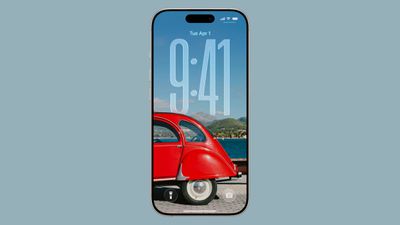
The size of the time adjusts automatically in some cases, but you can also drag the bar at the corner to resize it to make it bigger. Note that you need to use the first font in the font list, because it's the only one that can be resized.
When choosing a photo for a wallpaper, there is an option to use a 2D image to generate a 3D "Spatial Scene" that uses depth information to separate the subject from the background. The Spatial Scene wallpaper will feature a little bit of motion when you move your iPhone, enhancing the 3D effect.
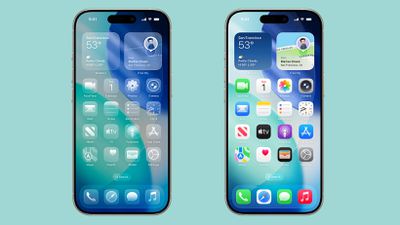
Most of the Home Screen is the same, aside from the Liquid Glass design changes. You can tap into Edit > Customize to select a new "Clear" option that gives all of your app icons a translucent, Liquid Glass look.
Messages
The Messages app features customized backgrounds, an option to create polls, and enhanced spam filtering and blocking features.
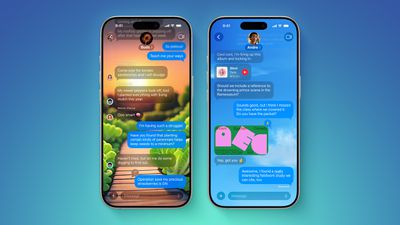
- Customizable backgrounds - In an individual or group conversation, you can tap on the name at the top and then choose the "Backgrounds" option to set a custom background for each conversation. There are options like sky, water, and aurora, or you can choose a color. You can also select photos or generate a background with Image Playground. Backgrounds that you set are changed for every participant in the conversation, unless they toggle off the feature in Messages settings.
- Polls - Tap on the "+" button to get to a new option to create a poll in any chat. You can add up to 12 different options, then send it to allow people to vote. Others can also add options to the list. On devices with Apple Intelligence, polls may come up as a suggestion.
- Group chats - Group chats support typing indicators and sending and receiving Apple Cash. There's also an option to add someone in a group chat who isn't in your contacts to your Contacts app with a tap.
- Natural language search - Messages supports natural language search.
- Copy/paste - You can now select just part of a text message to copy. Long press and tap on the new "Select" option to do so.
- Spam messages - Spam messages and Unknown Senders are two separate categories in iOS 26. There's a new Filter box at the top right of the Messages app, and Unknown Senders go in one category, while Spam goes in another. A badge lets you know if you have messages in these categories, but you won't get notifications for them.
- Unknown Senders - Messages from Unknown Senders won't send notifications if the option to filter them is on, but you will get alerts if it is a time sensitive notification, such as a notification from a ride share app or a delivery person.
- Live Translation - Messages that aren't in your language can be automatically translated as you receive them in iOS 26. Apple Intelligence is required for this feature.
Phone
The Phone app includes multiple new features that are designed to cut down on unwanted calls and reduce the amount of time that you need to spend on the phone.
Call Screening
Call Screening is an extension of Live Voicemail. When you receive a call from an unknown number that is not in your list of contacts, your iPhone asks the caller for their name and reason for calling. The information is relayed to you so you can decide if you want to accept the call or ignore it.
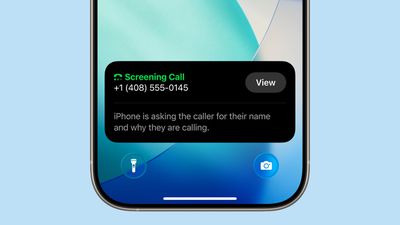
Call Screening can be enabled in the Phone section of the Settings app.
Hold Assist
If you make a phone call and you're stuck on hold waiting to speak to a person, you can activate Hold Assist. Your iPhone can wait for you while you do other things, and then let you know when a live agent is on the line. The agent is informed that you'll be on the call in just a moment.
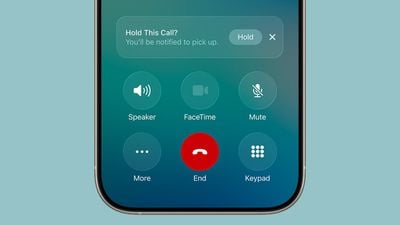
To use Hold Assist, tap on the "Hold" button after placing a call.
Live Translation
When talking to someone that speaks another language, there is an option to turn on Live Translation to have the call automatically translated for each person on the line. Live Translation is an Apple Intelligence feature and requires an iPhone 15 Pro or later.
Other Features
- Unified Layout - The Phone app has an optional unified layout that combines Favorites, Recents, and Voicemails in one spot.
- Spam calls - Calls identified as spam can be silenced and sent directly to voicemail.
- Type to Siri - You can now use Type to Siri while on a phone call.
- Call History - Tapping on the info button next to a call in the recents list or on a name or number in the unified view shows a call history that lists every time you've spoken with someone.
- Flag spam voicemails - If you tap into a voicemail from a person not in your contact list, you'll see an option to report the voicemail as spam.
- eSIM transfer - It's easier to transfer an eSIM to an Android device and vice versa with new integrated eSIM transfer capabilities.
- Focus eSIM - There is a Focus mode for silencing a single eSIM, so you can disable a home number at work, or a work number at home.
- Screen sharing - The Phone app supports screen sharing and SharePlay during phone calls.
Apple Music
There are several new Apple Music features, ranging from translation to new options for transitioning between songs.
AutoMix
Apple Music includes AutoMix, a feature that transitions from one song to another as the song that's playing ends. It uses time stretching and beat mixing for a seamless shift, and Apple says that it's meant to work like a DJ.

Songs transition at the "perfect moment" based on an analysis of the key and tempo of the music, with AutoMix serving as an alternative to Crossfade.
Other New Features
- Lyrics Translation - Songs that are in another language can be translated automatically with Lyrics Translation.
- Lyrics Pronunciation - Lyrics Pronunciation helps you pronounce lyrics that are in another language.
- Pinned playlists - Apple Music playlists can now be pinned to the top of the Music app, with pinned playlists available in a new Home Screen widget as well.
- Playlist folders - Playlists can be organized into folders.
- iPhone microphone - When using the Apple Music Sing karaoke feature on Apple TV, the iPhone can be used as a microphone.
- Lock Screen - On the Lock Screen, the Now Playing widget now provides full screen album artwork. Album art animates based on what you're listening to.
Shortcuts
The Shortcuts app now features Apple Intelligence, and the option to use Apple's AI models when creating shortcuts. Apple Intelligence models can be used for summarizing PDFs, generating recipes, answering questions, and more. Writing Tools and Image Playground are available for spellchecking, image generation, rewriting, tone changes, and more.
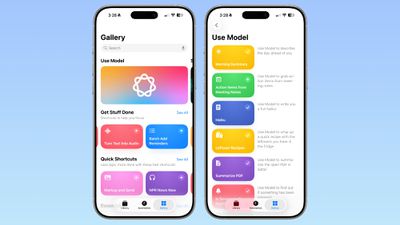
Apple offers several pre-programmed Shortcuts in the Gallery that use Apple Intelligence, such as options for getting a morning summary of the coming day, generating a haiku, or summarizing a PDF.
When creating a shortcut, there is an Apple Intelligence section that includes options for an on-device model, a cloud model that uses Private Cloud Compute, or ChatGPT. Some pre-set options are available, such as opening Visual Intelligence, generating an image with Image Playground, or using Writing Tools, along with the option to use a model.
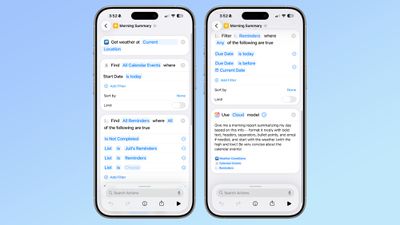
Selecting one of the AI models provides an open-ended prompt where you can write in what you want it to do. You need to work in the confines of the model that Apple provides, pairing it with other functionality in Shortcuts.
Other New App Features
Safari
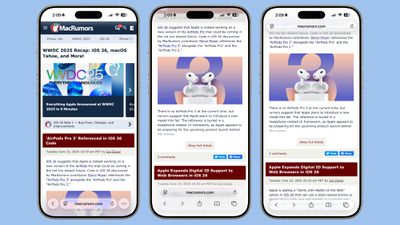
- Tab View - Safari has a new "Compact" view for the Tab bar that puts several settings out of sight. You can change back to the standard bottom bar or top bar in the Safari section of the Settings app.
- Liquid Glass - When scrolling, the Tab bar collapses down. Scroll up to bring it back.
- Tracking Prevention - Advanced fingerprinting protection extends to all browsing by default. Advanced fingerprinting protection prevents websites from tracking your device usage across websites. Previously, this was limited to private browsing unless explicitly enabled.
- Web apps - Every website added to the Home Screen through Safari opens a web app, even if it is not configured that way. In earlier versions of iOS, websites added to the Home Screen that were not properly configured would open in Safari.
- HDR images - Safari supports HDR images in iOS 26.
- SVG icons - Safari supports the SVG file format for icons in the bookmark bar and start page.
Camera
- Design - The Camera app has a simplified design with just Photo and Video tabs. Swiping swaps to other photo modes, and tapping on one of the buttons expands the available settings.
- Lens - If the Camera lens is dirty, your iPhone lets you know that it needs to be cleaned.
- AirPods - The AirPods 4 or AirPods Pro 2 can be used to take a photo or start a video recording by pressing and holding on the stem.
Photos
- Design - Apple reverted to a more pre-iOS 18 design for Photos, separating the Library and Collections into different tabs.
- Search - Video thumbnails show up in search results.
- Spatial Scenes - You can use a new 3D feature to turn 2D photos into 3D images, adding subtle depth and motion that separates the subject from the background.
- Read More - iOS 26 Photos App: Everything That's Changed
Notes
- Markdown - The Notes app supports exporting in Markdown.
- Math Notes - Three-variable equations can be used to create 3D graphs.
Reminders
- Categorization - Apple Intelligence can categorize reminders into different sections.
- Suggestions - Apple Intelligence can suggest adding tasks, grocery items, and more to Reminders based on what's on your iPhone.
FaceTime
- Live Translation - FaceTime supports Live Translation, displaying captions if you're talking to someone who speaks another language.
- Call Screening - FaceTime has new screening features for unknown numbers. Calls from unknown numbers can be asked for more information like name and reason for calling, or they can be sent directly to voicemail. Missed calls from unknown numbers can be silenced and sent to an Unknown Callers list.
- Read More - iOS 26: Everything New With FaceTime
Podcasts
- Enhance Dialogue - An Enhance Dialogue option mutes background sounds to enhance speech.
- Playback speed - There are more options for playback speeds, ranging from 0.5x to 3x.
Apple Maps
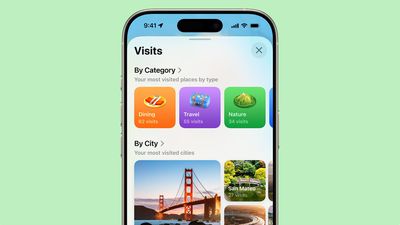
- Preferred Routes - Apple Maps learns your frequent commutes and the Maps widget can let you know if there are any significant delays along your preferred route, offering an alternative if necessary.
- Saved Places - Apple Maps can save the places that you visit and spend time in so you can look them up later.
- Incidents - There are additional types of incidents to choose from when making a report in the Maps app.
Wallet
There is an option to add a passport to the Wallet app, which creates a "Digital ID" that can be used at select TSA checkpoints in the United States. Support for the feature rolled out in November 2025.
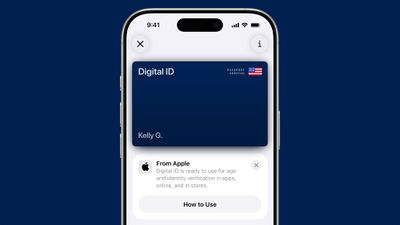
A new "Verify with Wallet on the Web" option allows websites to use the license or ID you have stored in the Wallet app for age and identity verification purposes. The process involves scanning a QR code with the iPhone and then authenticating, so it works in Safari and all other web browsers, too. It also works on non-Apple devices.
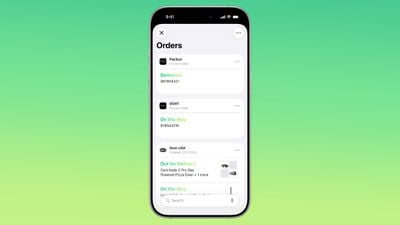
- Package tracking - Apple Intelligence can recognize order tracking details from emails, adding the information to the Wallet app. This works on all purchases, not just those that were made using Apple Pay.
- Boarding Passes - Boarding passes in Wallet have been upgraded and now show relevant information below the boarding pass, like Apple Maps directions for the airport terminal, and a link to Find My for luggage tracking.
- Live Activity - Boarding passes now show up as a Live Activity on iPhone, so you can keep track of relevant flight information without having to open the Wallet app. Flight Live Activities can be shared with friends and family.
- AutoFill Credit Cards - You can add and remove credit cards and debit cards that work with AutoFill from the Wallet app.
- Apple Pay - Apple Pay supports rewards and installments for in-store purchases.
Games
iOS 26 includes a Games app that comes pre-installed on the iPhone. It has all of the games from the App Store, along with Apple Arcade titles.

Games you have installed are shown in a Library section. A Play Together section lets you invite friends to "Challenges," where you compete to win in a game-specific task like getting the highest score during a given week.
Preview
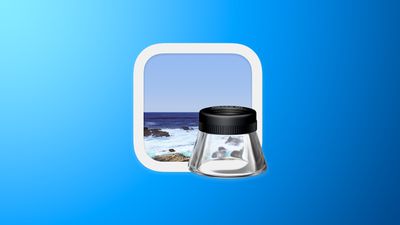
The Mac Preview app is now available on the iPhone and the iPad. It can be used for creating, viewing, and annotating PDFs. There are also tools for cropping, flipping, rotating, resizing, and editing images.
Journal
- Multiple Journals - You can now create more than one journal if you want to separate your entries by topic.
- Maps - Journal entries can be viewed on a map.
- Images - There's support for adding images inline with text.
CarPlay
CarPlay has been updated with the same Liquid Glass design that Apple added to iOS 26. The look includes layered glass-like app icons and translucent user interface elements.
New Messages App Features
Starting with iOS 26, you can respond to messages with standard Tapbacks like a heart, thumbs up, or exclamation marks directly through CarPlay.

CarPlay also now displays pinned conversations in the Messages app.

Phone Calls
Apple added a compact view for incoming phone calls, so that you can still see other information on the screen, such as turn-by-turn directions.

Live Activities and Widgets
CarPlay's Dashboard screen can now show Live Activities, letting you keep track of things like a flight's arrival time at a glance.

The regular version of CarPlay also now has a widgets screen, for things like calendar appointments and HomeKit accessory controls.

Other New Features
- Multi-Touch Maps - Starting with iOS 26, CarPlay users can interact with mapping apps using multi-touch gestures in supported vehicles. This allows users to zoom and pan on the map with their fingers, just like they can on an iPhone.
- Watch Videos While Parked - iPhone users can wirelessly stream videos to the CarPlay screen using AirPlay, according to Apple. For safety reasons, video playback will only be available when the vehicle is parked, to prevent distracted driving. The connected iPhone will be able to detect when the vehicle is in motion and end playback. Automakers need to add support for this feature, so it might be limited to newer vehicles and take some time to roll out.
- Smart Display Zoom - iOS 26 adds a new Smart Display Zoom setting to CarPlay. When the setting is enabled, CarPlay will be automatically resized to better fit the shape and size of your vehicle's dashboard screen, if possible.
Battery and Adaptive Power Mode
Apple updated the Battery section of the Settings app to provide a more in-depth look at how iPhone usage impacts battery life, and how much battery apps are draining.
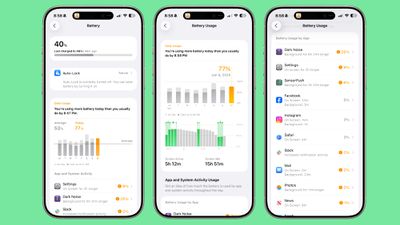
The Battery section now displays a weekly view of battery usage along with a comparison of how much battery you're currently using compared to your typical average. You can see if you're using more, the same, or less battery life than you do on most days, with a readout of which apps are using the most battery, and by how much.
App battery usage includes specific details, such as letting you know if an app ran in the background longer, was on your screen longer, or sent more notifications than normal. You'll also see how much battery you've used since your last charge.
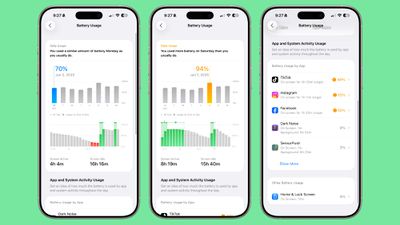
Apple also added an Adaptive Power mode that detects when iPhone usage is higher than normal and makes small performance adjustments like lowering display brightness or allowing certain background activities to take longer to extend battery life. Adaptive Power Mode is only available on the iPhone 15 Pro models and newer because it uses Apple Intelligence.
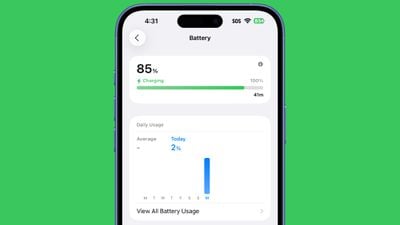
On the Lock Screen and in the Battery section, you'll see information on how long it will take your iPhone to charge up to full when it's plugged in.
Apple Intelligence Updates
There are new Apple Intelligence features throughout iOS 26, such as the Live Translation options in Phone, Messages, and FaceTime, and the suggestions and sorting options in the Reminders app. Some existing Apple Intelligence features have also been updated.
Visual Intelligence
In iOS 26, Visual Intelligence works with screenshots for the first time. You can capture a screenshot of what's on your screen and then use Visual Intelligence on it to identify what you're looking at, find images, and get more information through ChatGPT.
There's a Highlight to Search option that lets you conduct an image search for a specific object in a screenshot, even if there are multiple things in the picture. It works with the apps that you use most frequently, like Google Search, Etsy, and others, and the feature is useful for finding a product in an image.
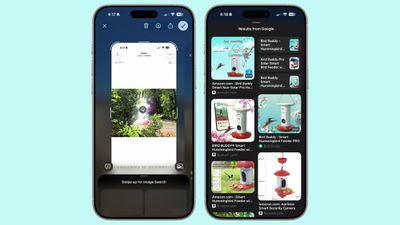
If you don't need to isolate one object in your screenshot, you can simply tap on the Ask button to ask questions about what you're seeing. Questions will be relayed to ChatGPT, and ChatGPT will provide the information. The Search button queries Google Search for more information.
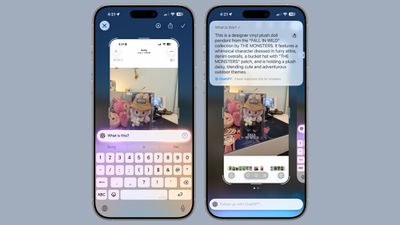
As with the standard Visual Search, if your screenshot includes dates, times, and related information for an event, it can be added directly to your calendar.
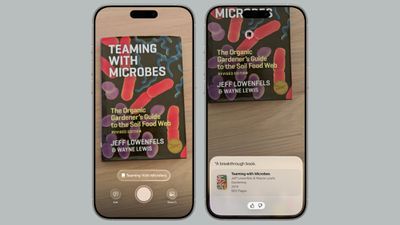
Visual Intelligence also adds support for quick identification of new types of objects. It can now identify art, books, landmarks, natural landmarks, and sculptures, in addition to the animals and plants it was able to provide information on before.
Genmoji
Genmoji supports combining two or more emoji together to create a new character. You can also combine existing emoji with text-based descriptions to tweak them, which is a more convenient starting point for generating something new.
Image Playground
Apple added support for ChatGPT image generation capabilities, which means you can use several ChatGPT image styles when generating images. Options include Anime, Oil Painting, Watercolor, Vector, and Print.
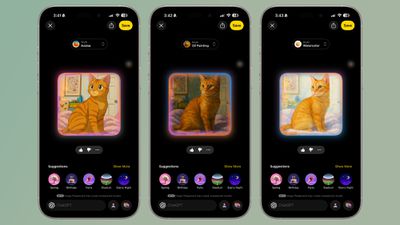
There's also an open-ended option where you can tell ChatGPT what style you want, and you can make realistic images with this option. The new ChatGPT styles join the existing Animation, Sketch, and Illustration styles.
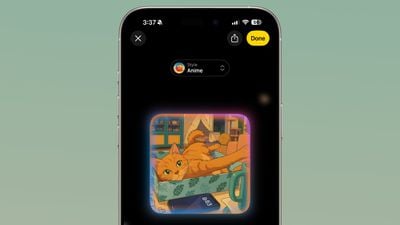
Note that generating images with ChatGPT is limited if you do not have a ChatGPT subscription, so you cannot freely use the ChatGPT styles.
ChatGPT
With iOS 26, the ChatGPT Siri integration uses OpenAI's latest GPT-5 model with enhanced reasoning capabilities and coding tools.
New AirPods Features
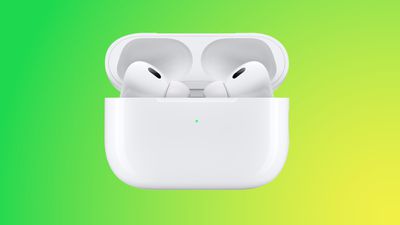
iOS 26 adds several features to the AirPods Pro 2 and the AirPods 4 through an accompanying AirPods firmware update.
Improved Call Quality
The studio-quality recording feature brings more natural vocal texture and clarity to iPhone calls, FaceTime calls, and all CallKit-enabled apps like Zoom.
Both studio-quality audio recording and improved call quality are available across iPhone, iPad, and Mac, and support the Camera app, Voice Memos, Messages dictation, third-party camera apps, and video conferencing apps.
Camera Remote
The AirPods can be used as a camera remote with the Camera app and third-party camera apps on iPhone or iPad. Just press and hold on the AirPods stem to take a photo or start a video recording.
When the recording is finished, a press and hold gesture will stop the recording. Apple says that users who like to capture themselves singing and dancing for social networks like TikTok will be able to easily perform in sync with a soundtrack while simultaneously recording video.
Software Updates
With the latest software updates, Apple is finally adding a way to manually update the firmware on your AirPods. When your AirPods are connected, you can go to the Settings app to get to a new software update interface.
Pause for Sleep
If you're listening to music, a podcast, or a book while you're in bed and you're wearing AirPods, the AirPods will pause your audio when you fall asleep.
Read More
Faster Qi Charging
iOS 26 adds 25W Qi 2.2 wireless charging support to the iPhone 16, iPhone 16 Plus, iPhone 16 Pro, and iPhone 16 Pro Max. A compatible Qi 2.2 wireless charger is required to use the faster Qi charging.
Smaller Changes
There are dozens if not hundreds of smaller changes in iOS 26, and we've highlighted some of the more notable ones below.
- Custom Ringtones - You can set custom ringtones in iOS 26 without using GarageBand. Ringtones can be saved to the Files app and then set using the Share Sheet.
- New ringtones - There are seven total new ringtones in iOS 26. Apple added six variants of the classic Reflection ringtone, and a new Little Bird ringtone.
- Screenshots - Apple tweaked the screenshots interface, rearranging some of the buttons and adding in the Visual Intelligence feature. CarPlay screenshots can also now be displayed in the Screen Capture section of the Settings app.
- iCloud Drive - There is an option to turn off iCloud Drive syncing when on a cellular network.
- Contacts - The Contacts app has new Monogram styles that you can set for people.
- Blocked Contacts - When you block someone, Apple now suggests Safety Check as an option. You can also see a list of Blocked Contacts in the Settings app.
- Passwords - The Passwords app supports password history so you can see your prior passwords.
- Tips - The Tips app includes step-by-step walkthroughs on troubleshooting iPhone issues.
- Alarms - In the Clock app, you can set a custom snooze duration of 1 to 15 minutes, so you are no longer limited to the default 9-minute snooze time.
- Keep Audio in Headphones - Prevents audio from automatically switching to newly connected devices like Bluetooth speakers or car speakers when you're already listening to music through headphones.
- Apple News - There's a new Emoji Game for Apple News+ subscribers.
- Weather - Getting weather updates via satellite is an option if you are outside of Wi-Fi or cellular range.
- Apple Fitness+ - Custom Plans in Apple Fitness+ automatically generate a personalized schedule based on your workout habits and meditation preferences. Top activities, durations, trainers, and music are included.
- Parental Controls - Apple improved the process for creating a Child Account and app approvals. Apple also requires parental approval for contact requests from kids, and blurring sensitive content in FaceTime calls and Shared Albums.
- Captive Wi-Fi - Captive Wi-Fi portal login information now syncs between all Apple devices, so you only have to log in on one.
- Wi-Fi Aware - iOS 26 supports Wi-Fi Aware, a function that supports peer-to-peer connections between Wi-Fi devices without an internet connection. Third-party apps are able to offer new features for high-speed file transfers, media sharing, screen sharing, and more.
- Dictation - Dictation supports spelling, so you can spell out names if necessary.
- Cinematic mode - Third-party video recording apps have access to Cinematic mode video capture. Cinematic mode lets users record video with a shallow depth of field and focus shifts between subjects.
- Audio Mix - Audio Mix, a feature in the Photos app that allows sound to be edited after a video is recorded, is available to third-party apps. Modes include standard, in-frame, studio, and cinematic.
Accessibility
iOS 26 includes a long list of new Accessibility features.
App Store Labels
App Store product pages feature Accessibility Nutrition Labels that highlight accessibility features in apps and games. The labels let users know if features like VoiceOver, Voice Control, Captions, Reduced Motion, and other accessibility options are supported in apps.
Accessibility Reader
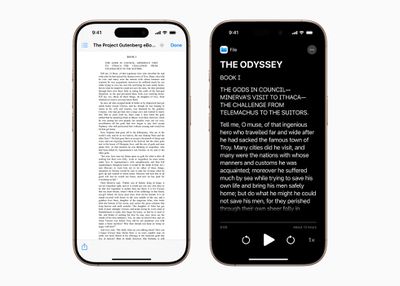
Accessibility Reader is a systemwide reading mode that makes text easier to read for users with a range of disabilities. It includes multiple text customization features with options for adjusting font, color, spacing, and more. Accessibility Reader can be launched from any app and is built into the Magnifier app.
Braille Access
Braille Access turns an iPhone or iPad into a braille note taking device integrated in the Apple ecosystem. Users can open any app with Braille Screen Input or a connected braille device, for quick note taking in braille format. Braille Ready Format files can be opened from Braille Access, and an integrated form of Live Captions is supported.
Other Features
- Background Sounds - There are new Background Sounds options, including Babble, Steam, Airplane, Boat, Bus, Train, Rain on Roof, and Quiet Night.
- Personal Voice - The Personal Voice feature that lets users preserve their voice is faster, easier, and more powerful. It will be able to take advantage of advances in on-device machine learning to create a smoother, more natural-sounding voice in less than a minute. Apple is also adding support for Spanish.
- Vehicle Motion Cues - Apple is adding new customization options for the animated onscreen dots used by Vehicle Motion Cues.
- Eye Tracking - Eye Tracking will let users choose to use a switch or dwell for making selections. There's also a new keyboard dwell timer for typing and reduced steps when typing with switches.
- Head Tracking - Users will be able to more easily control iPhone and iPad with head movements.
- Brain Computer Interfaces - For users who have Brain Computer Interface devices, Apple is adding a protocol that supports Switch Control, a technology that will let users control their device without physical movement.
- Assistive Access - This setting is getting a custom Apple TV app with a simplified media player.
- Music Haptics - Music Haptics on iPhone include customization options so haptics can be enabled for a whole song, or just vocals, plus there are options to adjust the intensity of taps, textures, and vibrations.
- Sound Recognition - Sound Recognition is gaining Name Recognition, so users who are deaf or hard of hearing will know when their name is being called.
- Live Captions - For Live Captions, Apple is adding support for English (India, Australia, UK, Singapore), Mandarin Chinese (Mainland China), Cantonese (Mainland China, Hong Kong), Spanish (Latin America, Spain), French (France, Canada), Japanese, German (Germany), and Korean.
- Sharing - A Share Accessibility Settings option will let users quickly and temporarily share their accessibility settings with another iPhone or iPad, which Apple says is useful for borrowing a friend's device.
Compatibility
iOS 26 is not available on the iPhone XR, iPhone XS, or the iPhone XS Max, but it will run on all other iPhones that support iOS 18.
- iPhone 16e
- iPhone 16
- iPhone 16 Plus
- iPhone 16 Pro
- iPhone 16 Pro Max
- iPhone 15
- iPhone 15 Plus
- iPhone 15 Pro
- iPhone 15 Pro Max
- iPhone 14
- iPhone 14 Plus
- iPhone 14 Pro
- iPhone 14 Pro Max
- iPhone 13
- iPhone 13 mini
- iPhone 13 Pro
- iPhone 13 Pro Max
- iPhone 12
- iPhone 12 mini
- iPhone 12 Pro
- iPhone 12 Pro Max
- iPhone 11
- iPhone 11 Pro
- iPhone 11 Pro Max
- iPhone SE (2nd generation and later)
While these iPhones will support iOS 26, advanced features are limited to newer iPhones with faster processors. Apple Intelligence, for example, only runs on the iPhone 15 Pro and later.
What's Next for iOS
Apple is already working on iOS 27, and the update will prioritize features and software that are tailored for the foldable iPhone that's expected to launch in 2026.
