Apple Announces Launch of U.S. Passport Feature in iPhone's Wallet App

Apple today announced that iPhone users can now create a Digital ID in the Apple Wallet app based on information from their U.S. passport.
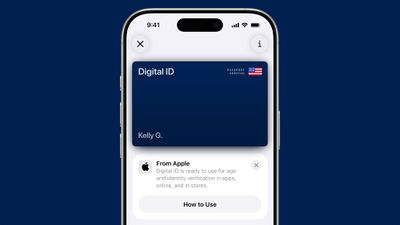
ios 26 digital id passport wallet
To create and present a Digital ID based on a U.S. passport, you need:

  • An iPhone 11 or later running iOS 26.1 or later, or an Apple Watch Series 6 or later running watchOS 26.1 or later
  • Face ID or Touch ID and Bluetooth turned on
  • An Apple Account with two-factor authentication turned on
  • A valid U.S. passport that is not expired
  • Your device region set to United States

To create a Digital ID, tap on the plus sign in the top-right corner of the Wallet app on the iPhone, and then select Driver's License or ID Cards. Next, select Digital ID and follow the on-screen instructions to start the setup and verification process.

During the setup process, one must use their iPhone to scan the photo page of their physical passport. They will also be asked to use their iPhone to read the chip embedded on the back of their passport, to ensure the data's authenticity. From there, they are asked to take a selfie for verification, and as another security step, they will also be prompted to complete a series of facial and head movements during the setup process.

After creating a Digital ID in the Wallet app, you can present it in person at TSA checkpoints in select U.S. airports for age and identity verification purposes during domestic travel. However, Apple said it is not a replacement for a physical passport, and it cannot be used for international travel and border crossing purposes.
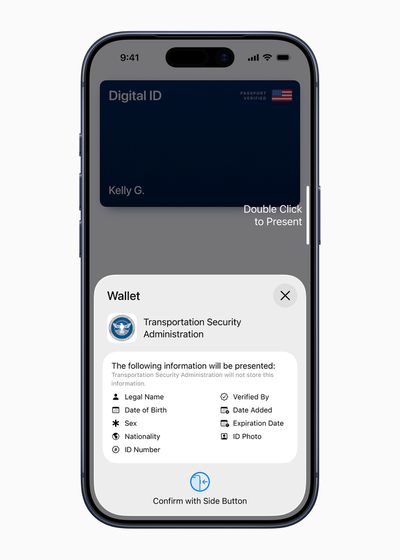
Digital ID Passport Apple Wallet
At launch, Apple said Digital IDs are accepted at TSA checkpoints at more than 250 airports in the U.S., but the company said the feature is still in public beta.

To present a Digital ID in person, double-click the iPhone's side button and select Digital ID. Then, hold the iPhone near a scanner, review the information being requested, and authenticate with Face ID or Touch ID. The feature is also available on the Apple Watch.

In the future, Apple said users will be able to present their Digital ID at select stores for identity and age verification in person, as well as in supported apps and online on supported websites. No specific timeframe for this was shared.

Apple said Digital ID data is encrypted, and it ensured that iPhone and Apple Watch privacy and security features help protect against tampering and theft. Users do not need to unlock, show, or hand over their device to present their Digital ID.

This feature builds on the existing driver's license feature in the Wallet app, which is currently available in 12 U.S. states, as well as the U.S. territory of Puerto Rico. Japan's My Number Card can also be added to the Wallet app.

More details about the passport feature are available in an Apple support document.

Related Roundups: iOS 26, iPadOS 26
Related Forum: iOS 26

Popular Stories

iOS 26

iOS 26.2 Coming Soon With These 8 New Features on Your iPhone

Thursday December 11, 2025 8:49 am PST by
Apple seeded the second iOS 26.2 Release Candidate to developers earlier this week, meaning the update will be released to the general public very soon. Apple confirmed iOS 26.2 would be released in December, but it did not provide a specific date. We expect the update to be released by early next week. iOS 26.2 includes a handful of new features and changes on the iPhone, such as a new...
Google maps feaure

Google Maps Quietly Added This Long-Overdue Feature for Drivers

Wednesday December 10, 2025 2:52 am PST by
Google Maps on iOS quietly gained a new feature recently that automatically recognizes where you've parked your vehicle and saves the location for you. Announced on LinkedIn by Rio Akasaka, Google Maps' senior product manager, the new feature auto-detects your parked location even if you don't use the parking pin function, saves it for up to 48 hours, and then automatically removes it once...
AirPods Pro Firmware Feature

Apple Releases New Firmware for AirPods Pro 2 and AirPods Pro 3

Thursday December 11, 2025 11:28 am PST by
Apple today released new firmware designed for the AirPods Pro 3 and the prior-generation AirPods Pro 2. The AirPods Pro 3 firmware is 8B30, up from 8B25, while the AirPods Pro 2 firmware is 8B28, up from 8B21. There's no word on what's include in the updated firmware, but the AirPods Pro 2 and AirPods Pro 3 are getting expanded support for Live Translation in the European Union in iOS...
Foldable iPhone 2023 Feature 1

Apple to Make More Foldable iPhones Than Expected [Updated]

Tuesday December 9, 2025 9:59 am PST by
Apple has ordered 22 million OLED panels from Samsung Display for the first foldable iPhone, signaling a significantly larger production target than the display industry had previously anticipated, ET News reports. In the now-seemingly deleted report, ET News claimed that Samsung plans to mass-produce 11 million inward-folding OLED displays for Apple next year, as well as 11 million...
AirTag 2 Mock Feature

Apple AirTag 2: Four New Features Found in iOS 26 Code

Thursday December 11, 2025 10:31 am PST by
The AirTag 2 will include a handful of new features that will improve tracking capabilities, according to a new report from Macworld. The site says that it was able to access an internal build of iOS 26, which includes references to multiple unreleased products. Here's what's supposedly coming: An improved pairing process, though no details were provided. AirTag pairing is already...
iOS 26

iOS 26.4 and iOS 27 Features Revealed in New Leak

Friday December 12, 2025 10:56 am PST by
Macworld's Filipe Espósito today revealed a handful of features that Apple is allegedly planning for iOS 26.4, iOS 27, and even iOS 28. The report said the features are referenced within the code for a leaked internal build of iOS 26 that is not meant to be seen by the public. However, it appears that Espósito and/or his sources managed to gain access to it, providing us with a sneak peek...
iOS 26

15 New Things Your iPhone Can Do in iOS 26.2

Friday December 5, 2025 9:40 am PST by
Apple is about to release iOS 26.2, the second major point update for iPhones since iOS 26 was rolled out in September, and there are at least 15 notable changes and improvements worth checking out. We've rounded them up below. Apple is expected to roll out iOS 26.2 to compatible devices sometime between December 8 and December 16. When the update drops, you can check Apple's servers for the ...
iOS 26

Apple Releases iOS 26.2 With Alarms for Reminders, Lock Screen Changes, Enhanced Safety Alerts and More

Friday December 12, 2025 10:10 am PST by
Apple today released iOS 26.2, the second major update to the iOS 26 operating system that came out in September, iOS 26.2 comes a little over a month after iOS 26.1 launched. ‌iOS 26‌.2 is compatible with the ‌iPhone‌ 11 series and later, as well as the second-generation ‌iPhone‌ SE. The new software can be downloaded on eligible iPhones over-the-air by going to Settings >...
maxresdefault

iOS 26 Code Leak Reveals Apple Smart Home Hub Details

Thursday December 11, 2025 4:02 pm PST by
Apple is working on a smart home hub that will rely heavily on the more capable version of Siri that's coming next year. We've heard quite a bit about the hub over the last two years, but a recent iOS 26 code leak provides additional insight into what we can expect and confirms rumored features. Subscribe to the MacRumors YouTube channel for more videos. Macworld claims to have access to an ...
studio display purple

Apple Studio Display 2 Code Hints at 120Hz ProMotion, HDR, A19 Chip

Thursday December 11, 2025 4:19 am PST by
Apple's next-generation Studio Display is expected to arrive early next year, and a new report allegedly provides a couple more details on the external monitor's capabilities. According to internal Apple code seen by Macworld, the new external display will feature a variable refresh rate capable of up to 120Hz – aka ProMotion – as well as support for HDR content. The current Studio...

Top Rated Comments

RevTEG Avatar
4 weeks ago

This is about as useless as the Invites app.

You can't use it as ID, few airports take it, you can't travel internationally with it. What's the point?
Everything has to have a starting point. According to the article, at launch, Apple said Digital IDs are accepted at TSA checkpoints at more than 250 airports in the U.S. 250 isn’t a “few” airports.
Score: 38 Votes (Like | Disagree)
tech_enthusiast_ Avatar
4 weeks ago

few airports take it
Did you miss the part that says "Digital IDs are accepted at TSA checkpoints at more than 250 airports in the U.S."?
Score: 28 Votes (Like | Disagree)
rman0726 Avatar
4 weeks ago

This is about as useless as the Invites app.

You can't use it as ID, few airports take it, you can't travel internationally with it. What's the point?
It’s a step forward towards not having to have your wallet on you? You could have said the same thing about Apple Pay in 2014. Now I carry one physical credit card on me just in case.

Don’t want to use it? Then don’t add your passport! What a concept!
Score: 26 Votes (Like | Disagree)
zilchfox Avatar
4 weeks ago
Had no issues adding mine. Went from applying to ready for use in less than 5 minutes.

Attachment Image
Score: 20 Votes (Like | Disagree)
jz0309 Avatar
4 weeks ago

This is about as useless as the Invites app.

You can't use it as ID, few airports take it, you can't travel internationally with it. What's the point?
You know, there are probably some people who do not have a drivers license … and then there are those people who live in a state that does not have a digital drivers license yet … but sure, it’s useless
Score: 13 Votes (Like | Disagree)
captrlp Avatar
4 weeks ago
Siri, open my passport Digital ID….I found several ports that don’t require passes, but you’ll need to unlock your phone to view them.
Score: 9 Votes (Like | Disagree)