

Here's What You Can Do With the iOS 26 Apple Intelligence Shortcuts App

Apple overhauled the Shortcuts app in iOS 26, iPadOS 26, and macOS Tahoe, and there are now Apple Intelligence options that users can take advantage of. The app supports ‌Apple Intelligence‌ models for things like summarizing PDFs, generating recipes, answering questions, and more.
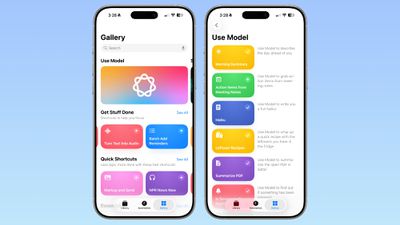
ios 26 shortcuts app examples
There are several pre-programmed Shortcuts in the Gallery that you can select in ‌iOS 26‌. Here's what Apple offers, along with the descriptions:

  • Morning Summary - Use Model to describe the day ahead of you.
  • Action Items From Meeting Notes - Use Model to grab action items from meeting notes.
  • Haiku - Use Model to write a you a fun haiku.
  • Leftover Recipes - Use Model to whip up a quick recipe with leftovers you have in the fridge.
  • Summarize PDF - Use Model to summarize the open PDF in Safari.
  • Is Severance Season 3 Out? - Use Model to find out if something has been released.
  • ASCII Art - Use Model to draw you some ASCII art.
  • Document Review - Use Mode to help you compare and contrast documents.
  • Reminders Roulette - Use Model to punt an unimportant reminder to tomorrow.
  • Get Started With Language Models - A tutorial for Use Model with examples.

As the last pre-made Shortcut suggests, you can create your own shortcuts that incorporate Apple's AI model, and Apple's offerings serve as examples.

When you go to create a Shortcut, there's a new ‌Apple Intelligence‌ section. You can opt to use an on-device model, a cloud model that takes advantage of Private Cloud Compute, or ChatGPT. There are some pre-determined options, so you can do things like open Visual Intelligence or generate an image with Image Playground.
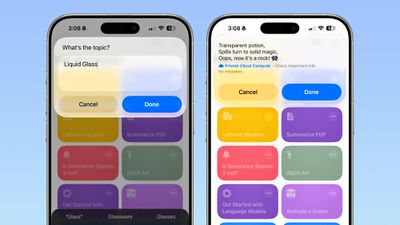
ios 26 shortcuts app haiku
There are several Writing Tools features for adjusting the tone of text, proofreading, creating a list from text, summarizing text, or rewriting text.

When you tap on Cloud, On-Device Model, or ChatGPT, there's an open-ended prompt where you can write in what you want to do. You need to work within the confines of the model that Apple provides, pairing it with other functionality in Shortcuts. You can pull in data from the Weather app, your Calendar, and Reminders, then ask the model to prepare a summary, for example. AI models can be incorporated into any Shortcut.
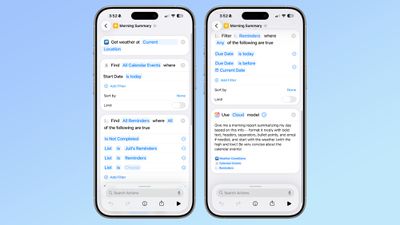
ios 26 shortcuts app ai
‌iOS 26‌, ‌iPadOS 26‌, and macOS Tahoe are in the early stages of beta testing, so the work on Shortcuts has just started, and Apple will be refining the app over the course of the beta testing period.


Popular Stories

iOS 26

iOS 26.1 Available Now With These 8 New Features

Monday November 3, 2025 5:54 am PST by
Following more than a month of beta testing, Apple released iOS 26.1 on Monday, November 3. The update includes a handful of new features and changes, including the ability to adjust the look of Liquid Glass and more. Below, we outline iOS 26.1's key new features. Liquid Glass Toggle iOS 26.1 lets you choose your preferred look for Liquid Glass. In the Settings app, under Display...
Finder Siri Feature

Apple's New Siri Will Be Powered By Google Gemini

Wednesday November 5, 2025 11:57 am PST by
The smarter, more capable version of Siri that Apple is developing will be powered by Google Gemini, reports Bloomberg. Apple will pay Google approximately $1 billion per year for a 1.2 trillion parameter artificial intelligence model that was developed by Google. For context, parameters are a measure of how a model understands and responds to queries. More parameters generally means more...
Apple Logo Spotlight

Report: Apple to Launch These New Products in 2026

Sunday November 2, 2025 5:34 am PST by
Apple is planning to launch at least 15 new products in 2026, according to Bloomberg's Mark Gurman. Gurman outlined what to expect from Apple in 2026 in the latest edition of his "Power On" newsletter. He said the company is heading "into one of its most pivotal years in recent memory," with the rollout of major new Apple Intelligence features, intense regulatory pressure on the App Store,...
iOS 26

Apple Releases iOS 26.1 With Liquid Glass Toggle, Slide to Stop Alarm, New Apple Intelligence Languages and More

Monday November 3, 2025 1:11 pm PST by
Apple today released iOS 26.1, the first major update to the iOS 26 operating system that came out in September, iOS 26.1 comes over a month after iOS 26 launched. ‌iOS 26‌.1 is compatible with the ‌iPhone‌ 11 series and later, as well as the second-generation ‌iPhone‌ SE. The new software can be downloaded on eligible iPhones over-the-air by going to Settings > General >...


2024 iPhone Boxes Feature

Apple Adjusts Trade-In Values for iPhones, iPads, Macs, and More

Thursday November 6, 2025 11:12 am PST by
Apple today updated its trade-in values for select iPhone, iPad, Mac, and Apple Watch models. Trade-ins can be completed on Apple's website, or at an Apple Store. The charts below provide an overview of Apple's current and previous trade-in values in the U.S., according to its website. Maximum values for most devices either decreased or saw no change, but the iPad Air received a slight bump. ...
Early Black Friday Deals 2

The Best Early Black Friday Apple Deals

Sunday November 2, 2025 10:04 am PST by
We're officially in the month of Black Friday, which will take place on Friday, November 28 in 2025. As always, this will be the best time of the year to shop for great deals, including popular Apple products like AirPods, iPad, Apple Watch, and more. In this article, the majority of the discounts will be found on Amazon. Note: MacRumors is an affiliate partner with some of these vendors. When ...
tvOS 26 Feature

Apple Releases tvOS 26.1

Monday November 3, 2025 1:07 pm PST by
Apple today released tvOS 26.1, an update to the tvOS 26 operating system that came out in September. tvOS 26.1 is available on the Apple TV 4K and the Apple TV HD models, but Liquid Glass is only available on the second-generation Apple TV 4K or later. tvOS 26 can be downloaded using the Settings app on the ‌‌Apple TV‌‌. Open up Settings and go to System > Software Update to get the ...
apple one  cpqesecbv342 upscaled feature

Apple One Gets New Colorful Logo Following Apple TV Rebrand [Updated]

Monday November 3, 2025 3:22 pm PST by
Apple updated the logo and name for its Apple TV streaming service today, and it looks like Apple One might be next. On the revamped Apple TV website, there's a new, more colorful Apple One logo available. The logo features an Apple icon that's split into six slices, and each slice includes the color that Apple uses for one of the services included in Apple One Premium. Apple One is...

Top Rated Comments

211 Avatar
21 weeks ago
I still don’t understand Shortcuts. Can I just tell it what I want now and it will create it?
Score: 6 Votes (Like | Disagree)
gaximus Avatar
21 weeks ago
I love shortcuts, and use them for everything. But most of these new things, Siri should just be able to handle. I shouldn’t have to create a shortcut to find out if a move has been released, Siri should just know if I ask.
Score: 5 Votes (Like | Disagree)
LordArchie Avatar
21 weeks ago
Loving this.. waiting for some really cool shortcuts. Great list to start from
Score: 3 Votes (Like | Disagree)
eifelbube Avatar
21 weeks ago
Much more fun to write one yourself …

So, i open the fridge, point my iPhone camera to engage visual intelligence, and i’ll get a recipe whipped up using the captured leftovers? Now that would be a real shortcut!! I forgot: I need it to scan the best-by dates … ?

Attachment Image
Score: 1 Votes (Like | Disagree)
svish Avatar
21 weeks ago
This is making the shortcuts app even better. Waiting to try out the various possibilities soon.
Score: 1 Votes (Like | Disagree)
tomtad Avatar
21 weeks ago
What's model?

Also isn't this essentially saved prompts for a chatbot? All of these I should be able to do by just asking Siri.
Score: 1 Votes (Like | Disagree)







































