watchOS 11.2 Lets You Pause iPhone Video With Camera Remote App
In watchOS 11.2, Apple has added a useful new feature that's designed to allow you to pause video that you're recording on the iPhone using the Camera Remote app on the Apple Watch.
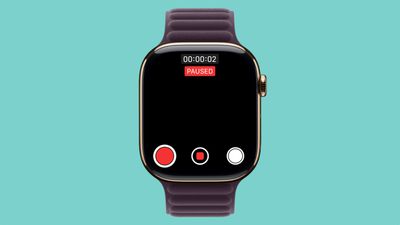
The Camera Remote app has been available since the Apple Watch initially launched, and while there was an option to start and stop video recording, there wasn't an option to pause video and restart it. When a video recording is in progress, there is now a pause button on the left side of the Camera Remote interface. Tapping it pauses a video, and then tapping the red record button restarts the video.
Apple initially added a feature for pausing video recordings with the iPhone Camera app in iOS 18, and the watchOS 11.2 update expands that same functionality to the Apple Watch's Camera Remote app.
Other new additions in watchOS 11.2 include expanded support for tidal conditions and coastal locations in the Tides app in China. watchOS 11.2 will see a release alongside iOS 18.2 next Monday.
Popular Stories
Apple released watchOS 27 on September 14, bringing a new Audio Intelligence feature set to its latest Apple Watch models, but as a result, owners of previous models are set to lose out doubly in the process.
Apple Watch Series 12 and Ultra 4 models later this year will get Live Rewind, a feature that provides a transcript of any spoken audio that was picked up by the device in the last 15...
Apple today released watchOS 27, the newest version of the operating system that runs on the Apple Watch. watchOS 27 is compatible with the Apple Watch Series 9 and later, the Apple Watch Ultra 2 and later, and the Apple Watch SE 3.
watchOS 27 can be downloaded for free on a compatible device through the Settings app on the watch.
The update introduces support for Siri AI, a more capable...
After releasing watchOS 27.0.1 for the Apple Watch Series 12 and Apple Watch Ultra 4 last week to address a bug that was causing devices to restart unexpectedly, Apple has now released the update for all eligible watches, which includes Series 9 and later.
Apple's release notes say only that the update "provides bug fixes for your Apple Watch" and the company does not list any security fixes,...

















































