macOS Sequoia Beta 2 Adds Support for iPhone Mirroring

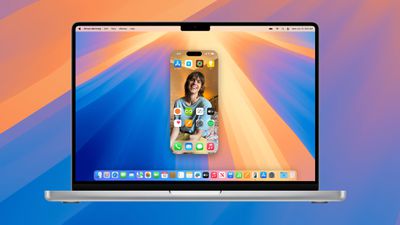
With the second developer beta of macOS Sequoia, Apple has added support for iPhone Mirroring, one of the main updates coming to the Mac. ‌iPhone‌ Mirroring is a Continuity feature that lets you control your ‌iPhone‌ from your Mac.

macos sequoia iphone mirroring
When you're signed in to the same Apple ID on a Mac and an ‌iPhone‌, you can use ‌iPhone‌ Mirroring to interact with your ‌iPhone‌ even when the ‌iPhone‌ is locked. You can open up and use apps, deal with notifications, send messages, and more.

You can use your Mac keyboard, trackpad, or mouse with your ‌iPhone‌, which is useful for typing up long emails and other documents on the ‌iPhone‌, and it provides an easy way to keep up with your ‌iPhone‌ notifications without having to pull out your device and check it. When you click on a notification on your Mac when using ‌iPhone‌ Mirroring, it is supposed to open up right into the app on your ‌iPhone‌.

Though it isn't enabled in this beta, ‌iPhone‌ Mirroring will eventually allow files, photos, and videos to be dragged and dropped between your ‌iPhone‌ and Mac and vice versa. Apple plans to add that ‌iPhone‌ Mirroring feature later in 2024, and it won't be available when macOS Sequoia first launches.
iphone screen mirroring
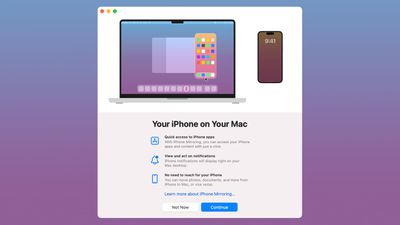
‌iPhone‌ Mirroring requires an ‌iPhone‌ running iOS 18 beta 2 and a Mac running macOS Sequoia beta 2, and it is accessible using the new ‌iPhone‌ Mirroring icon in the Dock. It works on Macs that have an Apple silicon chip or a T2 Security Chip, and you'll need to have the devices near each other with Bluetooth and Wi-Fi and you'll need to be signed in to the same ‌Apple ID‌ with two-factor authentication turned on. ‌iPhone‌ Mirroring can't be used when Sidecar or AirPlay are activated.

Today's second beta also adds iOS 18 and iPadOS 18 support for remote control when using the SharePlay screen sharing feature. This option allows you to ask for permission to control someone's device remotely so that you can provide more direct technical assistance for problem solving.

The macOS Sequoia and iOS 18 betas are only available to developers right now, but Apple plans to release a public beta in July that will allow anyone to try out the new ‌iPhone‌ Mirroring feature before it launches. The updates will see a public release this fall.

Related Forums: iOS 18, iPadOS 18, macOS Sequoia

Popular Stories

Touchscreen MacBook Feature

Apple Is Expected to Launch These Four MacBooks in 2026

Friday January 9, 2026 8:17 am PST by
2026 could be a bumper year for Apple's Mac lineup, with the company expected to announce as many as four separate MacBook launches. Rumors suggest Apple will court both ends of the consumer spectrum, with more affordable options for students and feature-rich premium lines for users that seek the highest specifications from a laptop. Below is a breakdown of what we're expecting over the next ...
iPhone Top Left Hole Punch Face ID Feature Purple

10 Reasons to Wait for This Year's iPhone 18 Pro

Thursday January 8, 2026 2:56 am PST by
Apple's iPhone development roadmap runs several years into the future and the company is continually working with suppliers on several successive iPhone models at the same time, which is why we often get rumored features months ahead of launch. The iPhone 18 series is no different, and we already have a good idea of what to expect for the iPhone 18 Pro and iPhone 18 Pro Max. One thing worth...
proposed unicode emoji 18%402x

Squinting Face, Pickle, and Lighthouse Among New Emoji Coming to iOS

Friday January 9, 2026 4:24 am PST by
The Unicode Consortium has published a draft list of emoji that could come to smartphones and other devices in the future. The list shared by Emojipedia outlines 19 emoji candidates under consideration for Emoji 18.0, which is expected to be finalized in September 2026. Among the proposed additions are a squinting face emoji, left- and right-pointing thumb gestures, a pickle, a lighthouse, a ...
apple homekit ios 18 5

Apple Reminding Users of Pending Home App Upgrade Requirement

Friday January 9, 2026 10:08 am PST by
Back in late 2022 and early 2023, Apple rolled out a new architecture for its Apple Home platform to deliver improved performance and compatibility, although the rollout came with some hiccups that forced Apple to pull and later re-release the upgrade. Three years later, Apple is now on the verge of ending support for the old version of the Home architecture, which may result in access to...
grok logo purple gradient

U.S. Senators Ask Apple and Google to Remove X and Grok Apps Over Sexualized Image Generation

Friday January 9, 2026 9:43 am PST by
In a letter to Apple CEO Tim Cook and Google CEO Sundar Pichai, U.S. Senators Ron Wyden, Ben Ray Lujan, and Edward Markey have requested that Apple and Google remove X Corp's X and Grok apps from their app stores over recent incidents of "mass generation of nonconsensual sexualized images of women and children." X has come under fire over the past week amid reports of Grok's AI image...
iOS 26 Glass Feature

iOS 26 Shows Unusually Slow Adoption Months After Release

Thursday January 8, 2026 3:44 pm PST by
iOS 26 is showing unusually slow adoption among iPhone users months after release, according to third-party analytics. Usage data published by StatCounter (via Cult of Mac) for January 2026 indicates that only around 15 to 16% of active iPhones worldwide are running any version of iOS 26. The breakdown shows iOS 26.1 accounting for approximately 10.6% of devices, iOS 26.2 for about 4.6%, and ...
iphone fold text

iPhone Fold to Pave Way for Thinner, Brighter Display on iPhone Air 2

Friday January 9, 2026 3:37 am PST by
The iPhone Fold will be the first Apple device to adopt a Samsung-made OLED technology called CoE (Color Filter on Encapsulation), which could make the display brighter and thinner than previous panels, reports The Elec. In a traditional OLED panel, a polarizing film sits above the display to cut reflections and improve contrast. The drawback is that this film also absorbs some of the OLED's ...

Top Rated Comments

Apple Mac Daz Avatar
20 months ago
iPadOS needs this feature
Score: 9 Votes (Like | Disagree)
furbzv1 Avatar
20 months ago
used it for a few minutes- looked at App Store, did some updates and sent some messages. Works really well. There is a little bit of a lag but nothing too crazy

Score: 8 Votes (Like | Disagree)
xxFoxtail Avatar
20 months ago
For the most part, it seems to work fine. Apps like my banking apps or Journal that require me to authenticate with Face ID, seem to have an issue. I'd expect a passcode prompt to pop up, but I'm not seeing anything, so I can't use them through the mirroring app. I have to go to my iPhone and open the app from there then restart the mirroring.

I tried a couple games, and they worked fine.

(Edit: Restarting the iPhone mirroring session fixed the authentication issues for me)
Score: 8 Votes (Like | Disagree)
widestload Avatar
20 months ago
Hope this comes to mirroring on the iPad too. And Mac mirroring on iPad, like an official version of Jump ?
Score: 7 Votes (Like | Disagree)
swiftapplefan Avatar
20 months ago
Has anyone found a workaround for the EU?
Score: 7 Votes (Like | Disagree)
bucknut89 Avatar
20 months ago
So far I would consider this is the best addition to iOS/MacOS in years. Only complaint so far is vertical scrolling doesn't seem to work with third party mice/trackballs. Works fine with the MagicMouse though.
Score: 7 Votes (Like | Disagree)