iPadOS 18 Brings a New Customizable Tab Bar and Sidebar UI to Apps - MacRumors
Skip to Content

iPadOS 18 Brings a New Customizable Tab Bar and Sidebar UI to Apps

In iPadOS 18, Apple has redesigned the tab bar experience for many apps like Podcasts, Apple TV, and Apple Music. Previously in these apps, tabs sat at the bottom of the interface. When in portrait orientation however, tab bars now sit at the top of these apps to be closer to other navigation controls, while a customizable sidebar appears in landscape mode.

tab bar ipados 18
In Apple apps other than the above, the tab bar appears in both portrait and landscape. Apple says having the tab bar at the top of the app and between other navigational controls reduces the amount of horizontal and vertical space used up by the interface, and allows users to focus more on the content.

To accompany the new tab bars, sidebars in apps have been updated to help users navigate apps and provide quick access to top-level destinations.

Together, side bars and tab bars support user customization, so it's now possible to drag and drop items from the sidebar into a pinned section on the tab bar for even quicker access to favorite content.

Some items in the tab bar are, however, fixed. For example, in the TV app, the Home, TV+, MLS, and Store tabs are always available, and at the end of the pinned section, the search option remains a constant presence. It's worth noting that tab bars disappear when apps are in landscape orientation.
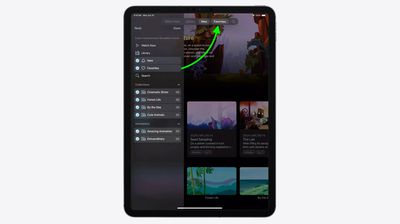
customize tab bar ipados 18
Third-party developers have control over what appears in the new tab bar and sidebar, enabling them to determine what stays fixed, and what can be added or removed.

The iPadOS 18 beta is available to developers at the current time, with Apple planning to introduce a public beta in July.


Related Forums: iOS 18, iPadOS 18

Popular Stories

macOS 27 on MacBook Pro

Apple Says macOS 27 Won't Be Compatible With These Macs

Wednesday June 3, 2026 8:29 am PDT by
During WWDC 2025, Apple revealed that macOS 26 Tahoe would be the final major macOS version for Intel-based Macs. macOS 27 will be compatible with Apple silicon Macs only, meaning that you will need a Mac with an M-series chip or a MacBook Neo with an A18 Pro chip in order to install the software update. Apple will unveil macOS 27 during its WWDC 2026 keynote this Monday, June 8, and the...
MacBook Neo on Yellow Feature

MacBook Neo is So Popular That Apple Reportedly Doubled Production

Wednesday June 3, 2026 9:24 am PDT by
On an earnings call in late April, Apple's CEO Tim Cook said that customer response to the MacBook Neo was "off the charts," and the popularity of the laptop has reportedly led the company to significantly boost production. Apple supply chain analyst Ming-Chi Kuo this week said he believes that MacBook Neo shipments to Apple were doubled from an initial target of 5 million units to 10...
iphone 18 pro blue%402x

iPhone 18 Pro: Dark Cherry, Light Blue, and Dark Gray Chassis Leaked [Update]

Thursday June 4, 2026 5:18 am PDT by
Update: Since publication, new information has come to light suggesting the images have been AI-manipulated and are not in fact iPhone 18 Pro chassis parts. The original article follows. The color options Apple is reportedly planning for the upcoming iPhone 18 Pro and ‌iPhone 18 Pro‌ Max have appeared online today in the form of images of chassis parts of unknown authenticity....

Top Rated Comments

F23 Avatar
26 months ago
can’t wait to use the full power of the M4 chip to customize my tab bar
Score: 20 Votes (Like | Disagree)
26 months ago
This is also an example of confusing UI in iOS 18 and change for the sake of changes.
This was supposedly a design used for TVOS, okay, but why suddenly bring it to iPad, and only iPad?

If you shrink the window (sorry tile) of the app, the tab bar will go to the bottom, like on an iPhone.
So you will have tab navigation on the top, on the left, and on the bottom, on a single device - iPad

I really want to know why Apple make this update, like what's the philosophy behind it?
The reason they gave in the keynotes, was: to refresh the look of your App. Do they really just changed the system and interaction fundamentals for a visual refresher?

Now some people will never know how to access the full tab bar, like why would a top navigation component transition to a complete different side of the screen on a single click?
Score: 13 Votes (Like | Disagree)
26 months ago
Is it me (and i'm using iphone since the first that came out) but isn't this OS getting to big with all those tiny features? It's getting hard to know how to add/find new things. Usability is getting lost imo.
Score: 13 Votes (Like | Disagree)
26 months ago
This little UI tweak is listed as a prominent feature on Apples iPadOS 18 preview page. That says all about the content of this update.
Score: 10 Votes (Like | Disagree)
klasma Avatar
26 months ago
Yeah, the top is easier to reach than the bottom, totally makes sense. :rolleyes:
Score: 9 Votes (Like | Disagree)
26 months ago
Floating menu bar tribute to its origins


And the macOS Settings redesign might look like it was copying iPad or Windows but it's really a vertical version of NeXT's.

Score: 7 Votes (Like | Disagree)