Apple at WWDC today announced macOS 15 Sequoia, the next version of its Mac operating system featuring several new AI capabilities also announced for iPhone with iOS 18, in addition to a new Password app, a major Safari update, and a new Continuity feature called iPhone Mirroring.

At the heart of the new AI features is "Apple Intelligence," which Apple says is a deeply integrated, personalized AI experience for Apple devices that uses cutting-edge generative artificial intelligence to enhance user experiences across iPhone, iPad, and Mac.
According to Apple, the service "combines the power of generative models with personal context to deliver intelligence that's incredibly useful and relevant." Apple Intelligence "understands and creates language and images, takes action across apps, and draws from personal context, simplifying and accelerating everyday tasks."
“The all-star combination of the power of Apple silicon and the legendary ease of use of macOS have made the Mac more capable than ever. Today, we’re excited to take macOS to new heights with macOS Sequoia, a big release that elevates productivity and intelligence,” said Craig Federighi, Apple’s senior vice president of Software Engineering. “macOS Sequoia ushers in Apple Intelligence, unlocking incredible new features that will be a game changer for working on Mac. And with more ways to help users effortlessly get things done, new Continuity features like iPhone Mirroring, major updates to Safari, and a host of new games, we think Mac users are going to love it.”
As part of the new AI features, Image Playground lets users can create playful images in seconds, choosing from three styles: Animation, Illustration, or Sketch. Image Playground is designed to be easy to use, and comes built right into apps like Messages, and is also available in a dedicated app.
macOS Sequoia includes a new Continuity feature called iPhone Mirroring that allows you to view and control your iPhone right from your Mac. According to Apple, "a user's custom wallpaper and icons appear just like on their iPhone, and they can swipe between pages on their Home Screen, or launch and browse any of their favorite apps." Not only that, but also the keyboard, trackpad, and mouse on Mac let you interact with your iPhone, and audio even comes through.
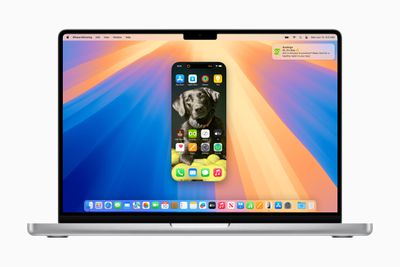
Your iPhone on your Mac shows everything, including icons, the Home Screen, apps, and more. Any app can be opened, and all the while, your iPhone can stay locked, so nobody else can access it. You can even drag and drop items and files from your Mac to your iPhone seamlessly. macOS 15 also brings iPhone notifications to Mac, where they appear alongside Mac notifications and can be responded to.
Meanwhile, Safari now offers Highlights, which Apple describes as "an even easier way to discover information on the web, such as directions, summaries, or quick links to learn more about people, music, movies, and TV shows." Reader mode has been redesigned, and now includes a streamlined view of the article, a summary, and a table of contents for longer articles."
In addition, macOS now automatically sizes windows to tile them and fill up the screen, utilizing maximum screen real estate. Drag a window to the edge of the screen, and macOS Sequoia automatically suggests a tiled position on your desktop. There are also new keyboard and menu shortcuts designed to better organize tiles.
The Presenter preview feature has also received an update, with new keyboard and menu shortcuts to help users organize tiles. Users can also add built-in backgrounds, including color gradients and system wallpapers, or upload their own photos. Background replacements can also be applied during a video call in FaceTime or in third-party apps like Webex.
macOS 15 also includes a new dedicated Passwords app, allowing you to manage Wi-Fi passwords, app and website passwords, verification codes, and more. Passwords sync across devices, and macOS uses autofill to populate passwords in the Passwords app. The Passwords app is also available on Windows, thanks to the iCloud for Windows app.
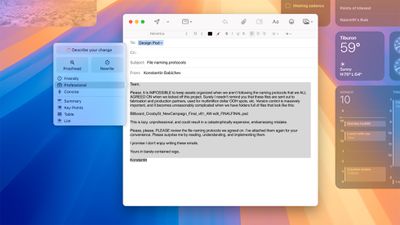
Apple is also highlighting Memories in Photos, which it says lets users create the stories they want to see "just by typing a description." Apple Intelligence picks out the best photos and videos based on the description, crafts a storyline with chapters based on themes identified from the photos, and arranges them into a movie with its own narrative arc. There's also a new Clean Up tool that can "identify and remove distracting objects in the background of a photo — without accidentally altering the subject."
Other features include: Updates to Messages, which has all-new text effects, emoji and sticker Tapbacks, and the ability to schedule a message to send later; hike and trail routes in Maps, Collections in the Photos app, smarter Notes, and better Calendar / Reminder integration. macOS 15 Sequoia will be released to the public in the fall.