iOS 17.5 Includes 'Repair State' Option That Doesn't Require Turning Off Find My for Service - MacRumors
Skip to Content

iOS 17.5 Includes 'Repair State' Option That Doesn't Require Turning Off Find My for Service

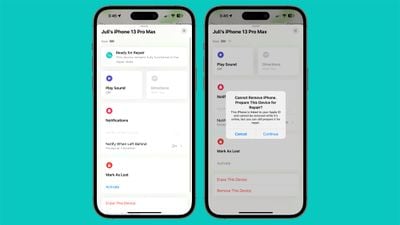
With iOS 17.5, Apple is adding a "Repair State" feature that is designed to allow an iPhone to be sent in for service without deactivating Find My and Activation Lock. The fourth iOS 17.5 beta that came out today adds a "Remove This Device" option for all devices in ‌Find My‌, and using it with an iPhone puts that iPhone into the new Repair State.
ios 17 5 repair state
Right now, sending an iPhone to Apple to be repaired requires turning off Find My, and Apple says that it "might not" be able to repair devices that have ‌Find My‌ activated. Turning off ‌Find My‌ disables Activation Lock, an important anti-theft security feature that prevents an iPhone from being used with another Apple ID.

Apple currently uses ‌Find My‌ and Activation Lock as a way to ensure that a person sending a device in for repair actually owns that device, and that it's not stolen. An iPhone sent in for repair with ‌Find My‌ disabled cannot be tracked, and it is not protected from theft, so if it is lost or stolen at some point in transit during the repair process, there is no recovery method available. Removing ‌Find My‌ also has a hitch with Stolen Device Protection, as there is an hour wait when turning off ‌Find My‌, which can be inconvenient for repair purposes.

The new repair state leaves ‌Find My‌ turned on, so Activation Lock remains enabled, and the iPhone continues to be trackable with the ‌Find My‌ app while it is being repaired. When enabled, the device in the repair state has a "Ready for Repair" label. "This device remains fully functional in the repair state," reads the text.
ios 17 5 repair state icon
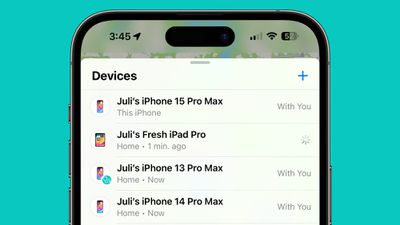
In the list of devices, an iPhone put into a repair state has a small stethoscope icon, and it can be marked as lost. While in repair state, the iPhone is fully functional.

As of right now, using the "Remove This Device" option in ‌Find My‌ to enable a repair state appears to be limited to the iPhone. Using it on other devices like an iPad, Mac, or Apple Watch shows a warning that the feature will remove the device from the ‌Apple ID‌ account, allowing it to be used by someone else. Note that an iPhone must be online and trackable through ‌Find My‌ for the repair state option to pop up. An iPhone that is offline will display the standard removal text. It is also worth noting that repair state cannot be disabled at the current time.

Repair state is a feature that is still in development, so it might work with other devices when iOS 17.5 and its sister updates launch in May.


Related Forums: iOS 17, iPadOS 17

Popular Stories

Apple Event Logo

Apple's Next Era Begins September 1

Thursday May 7, 2026 10:36 am PDT by
Apple recently announced that Tim Cook will be stepping down as CEO later this year, after 15 years of leading the company. Effective September 1, Apple's hardware engineering chief John Ternus will become the company's next CEO, while Cook will become executive chairman of Apple's board of directors. In his new role, Apple said Cook will assist with "certain aspects" of the company,...
Four iPhone 18 Pro Colors Mock Feature

iPhone 18 Pro Launching in September With These 10 New Features

Saturday May 9, 2026 6:03 am PDT by
While the iPhone 18 Pro and iPhone 18 Pro Max are not launching until September, there are already plenty of rumors about the devices. It was initially reported that the iPhone 18 Pro models would have fully under-screen Face ID, with only a front camera visible in the top-left corner of the screen. However, the latest rumors indicate that only one Face ID component will be moved under the...
MacBook Pro Low Angle Wide Lens

macOS 27: Two More Changes Leaked Ahead of WWDC Next Month

Sunday May 10, 2026 9:45 am PDT by
macOS 27 will have a "slight redesign" compared to macOS Tahoe, according to the latest word from Bloomberg's Mark Gurman. In his Power On newsletter today, Gurman said the design changes will help to improve the readability of macOS Tahoe's Liquid Glass interface:If you've used Tahoe, you're likely familiar with some of the quirks — particularly the transparency effects and shadows that...

Top Rated Comments

HeavenDynamic Avatar
27 months ago
Thank you, from all the Technical Specialists at Apple.
Score: 18 Votes (Like | Disagree)
27 months ago
Hoping this means that they will also stop asking users for passwords so they can test the repair was successful. Users should never have to disclose a password to support personnel.
Score: 17 Votes (Like | Disagree)
TheLarkShark Avatar
27 months ago
why does juli have so many iphones?
Score: 13 Votes (Like | Disagree)
27 months ago
Now I guess we all get to find out the super secret locations where Apple repairs things.
Score: 10 Votes (Like | Disagree)
Blackstick Avatar
27 months ago
As a former Mac Genius (left 10 years ago), this was a considerable hassle even back then... and I assume is a larger one today. Good stuff.
Score: 9 Votes (Like | Disagree)
antiprotest Avatar
27 months ago

As a former Mac Genius (left 10 years ago), this was a considerable hassle even back then... and I assume is a larger one today. Good stuff.
Would you say that Apple's staff, especially those in retail stores, are much less "genius" than before? Like 5-10 years ago? That has been my experience. I have talked to some in store that sounded like they were hired off the street that same morning, with almost no training and familiarity with the products, services, settings and features. They knew even less than me and kept trying to sell me stuff while describing the products and services quite incompetently.
Score: 8 Votes (Like | Disagree)