

8BitDo Gaming Controllers Now Compatible With iPhone, iPad, Apple TV and Mac - MacRumors
Skip to Content

8BitDo Gaming Controllers Now Compatible With iPhone, iPad, Apple TV and Mac

A selection of controllers from gaming company 8BitDo are now compatible with Apple's product lineup, thanks to a firmware update that was released today.
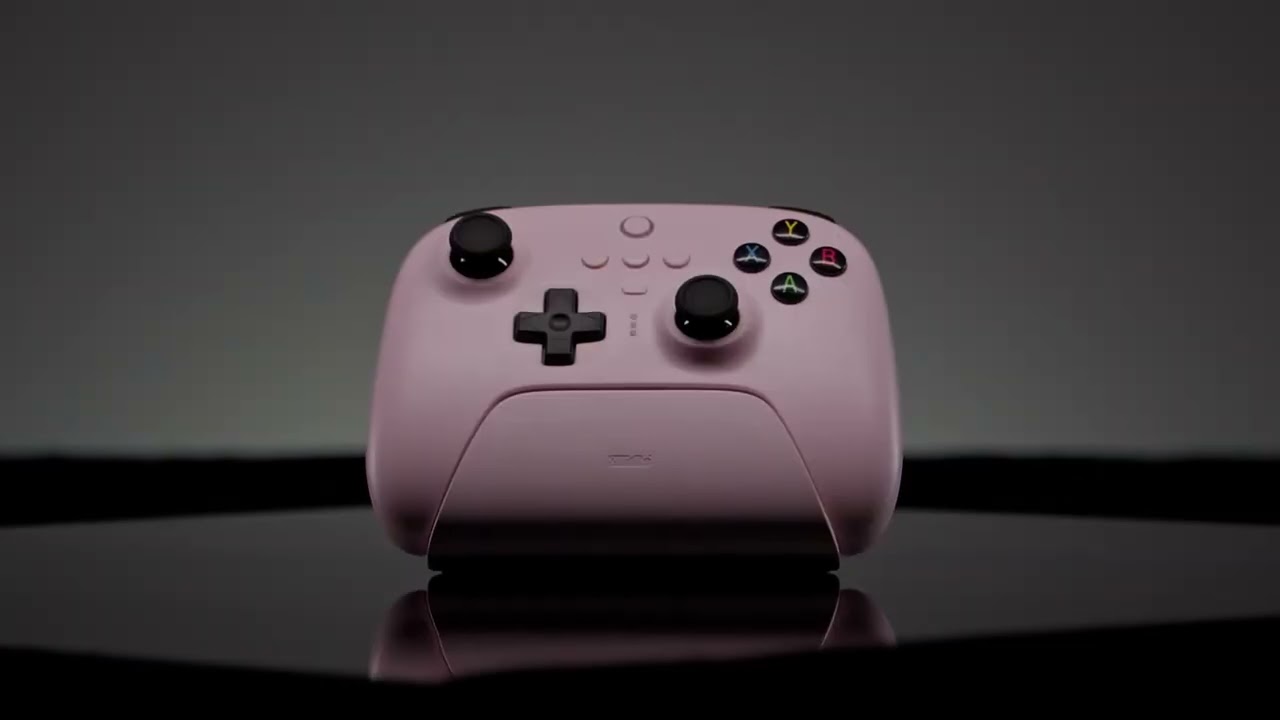

The 8BitDo SN30 Pro for Android, SN30 Pro, Pro+, Pro 2, Ultimate 2.4g and Lite SE can be used with iPhones, iPads, Macs, and Apple TV devices that are running the latest Apple software.

All 8BitDo controllers that are compatible with Apple devices can be used like any other Made for iPhone controller to play games that offer controller support, including Apple Arcade titles.


iPads and Macs with USB-C ports can use a wired connection to a compatible 8BitDo controller, but otherwise Bluetooth connections are available. Up to four controllers can be connected at one time depending on device, and unfortunately, rumble and motion control functions are not supported.

Controllers will need a firmware update to work with Apple devices, with the firmware updating software available through the 8BitDo website.


Popular Stories

All Screen iPhone 2030 Feature Sans Text

iPhone 18 Pro: Nine Reasons Not to Upgrade This Year

Monday September 7, 2026 5:01 am PDT by
Apple is set to unveil new iPhone 18 Pro and iPhone 18 Pro Max models on Wednesday, September 9, and the devices are expected to feature a design that's largely similar to the iPhone 17 Pro models, with a peppering of enhancements inside. Major changes are not expected until next year, when Apple is expected to introduce a radically redesigned 20th-anniversary iPhone. If you're thinking of...
apple watch series 12

Leak Hints at Four New Features for Apple Watch Series 12 and Ultra 4

Monday September 7, 2026 8:57 am PDT by
Ahead of the announcement of the Apple Watch Series 12 and Ultra 4 later this week, code in the watchOS 27 and iOS 27 betas points to a series of new features for the product line. The information comes from a new post from MacRumors forums member "pdfu." The findings include: New "Readiness" app: An all-new separate Watch app referred to in code as "Readiness," distinct from the...
iPhone 18 Pro Dark Cherry Feature

iPhone 18 Pro Reportedly Starts With 256GB of Storage

Thursday September 3, 2026 9:22 am PDT by
While the iPhone 17 Pro has double the base storage compared to the iPhone 16 Pro, there will apparently be no further increase this year. Taiwanese research firm TrendForce today again reported that the iPhone 18 Pro models will start with 256GB of storage, like the iPhone 17 Pro models. Minimum storage capacities by model:iPhone 16 Pro: 128GB iPhone 17 Pro: 256GB iPhone 18 Pro...

Top Rated Comments

TheYayAreaLiving 🎗️ Avatar
45 months ago
Apple needs to come up with its own gaming controller. Imagine integrated with Dynamic Island!

Score: 17 Votes (Like | Disagree)

Mac Fly (film) Avatar
45 months ago
Now all Apple need to do is quit messing around with Ted Lasso and licence some real AAA games for people to play.
Score: 11 Votes (Like | Disagree)
Razorpit Avatar
45 months ago
I guess options are good, but I don’t see why you’d pick one of these over a PS or Xbox controller.
Score: 11 Votes (Like | Disagree)
idktbh Avatar
45 months ago

Apple needs to come up with its own gaming controller. Imagine integrated with Dynamic Island!


wtf is this lmao
Score: 8 Votes (Like | Disagree)
Think|Different Avatar
45 months ago
Oh this is actually cool – I randomly was going to purchase one of these a few weeks ago, on a whim, and I literally didn't pull the plug because a lot of the comments and reviews confirmed it didn't have official support. I'll take another look then! Good on them.
Score: 7 Votes (Like | Disagree)
45 months ago

I thought these always worked with Macs?
They did, but only by by emulating an PS4 controller. There's some nuance to how the controller behaves and what functions are available depending on the mode you're in, but I'm not too sure on the specifics but my understanding of it from piecing together info from 8BitDo's FAQ and forum posts is:

Switch compatible (S mode)

* emulates a Nintendo Switch Pro controller
* allows for gyro to be used for motion controls
* trigger buttons not in analogue mode (they're either fully on or fully off)
* rumble support

Apple compatible (A mode)

* emulates a PlayStation DS4 controller
* no gyro
* trigger buttons in analogue mode
* rumble support

DirectInput (D mode)

* most compatible mode for emulators and old games due to it being the dominant 'standard' input mode before X-input
* can be used in Windows, Linux, Android and macOS (with emulators)
* no gyro
* trigger buttons in analogue mode (if the game supports it?)
* no rumble

X-input (X mode)

* emulates a Xbox 360 controller
* supported by pretty much all modern platforms such as Windows, Linux, macOS, Android and iOS/tvOS/iPadOS
* most modern games will pre-map their controller buttons automatically in this mode
* no gyro
* trigger buttons in analogue mode
* rumble support


I'm not really sure how it's better than a PS5 controller? I paired the PS5 controller with my mac to run ETS 2 on Steam, the problem isn't the controller, the issue is the weak GPU of the M1 mac mini, it's just no good even for old games.
It depends. Some of 8BitDo's controllers are better if you're frequently swapping your controller between different devices (of different types) since you can have it paired with up to 4 different types of devices with a simple switch mode on the back.

I for one, absolutely hate having to do the pair/re-pair Bluetooth dance between different devices when I use an Xbox or PS4/5 controller. With my Pro 2, I can go from using it on my iPhone (A mode) to my Windows PC (X mode) to my emulation box (D mode) to my tablet (S mode) by simply flicking a switch and it instantly pairs to each device. That functionality alone is a really nice 'quality of life' feature.

You also have control over things like deadzones in the 8BitDo software that you don't get with Xbox and PS controllers.

Controllers are also a bit of personal preference when it comes to ergonomics, so as always, it's best to check and test them yourself if you can before buying.
Score: 6 Votes (Like | Disagree)








































