Uber Rides Now Easier to Track on iPhone's Lock Screen and Dynamic Island as Live Activities Expands Worldwide
Uber today announced it is updating its iPhone app with Live Activities support in over 1,200 cities around the world following several months of testing. The new version of the app will be available on the App Store starting this morning.
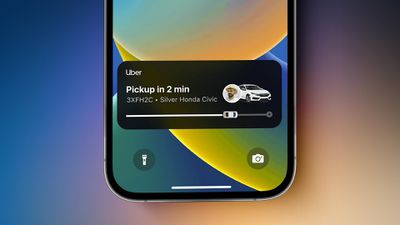
Live Activities is an iOS 16 feature that allows iPhone users to stay on top of real-time events right on the Lock Screen on all iPhones and in the Dynamic Island on the iPhone 14 Pro and iPhone 14 Pro Max. The feature will make it easier for iPhone users to track the live progress of an Uber ride at a glance without opening the app, including the latest ETA, the trip status, and the vehicle's description and license plate number.
Apple announced that Uber would support Live Activities back at WWDC 2022, and the feature has been in testing in select countries since late last year. With the latest update to the Uber app, the feature is available around the world.
Live Activities will also be supported by the Uber Eats app for food deliveries "in the coming months," according to a company spokesperson.
Other popular third-party apps that support Live Activities include Flighty for flight tracking, Citymapper for public transit, ParkMobile for parking, CARROT Weather for weather forecasts, and soon Google Maps for turn-by-turn navigation.
Popular Stories
Just two days before Apple's "Welcome home" experience in New York, Bloomberg's Mark Gurman has leaked several details about the new products set to be unveiled, including an all-new smart home hub, a HomePod mini 2, and a new Apple TV 4K.
Here is an all-in-one summary of the details shared by Gurman:Apple's home hub with a touch-enabled display will be named HomeView, seemingly confirming a ...
Apple may be planning to announce a new partnership with home security company ADT, alongside the introduction of its all-new smart home hub, according to several clues.
First and foremost, ADT has been posting "Low Voltage Technician" job listings in various U.S. cities since around July, but those hired for the position so far have been provided with very few details about their specific...
Apple today announced an upcoming product launch that will take place on Tuesday, October 13. We are expecting Apple's announcement to focus on new smart home products, including the long-rumored smart home hub, a new Apple TV 4K, and a refreshed HomePod mini.
Subscribe to the MacRumors YouTube channel for more videos.
The home hub is an all-new device that's like a cross between an iPad and...