

Ulysses App Now Lets Writers Organize Their Work into Projects - MacRumors
Skip to Content

Ulysses App Now Lets Writers Organize Their Work into Projects

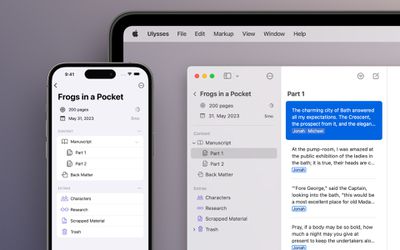
Popular writing app and markdown editor Ulysses has gained a new Projects feature that's aimed at users who tend to work on larger projects, such as books, a thesis, or a blog.
29 Projects Assembly
New to the app in version 29, the Projects feature only shows what's relevant to the current project and hides everything else in the app's sidebar to improve focus.

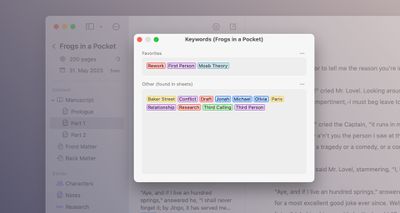
The writing goal and deadline for the project is shown in prominently in the sidebar, where there are dedicated sections for content as well as additional silos for research material, while keywords for each project are managed separately.

The interface for projects has been designed to make content easily exportable, and each project can have separate settings, such as export style and file format.

In addition, Ulysses 29 overhauls the dashboard and Revision mode toolbars on Mac and the menus on iOS, and fixes a bug where italics would fail to show in the editor. The whole process of moving groups and sheets has also been reworked, so that Ulysses drag-and-drop interactions finally work as they should.
29 Projects Keywords ulysses
Ulysses can be downloaded for free on the App Store. After a 14-day trial period, a subscription is required to unlock the app on all devices. A monthly subscription costs $5.99, while a yearly subscription is $39.99.

Students can use Ulysses at a discounted price of $10.99 per six months. The discount is granted from within the app. Ulysses is also included in Setapp, the subscription-based service for Mac applications created by MacPaw.


Tag: Ulysses

Popular Stories

Four iPhone 18 Pro Colors Mock Feature

iPhone 18 Pro Launching Later This Year With These 10 New Features

Tuesday May 26, 2026 6:32 am PDT by
While the iPhone 18 Pro and iPhone 18 Pro Max are not launching until September, there are already plenty of rumors about the devices. It was initially reported that the iPhone 18 Pro models would have fully under-screen Face ID, with only a front camera visible in the top-left corner of the screen. However, the latest rumors indicate that only one Face ID component will be moved under the...

Apple Watch Ultra 2 Black Titanium

watchOS 27 Will Add These New Features to Your Apple Watch

Sunday May 24, 2026 11:53 am PDT by
Apple will unveil watchOS 27 during its WWDC 2026 keynote on Monday, June 8, and a handful of new features have been rumored already. The first developer beta of watchOS 27 should be available immediately following the keynote, and a public beta typically follows in July. The update should be released to all users with a compatible Apple Watch model in September. Below, we recap watchOS...
iPhone 15 General Feature Green

Apple Preparing 'Most Significant Overhaul in the iPhone's History'

Friday May 22, 2026 1:36 pm PDT by
Apple reportedly plans to unveil its first foldable iPhone in September this year — it may be named "iPhone Ultra" — and expectations are high. In his Power On newsletter, Bloomberg's Mark Gurman said the foldable iPhone will be "the most significant overhaul in the iPhone's history." "iPhone 4, iPhone 6 and iPhone X were clearly a big deal, but this is a whole new design," he said....

Top Rated Comments

45 months ago

Scrivener is cheaper and more widely respected and multi platform.
Plus, Scrivener is not tied to a subscription fee! I'm happy to pay for perpetual license, and happy to pay to upgrade when major versions come out. There was a time when I used Ulysses before the subscription model. As soon as they turned to subscription, I ditched them and never looked back.
Score: 11 Votes (Like | Disagree)
enterthemerdaverse Avatar
45 months ago
Scrivener is cheaper and more widely respected and multi platform.
Score: 10 Votes (Like | Disagree)
enterthemerdaverse Avatar
45 months ago

Plus, Scrivener is not tied to a subscription fee! I'm happy to pay for perpetual license, and happy to pay to upgrade when major versions come out. There was a time when I used Ulysses before the subscription model. As soon as they turned to subscription, I ditched them and never looked back.
I can only understand the concept of subscription if there is a very complex app that costs a lot of money to maintain, has regular ‘Big Feature updates’ and suffers badly from piracy. Things like Autodesk, Foundry and Adobe had to go the sub route.

But a text processor isn’t sub worthy. Scrivener is very feature rich and have maintained compatibility with each macOS and Windows update for free. That means I spent only about $170 on version 1, 2 and 3 since 2007.
Score: 6 Votes (Like | Disagree)
45 months ago

Should be as simple as linked your Dropbox, etc.
What throws me off is that there's somehow no iCloud syncing. So you're apparently left to install third-party software like Dropbox or Google Drive, which I'm really not into. And even then, there are dire warnings ('https://scrivener.tenderapp.com/help/kb/cloud-syncing/using-scrivener-with-cloud-sync-services') about manually closing projects or risking sync conflicts or corruption. As much as I dislike Ulysses' subscription model, it's absolutely seamless when it comes to syncing and frankly I think that's table stakes in 2022. Ulysses' UI is also still incredibly smooth and nice to work with. So, I take the hit once a year and keep my eyes open for good alternatives. I keep an eye on Scrivener, though, and if they ever get syncing sorted properly I'd be happy to pay up and give it a whirl.
Score: 5 Votes (Like | Disagree)
45 months ago

No matter how much money I make, I can never justify the cost of that app. But I admit from my trial, I like it. I really like the app. I hope whoever is behind it, is swimming Scrooge-McDuck style in a vault of money for the amount being charged for a text editor.
It's not just "a text editor" though, it's a whole project binder and management system for lengthy and complex pieces of work. If it was easy to do this kind of thing in TextEdit, then no one would be paying for Ulysses or Scrivener.
Score: 5 Votes (Like | Disagree)
Gnik Nus Avatar
45 months ago

Every time I’ve checked out Scrivener, the sync process seems so fraught and weird that I immediately turn away.
It's a shame that there is no iCloud sync on Scrivener. I admit that. The only option is Dropbox. But if you set it up right, it does work as a charm. I've been using it for years on huge projects, moving back and forth between Mac and iPad without a single issue.
Score: 4 Votes (Like | Disagree)









































