

Skip to Content

Live Activities to Get More Frequent Updates Option in iOS 16.2

Apple released iOS 16.1 earlier this week and introduced Live Activities – lingering interactive notifications that stay up to date, allowing you to keep an eye on things happening right from the Lock Screen. Since then, Apple has released the first iOS 16.2 beta to developers, and evidence has been found that Apple is working on a way for Live Activities to update more frequently.
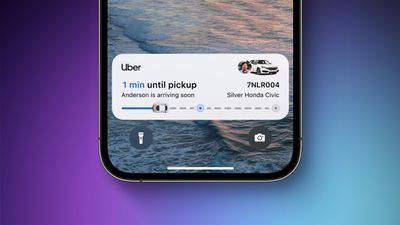
ios 16 live activities feature
According to inactive code in iOS 16.2 beta 1 discovered by 9to5Mac, Apple will provide users with an option for "More Frequent Updates" for Live Activities, although the setting will also drain an iPhone battery faster, warns the following unearthed message:

More Frequent Updates

Allowing more frequent updates lets you see more real time information, but can drain your battery faster.

Despite the increased battery usage, the upcoming option in the Settings app is likely to be a welcome addition for users relying on third-party apps that use Live Activities to relay information about travel times, such as Flight tracking app Flighty.

Since the release of iOS 16.1, several third-party apps have been updated to support Live Activities on iPhone Lock Screens. The ‌Dynamic Island‌ component requires an ‌iPhone 14 Pro‌ or ‌iPhone 14 Pro‌ Max.

In addition to the additional Live Activities option, the first iOS 16.2 beta includes other extras including the new Freeform App, Stage Manager External Display Support, Accidental Emergency SOS Reports and More


Popular Stories

MacBook Neo Feature Pastel 1

First MacBook Neo Benchmarks Are In: Here's How It Compares to the M1 MacBook Air

Thursday March 5, 2026 4:07 pm PST by
Benchmarks for the new MacBook Neo surfaced today, and unsurprisingly, CPU performance is almost identical to the iPhone 16 Pro. The MacBook Neo uses the same 6-core A18 Pro chip that was first introduced in the iPhone 16 Pro, but it has one fewer GPU core. The MacBook Neo earned a single-core score of 3461 and a multi-core score of 8668, along with a Metal score of 31286. Here's how the...
MacBook Neo Feature Pastel 1

Apple Announces $599 'MacBook Neo' With A18 Pro Chip

Wednesday March 4, 2026 6:15 am PST by
Apple today announced the "MacBook Neo," an all-new kind of low-cost Mac featuring the A18 Pro chip for $599. The MacBook Neo is the first Mac to be powered by an iPhone chip; the A18 Pro debuted in 2024's iPhone 16 Pro models. Apple says it is up to 50% faster for everyday tasks than the bestselling PC with the latest shipping Intel Core Ultra 5, up to 3x faster for on-device AI workloads,...
Multicolored Low Cost A18 Pro MacBook Feature

Apple Accidentally Leaks 'MacBook Neo'

Tuesday March 3, 2026 7:00 am PST by
Apple appears to have prematurely revealed the name of its rumored lower-cost MacBook model, which is expected to be announced this Wednesday. A regulatory document for a "MacBook Neo" (Model A3404) has appeared on Apple's website. Unfortunately, there are no further details or images available yet. While the PDF file does not contain the "MacBook Neo" name, it briefly appeared in a link...

Top Rated Comments

44 months ago

So „Live“ activities aren’t actually Live right now?
Trust me, I'm an engineer: there's a big difference (performance, data transfer and battery wise) between updating the state of the UI every 10 seconds and doing it every 1 second, but both would be considered live updates.

In general, almost always when something happens "live" in code it's actually some sort of "are we there yet?" running on a timer, either pushed to the device by the server or pulled by the device from the server. This applies to notifications, live chats and any other UI that constantly refreshes its own state.

As a programmer you need to balance the need for "liveness" of the updates with the drawback/cost to you and the end user (data transfer, battery life, server resources).
Score: 12 Votes (Like | Disagree)
ProfessionalFan Avatar
44 months ago
It will make it much more useful yes. Need to see how much of a battery drain we're talking about here though.
Score: 4 Votes (Like | Disagree)
44 months ago
What is the refresh rate now and what will it be with this on?
Score: 3 Votes (Like | Disagree)
The Game 161 Avatar
44 months ago

What does this app do that CBS Sports app or The Score app can't do? Show a score on the lock screen? And do they just show one game or an entire scoreboard for multiple leagues? I mean for me, it's two taps to open CBS Sports or The Score to get to all the scores for all the leagues I have set up as favorites. I'm just trying to understand. Thanks.
will be on the lockscreen and the island. It will show the score and the time left. Sure it's a couple of clicks away but you don't need to do anything it will be on the bottom of your lock screen. You don't need to go into the app to go in touch with games. Even better on 14 pros AOD as well

sports alerts is my go to sports app as will have all my favourite sports with one swipe.
Score: 3 Votes (Like | Disagree)
Kylo83 Avatar
44 months ago
But isn’t the whole idea of live activities means it’s live and always updating live, so does this mean now they don’t update live in real time?
Score: 3 Votes (Like | Disagree)
contacos Avatar
44 months ago
So „Live“ activities aren’t actually Live right now?
Score: 2 Votes (Like | Disagree)















