Apple Updates Beats Studio Buds Firmware - MacRumors
Skip to Content

Apple Updates Beats Studio Buds Firmware

Apple today released a new 10M359 firmware update for the Beats Studio Buds that came out back in June. Prior to today's firmware update, the Beats Studio Buds had 9M6599 software installed. Note that this is Apple's internal numbering, and the firmware version seen in the Settings app can be different and will likely show up as 1B56 after updating.
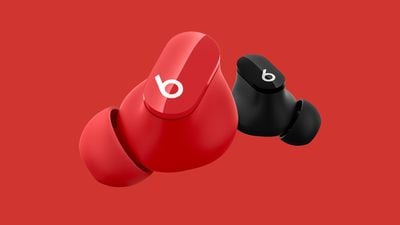
beats studio buds red
There's no standard way to upgrade the ‌Beats‌‌ software, but firmware is generally installed over-the-air while the earbuds are connected to an iOS device. Putting the Beats Studio Buds‌‌‌‌‌ in the case, connecting them to a power source, and then pairing them‌‌‌‌‌ to an iPhone or an iPad should force the update after a short period of time.

Beats Studio Buds were the first Beats-branded earbuds to compete with the AirPods with a wire-free design and no earhook. Beats Studio Buds are similar in design to the AirPods Pro and feature Active Noise Cancellation, but the earbuds have a stemless design that we could see in future Apple products.

If we find notable changes after the firmware updates are installed, we'll share details, but the software likely includes performance improvements and bug fixes.
Popular Stories

beats solo buds orange

Beats Launches Solo Buds in Retailer-Exclusive Orange Color in the U.S. and Japan

Tuesday June 30, 2026 11:59 am PDT by
Apple's Beats brand has launched a new retailer-exclusive orange color for its Solo Buds, with the earphones available now at Best Buy in the United States and coming July 4 to 7–Eleven in Japan. The Solo Buds are an entry-level earphone product from Beats, normally priced at $79.99 in the United States, although they are occasionally offered on sale such as the current $10 discount at Best...
Beats Power Pink Feature

Beats Charging Cables Now Available in 'Power Pink'

Tuesday July 7, 2026 7:00 am PDT by
Back in April 2025, Apple's Beats brand debuted a collection of woven charging cables in a variety of colors, initially offering varying combinations of USB-C to USB-C, USB-A, and Lightning in 1.5-meter and 20-centimeter lengths. The lineup was expanded earlier this year with new 3-meter USB-C to USB-C options in four different colors, and today Beats is launching a new Power Pink color option...
macbook ultra

'MacBook Ultra' Coming Soon With These 12 New Features

Friday July 24, 2026 6:00 pm PDT by
Apple's first high-end MacBook redesign in five years is expected to arrive in the near future, bringing a run of firsts to the Mac. Bloomberg's Mark Gurman expects the laptop to arrive between late 2026 and early 2027, with the later window now looking more likely owing to the global memory chip shortage. Analyst Ming-Chi Kuo expects mass production to begin by late 2026. Apple last...

Top Rated Comments

Canyda Avatar
59 months ago
So it appears the big change with the new firmware is that you can set your earbuds now to control the volume!

Go into the Bluetooth settings, see the new Press and Hold option, click into that and turn the Volume Control slider on. You can set one earbud for volume down and the other for volume up.
Score: 3 Votes (Like | Disagree)
Ozid Avatar
59 months ago
these buds are so clean. I say this every time an article pops up about these, but I wish they had the iCloud integration and a better mic.

Seriously good looking headphones. The output quality was quite good too.


Score: 2 Votes (Like | Disagree)
dammyonline Avatar
59 months ago
Is anyone experiencing a UI issue with their beats studio buds (started after updating to iOS 15 upwards). When selecting any sound profile (ANC or transparency) from control centre…the UI sort of sticks to a random profile. The actual sound profile does change but it doesn’t display the selected profile. It’s incredibly frustrating

I logged it with apple engineers going on 4 months but still no fix. Apparently they are aware of the bug and are looking into it 🤦🏿‍♂️

[Click to view video attachment]
Score: 1 Votes (Like | Disagree)