

MacRumors Giveaway: Win a Magnetic iPad Stand From Lululook - MacRumors
Skip to Content

MacRumors Giveaway: Win a Magnetic iPad Stand From Lululook

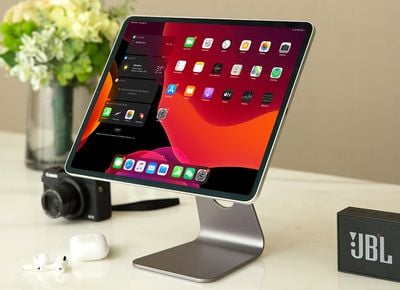
For this week's giveaway, we've teamed up with Lululook to offer MacRumors readers a chance to win an Urban Magnetic iPad Stand that turns an iPad Pro or an iPad Air into a little iMac for a desktop setup.
lululook urban ipad stand 1
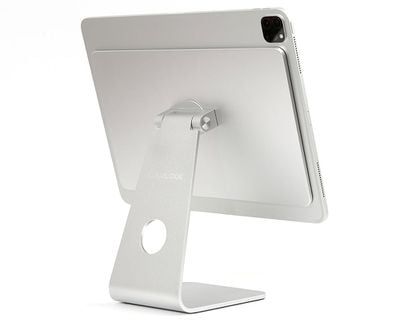
As the name suggests, the Urban iPad Stand has a strong built-in magnet that's designed to attach to a compatible ‌iPad‌. Like the iPhone and a MagSafe charger, the ‌iPad‌ and the stand automatically align with one another.
urban ipad stand 2
Once on the stand, the ‌iPad‌ is at an ideal height to provide an ergonomic viewing experience, and with the adjustable hinge at the back, it can be rotated around 360 degrees to any viewing angle that works best for you. It's useful for watching movies, working with a keyboard and mouse, drawing, and more.

urban ipad stand 3
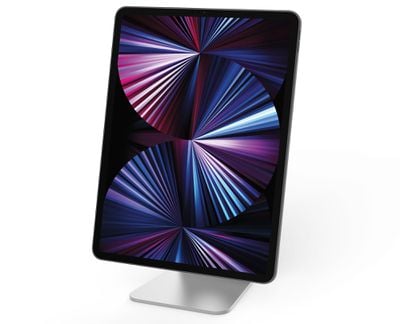
Available in either silver or space gray, the ‌iPad‌ Stand matches well with Apple's devices, and it is made from a hard, durable aluminum material that will last for years to come. It's priced at $70.

The Urban Magnetic Stand is compatible with all of Apple's modern ‌iPad‌,s including the third, fourth, and fifth-generation 12.9-inch ‌iPad Pro‌ models, the first, second, and third-generation 11-inch ‌iPad Pro‌ models, and the fourth-generation MacBook Air.
urban ipad stand 4
We have 10 of the Urban Magnetic ‌iPad‌ Stands to give away to MacRumors readers. To enter to win, use the Gleam.io widget below and enter an email address. Email addresses will be used solely for contact purposes to reach the winners and send the prizes. You can earn additional entries by subscribing to our weekly newsletter, subscribing to our YouTube channel, following us on Twitter, following us on Instagram, or visiting the MacRumors Facebook page.

Due to the complexities of international laws regarding giveaways, only U.S. residents who are 18 years or older and Canadian residents (excluding Quebec) who have reached the age of majority in their province or territory are eligible to enter. To offer feedback or get more information on the giveaway restrictions, please refer to our Site Feedback section, as that is where discussion of the rules will be redirected.

The contest will run from today (September 24) at 11:00 a.m. Pacific Time through 11:00 a.m. Pacific Time on October 1. The winners will be chosen randomly on October 1 and will be contacted by email. The winners will have 48 hours to respond and provide a shipping address before new winners are chosen.



Popular Stories

lululook apple watch titanium

MacRumors Giveaway: Win an Apple Watch Ultra 4 From Lululook

Friday September 25, 2026 10:56 am PDT by
For this week's giveaway, we've teamed up with Lululook to offer MacRumors readers a chance to win a new Apple Watch Ultra 4. Lululook makes all kinds of accessories for Apple devices, including the Apple Watch. The company has a selection of Apple Watch bands that work well with the new Series 12 and the Ultra 4 models. Lululook's $129.99 Strata Milanese Band matches the Apple Watch Ultra...
southern straps 3 1

MacRumors Giveaway: Win an Apple Watch Series 12 and a Nylon Band From Southern Straps

Friday October 9, 2026 10:20 am PDT by
For this week's giveaway, we've teamed up with Southern Straps to offer MacRumors readers a chance to win an Apple Watch Series 12 and a nylon band from Southern Straps to go along with it. Southern Straps is a California-based company that has been making high-quality bands for the Apple Watch since the device first launched in 2015, and the company's selection of bands offer a an...
iphone duo screen crack in store

Crackgate? iPhone Duo Owners Report Screens Breaking Along the Hinge

Friday October 23, 2026 11:05 am PDT by
Some iPhone Duos are already experiencing hinge issues that cause display cracks, based on photos shared on Reddit and the MacRumors forums. Almost all of the display faults are right along the hinge, and most result in a line of bright pixels across one side of the screen. An iPhone Duo owner in Australia said his device cracked after being opened fewer than 20 times, and there was no...

Top Rated Comments

66 months ago

Does anyone ever win these giveaways?
I won a walnut iPad mini stand from one of these a couple of years ago. It's quite nice.
Score: 8 Votes (Like | Disagree)
TheDailyApple Avatar
66 months ago
Nice! I could use that. I like the mini-iMac aesthetic.
Score: 6 Votes (Like | Disagree)
66 months ago
I had one of those for my 11" iPad Pro.

And I really hated it.
Been sent to recycling by now...

It is OK if you never move it, and never adjust the hinge.
If you keep the tilt angle exactly as it is, and the stand in exactly the same position on your desk, it'll be fine.

But that is not my use case.
But YMMV.

I move the stand around a lot. Between my desk and the coffee table and the dining table and the kitchen table and back.
And every time I also adjusted the viewing angle of the hinge.
If you do all that, then this stand is definitely not for you!

On top of that, this stand is actually very heavy. Is not much fun to constantly carry around. Bulky and heavy.

After merely 2 weeks, the hinge went limp. The iPad always drooped. In fact when the hinge drooped the first time, my iPad also dropped off the stand, which caused a small dent on the iPad's rim as it hit something on my desk...
Bummer.
Luckily the screen did not break.

The stand comes with a hex driver, and you really need that one!
Be weary of any stand that comes with a hex driver! Because you likely will need it! And a lot.
I ended up having to tighten the hinge every day - it has two hex screws on either side of the hinge. If I tightened both screws, the stand worked for another day, which in my case meant about 3-5 hinge adjustments, after which the hinge wore out again and the iPad started drooping again...
Retightening both hex screws again...
Rinse lather and repeat.
It got really annoying.
Useless stand, in my opinion.

After I threw this Lululook stand away, I purchased this one from Invzi instead:
https://invzi.com/products/invzi-magnetic-aluminum-stand-for-ipad-pro-ipad-air-4

Does the same thing, but is much lighter, hence easier to carry around - while still sturdy.

And after 4 weeks of use, the hinges are still strong.
In fact this stand does not even come with any screw or hex driver - and the hinges have no means of tightening. They do not need it.

Much better product IMHO.


Just my 2 cents on that Lululook stand...
Don't get it. Save your money. Get another product.
Score: 5 Votes (Like | Disagree)
66 months ago

Poor Man's iMac... ;)
With your fully specced 1TB ipad pro 12.9 5G ? Not so sure
Score: 4 Votes (Like | Disagree)
66 months ago
Does anyone ever win these giveaways?
Score: 4 Votes (Like | Disagree)
66 months ago

I had one of those for my 11" iPad Pro.

And I really hated it.
Been sent to recycling by now...

It is OK if you never move it, and never adjust the hinge.
If you keep the tilt angle exactly as it is, and the stand in exactly the same position on your desk, it'll be fine.

But that is not my use case.
But YMMV.

I move the stand around a lot. Between my desk and the coffee table and the dining table and the kitchen table and back.
And every time I also adjusted the viewing angle of the hinge.
If you do all that, then this stand is definitely not for you!

On top of that, this stand is actually very heavy. Is not much fun to constantly carry around. Bulky and heavy.

After merely 2 weeks, the hinge went limp. The iPad always drooped. In fact when the hinge drooped the first time, my iPad also dropped off the stand, which caused a small dent on the iPad's rim as it hit something on my desk...
Bummer.
Luckily the screen did not break.

The stand comes with a hex driver, and you really need that one!
Be weary of any stand that comes with a hex driver! Because you likely will need it! And a lot.
I ended up having to tighten the hinge every day - it has two hex screws on either side of the hinge. If I tightened both screws, the stand worked for another day, which in my case meant about 3-5 hinge adjustments, after which the hinge wore out again and the iPad started drooping again...
Retightening both hex screws again...
Rinse lather and repeat.
It got really annoying.
Useless stand, in my opinion.

After I threw this Lululook stand away, I purchased this one from Invzi instead:
https://invzi.com/products/invzi-magnetic-aluminum-stand-for-ipad-pro-ipad-air-4

Does the same thing, but is much lighter, hence easier to carry around - while still sturdy.
And after 4 weeks of use, the hinges are still strong.
In fact this stand does not even come with any screw or hex driver - and the hinges have no means of tightening. They do not need it.

Much better product IMHO.


Just my 2 cents on that Lululook stand...
Don't get it. Save your money. Get another product.
This other one you link to

You are welcome.


I don't want to badmouth the Lululook stand. But it really is not for everyone.
That is what I learnt the hard way, and which I wanted to inform others about.
It certainly was not for me.


In case you are looking for a fixed stand to mount your iPad in place at your desk.
You never intend to move the stand from where it is on your desk.
You never intend to adjust the hinge angle, you always prefer it at one fixed angled position.
Then this Lululook stand could be for you.

It is heavy and bulky, massively built. Therefore it won't easily move on your desk at all. It will stay put.
And if you tighten the hinge really, really tight with the hex driver, then the hinge will never adjust again and hence it won't droop either.
It'll likely be fine.


But in case you are looking for a flexible stand, that you can more around easily in your home and constantly adjust the angle depending on portrait and landscape orientation and your seating height.
Then the Lululook stand is definitely not for you. It does not work that way.

For that second use case I would definitely recommend the Invzi stand
https://invzi.com/products/invzi-magnetic-aluminum-stand-for-ipad-pro-ipad-air-4

I am really happy with mine so far. (Knocking on wood.)

Its backplate is also exactly the same size as the iPad (at least on the 11" model), which makes it super easy to place the iPad on it, as you can just align the iPad outline shape with the backplate outline shape. They are a 1:1 match.
The Lululook backplate is smaller than even the 11" iPad, so it was harder to place it correctly as you had no "guidance" from the backplate shape.

Those two stands are the only ones that allow for a negative angle, i.e. the iPad looking downwards.
Which was something I wanted as it would allow me to show items lying on my table to a video chat counterpart by just adjusting the hinge downwards.

If the downward angle option is not necessary for you, here are two other magnetic stands I found.

The MagFit:
https://www.magfits.com/products/magfit-ipad-stand-with-magnetic-foldable-adjustable-float-stand-for-ipad-pro

And the Magflött:
But this is still just a kickstarter project. You can only preorder it, so careful with all the usual kickstarter caveats that this comes with.
tinyurl.com/aeu9b53j ('http://tinyurl.com/aeu9b53j')


To answer this question.

Yes, the iPad is only mounted (held in place) by its own built-in magnets which the stand has counter-magnets bult-in at just the right places.
The magnets are really strong. So you need quite a bit of force to "rip" the iPad from the stand. At least the 11" iPad Pro is very securely mounted. It also strongly snaps to the stand if the magnets are correctly aligned.

One caution though:
There are many magnets on the iPad and if you misalign them with the stand, you still get some sort of magnetic attraction, but it is much weaker.
Chances are if misaligned you may think that you aligned the magnets properly as you can feel the magnetic foce, but when you let go of the iPad, it falls off the stand and drops onto the desk as the misaligned magnets were not strong enough to actually hold the iPad in place.
Happened to me a few times with the Lululook stand.
Where I almost dropped the iPad as it was not properly aligned.

Which is why the Invzi stand with its backplate size identical to the 11" iPad's size really helps you guide aligning those magnets.
Is much more foolproof, that Invzi model, IMHO.
The Lululook stand seems not really intended for constantly putting the iPad on and taking it off again. You put it on once a day and leave it there. The Invzi stand is definitely built with more flexibility in mind.

Will the magnets wear out over time? Who knows? Certainly something to be aware of.
In a couple of years, perhaps they are so weak that the iPad will no longer stick to the stand securely enough. Time will tell.
But chances are you have a newer model iPad by that time.
https://www.amazon.com/dp/B098B2SRW2/ref=cm_sw_r_cp_api_glt_fabc_SSH08TVBGXFG8JSVJFQZ

I think you might be complaining about the old version, which looks like it has a hex screw. The one in the giveaway appears virtually identical to the one you recommend, and is probably the same generic thing with just different branding stamped on it
Score: 2 Votes (Like | Disagree)
Latest Stories
'Arguably Better Than Face ID': the iPhone Duo Touch ID Tip to Try
4 hours ago
Verizon Apologizes for iPhone Duo Pre-Order Delays, Giving Customers $100 Gift Card
9 hours ago
Skip the Touch ID Scan: Unlock iPhone Duo With Apple Watch
10 hours ago
iPhone Duo Fails JerryRigEverything's Dusty Durability Test
10 hours ago
Make iPhone Duo Volume Buttons Follow Screen Rotation
12 hours ago
iPhone Duo Teardowns Reveal Two Batteries and More
13 hours ago
M5 MacBook Air Returns to Prime Day Low With $200 Amazon Discount
14 hours ago
Top Stories: Apple 'Pro and Tell' Debut, iPhone Duo Launch, and More
15 hours ago
Apple Store Pickup System for iPhone Duo Just Went Live Again in U.S. and Canada
16 hours ago
Apple Closes French Stores Ahead of Further Protests
23 hours ago
Apple Pushes Back on DOJ Request for More Evidence
1 day ago
The iPhone Duo Can Be a Tiny Mac, a Toaster, and a Nintendo DS
1 day ago
Using an Apple Pencil With the iPhone Duo: What to Know
1 day ago
Apple Store Pickup for iPhone Duo Starting to Resume But Very Limited
1 day ago
iPhone Duo Jailbroken on Launch Day
1 day ago
Apple Seeds Updated watchOS 27.2 Release Candidate
1 day ago
Apple Store in UK Reopens With New Design on iPhone Duo Launch Day
1 day ago
Crackgate? iPhone Duo Owners Report Screens Breaking Along the Hinge
1 day ago
iPhone Duo Brings Back Long Lines at Apple Stores
1 day ago
The MacRumors Show: iPhone Duo Arrives, Touchscreen MacBooks Next
2 days ago
Apple Released iOS 27.1 for iPhone Duo Only
2 days ago
iPhone Duo: Open Two Apps Side by Side and Lock Them As an App Pair
2 days ago
iPhone Duo Launches With Carrier and Accessory Discounts Available
2 days ago
Apple Music Has a Hidden iPod You Can Play With
2 days ago
iPhone Duo Says 'Hello' to You Personally
2 days ago
iPhone Duo: How to Skip the Swipe Up After Touch ID
2 days ago
Where to Buy iPhone Duo Today: Stores, Pickup, and Wait Times
2 days ago
MacBook Neo Helps Apple Outpace Rivals as Market Declines
2 days ago
Happy 25th Anniversary, iPod
2 days ago
iPhone Duo Demand Reportedly Exceeds Apple's Expectations
2 days ago






































