iPhone 13 Still Doesn't Display Battery Percentage in the Status Bar, Despite Smaller Notch - MacRumors
Skip to Content

iPhone 13 Still Doesn't Display Battery Percentage in the Status Bar, Despite Smaller Notch

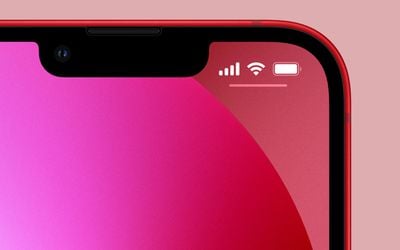
Despite a smaller notch, the iPhone 13 lineup will not show users their battery percentage in the status bar, or at least, not by default, according to the iPhone 13 simulator embedded within Xcode.
iphone 13 notch battery percent
The entire iPhone 13 series features a smaller notch, allowing for more area to display content. While many customers may have hoped that a smaller notch would lead Apple to show the battery percentage in the status bar, that doesn't seem to be the case, at least for now.

As noted on Twitter, the Xcode 13 simulator for the iPhone 13 Pro Max shows the status bar without a battery percentage, despite ample room to shift the signal and Wi-Fi bars to the left. While the simulator in the release candidate of Xcode 13, released after yesterday's event, shows no battery percentage, Apple may offer it as an option within Settings.


Apple is unlikely to place the battery percentage in the status bar with no way for users to turn it off. With older iPhones that feature no notch, Apple includes an option within settings to toggle the percentage on or off, and a similar play could be in-store with the iPhone 13. Although it's worth noting that none of the iPhone 13 or updated iOS 15 marketing images depict that as a possibility.

The iPhone 13 and iPhone 13 Pro will begin shipping to customers on Friday, September 24, but we do expect reviews and hands-on impressions of the devices to be released before that. Those reviews and impressions will give us a definitive answer on whether Apple will finally allow customers to show their battery percentage in the status bar, rather than having to drag down on the right corner of the screen.


Related Forum: iPhone

Popular Stories

iOS 27 on iPhone 17 1

iOS 27 Will Add These New Features to Your iPhone

Saturday May 2, 2026 8:43 am PDT by
Apple is expected to unveil iOS 27 during its WWDC 2026 keynote on June 8, and there are already many rumored features and changes for iPhones. The first developer beta of iOS 27 will likely be available immediately following the keynote, and a public beta typically follows in July. Following beta testing, the software update should be released to all users with a compatible iPhone in...
Apple Event Logo

Apple Just Released a New Accessory

Monday May 4, 2026 8:13 am PDT by
Apple today released a new Pride Edition Sport Loop for the Apple Watch. The band features a rainbow design with 11 colors of woven nylon yarns. The new Pride Edition Sport Loop is available to order now on Apple.com and in the Apple Store app in 40mm, 42mm, and 46mm sizes, and it will be available at Apple Store locations starting later this week. In the U.S., the band costs $49. There...
Apple Announces 2026 Pride Band Watch Face and iPhone Wallpaper Article 2

iOS 26.5 Coming Soon With These New Features

Monday May 4, 2026 8:40 am PDT by
iOS 26.5 is expected to be released next week, following more than a month of beta testing. The update is relatively minor, but there are a couple of new features and changes across the operating system that we have recapped below. iOS 26.5 lays the groundwork for end-to-end encryption for RCS in the Messages app and ads in the Apple Maps app, and it will include a new Pride wallpaper and a...

Top Rated Comments

61 months ago
This was a very underwhelming launch of iOS 15, iPhone 13, iPad OS 15, and Watch 7.
Score: 54 Votes (Like | Disagree)
61 months ago

How exactly do those 10% affect you?
10%
Score: 28 Votes (Like | Disagree)
The_Interloper Avatar
61 months ago
That’s okay, the new Always On Display will show your battery percentage below your clock in the centre of the screen. Oh, wait…. 😜


Score: 28 Votes (Like | Disagree)
Kylo83 Avatar
61 months ago

😂 How lazy can one get. You swipe down to see the control center and there is the battery percentage. Takes like one second.

I don’t even care about seeing battery percentage until it goes into power save mode. Then I just swipe down and look in control center when ever I want. One second is all it takes …
Maybe some people just want it without doing that, no reason we can’t they just don’t want us seeing the number go down so quick
Score: 24 Votes (Like | Disagree)
Pakaku Avatar
61 months ago

😂 How lazy can one get. You swipe down to see the control center and there is the battery percentage. Takes like one second.

I don’t even care about seeing battery percentage until it goes into power save mode. Then I just swipe down and look in control center when ever I want. One second is all it takes …
Good for you if you don't care, but I think many of us would rather not have to stretch our hands to the top of the screen just to look at a battery percentage, especially those of us with Max-size phones
Score: 19 Votes (Like | Disagree)
contacos Avatar
61 months ago
because they got lazy and go by one development fits them all. We will see a weather app on iPad before that. However, maybe they are waiting for M2 and 16 GB of RAM for that. The rain drop animations are very power consuming
Score: 16 Votes (Like | Disagree)