Spotify Developing iOS 14 Widgets in Latest Beta

One of the big new features of iOS 14 is Home Screen widgets, which provide information from apps at a glance. The widgets can be pinned to the ‌Home Screen‌ in various spots and sizes, allowing for many different layouts.
xwlupgldv4s51 2

Image credit: Reddit user AustinMauritz

Many third-party apps have released widgets, and now evidence that Spotify is developing its own official widget has appeared in a TestFlight beta.

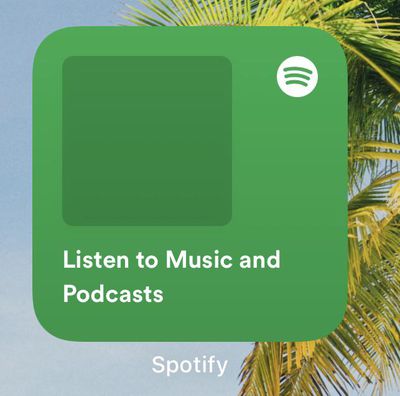
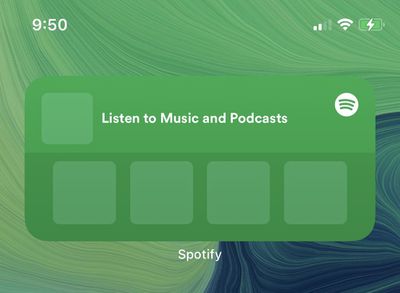
The widget is currently available in small and medium sizes, with the former designed to display the artwork of the last played artist, song, or album, while the latter size shows four of the same content elements.

Unfortunately there are no play, pause, or next song buttons, since Apple only allows widgets to present read-only information, with interactive elements such as scrolling elements or switches not allowed, presumably due to battery life considerations.
spotify widget beta

Image credit: Reddit user Lupolo

Instead, both widgets include the text "Listen to Music and Podcasts," and tapping the widget opens the Spotify app. Based on user reports on Reddit, the Spotify widgets don't yet display album artwork, but the fact that they exist at all proves that Spotify is working on them.

Last month, we reported that Spotify is testing dedicated support for direct audio streaming to Apple Watch without being connected to ‌iPhone‌.

There's no indication that the appearance of the beta feature is tied to a particular version of watchOS or iOS, but hopefully it won't be long before the ability to stream Spotify from the wrist will be available to all subscribers.


Related Forum: iOS 14

Popular Stories

iOS 26

iOS 26.2 Coming Soon With These 8 New Features on Your iPhone

Thursday December 11, 2025 8:49 am PST by
Apple seeded the second iOS 26.2 Release Candidate to developers earlier this week, meaning the update will be released to the general public very soon. Apple confirmed iOS 26.2 would be released in December, but it did not provide a specific date. We expect the update to be released by early next week. iOS 26.2 includes a handful of new features and changes on the iPhone, such as a new...
iOS 26

iOS 26.4 and iOS 27 Features Revealed in New Leak

Friday December 12, 2025 10:56 am PST by
Macworld's Filipe Espósito today revealed a handful of features that Apple is allegedly planning for iOS 26.4, iOS 27, and even iOS 28. The report said the features are referenced within the code for a leaked internal build of iOS 26 that is not meant to be seen by the public. However, it appears that Espósito and/or his sources managed to gain access to it, providing us with a sneak peek...
iOS 26

Apple Releases iOS 26.2 With Alarms for Reminders, Lock Screen Changes, Enhanced Safety Alerts and More

Friday December 12, 2025 10:10 am PST by
Apple today released iOS 26.2, the second major update to the iOS 26 operating system that came out in September, iOS 26.2 comes a little over a month after iOS 26.1 launched. ‌iOS 26‌.2 is compatible with the ‌iPhone‌ 11 series and later, as well as the second-generation ‌iPhone‌ SE. The new software can be downloaded on eligible iPhones over-the-air by going to Settings >...
AirPods Pro Firmware Feature

Apple Releases New Firmware for AirPods Pro 2 and AirPods Pro 3

Thursday December 11, 2025 11:28 am PST by
Apple today released new firmware designed for the AirPods Pro 3 and the prior-generation AirPods Pro 2. The AirPods Pro 3 firmware is 8B30, up from 8B25, while the AirPods Pro 2 firmware is 8B28, up from 8B21. There's no word on what's include in the updated firmware, but the AirPods Pro 2 and AirPods Pro 3 are getting expanded support for Live Translation in the European Union in iOS...
macOS Tahoe 26 Thumb

Apple Releases macOS Tahoe 26.2 With Edge Light

Friday December 12, 2025 10:08 am PST by
Apple today released macOS Tahoe 26.2, the second major update to the macOS Tahoe operating system that came out in September. macOS Tahoe 26.2 comes five weeks after Apple released macOS Tahoe 26.1. Mac users can download the macOS Tahoe update by using the Software Update section of System Settings. macOS Tahoe 26.2 includes Edge Light, a feature that illuminates your face with soft...
AirTag 2 Mock Feature

Apple AirTag 2: Four New Features Found in iOS 26 Code

Thursday December 11, 2025 10:31 am PST by
The AirTag 2 will include a handful of new features that will improve tracking capabilities, according to a new report from Macworld. The site says that it was able to access an internal build of iOS 26, which includes references to multiple unreleased products. Here's what's supposedly coming: An improved pairing process, though no details were provided. AirTag pairing is already...
ipados 26 1 slide over

Apple Releases iPadOS 26.2 With Multitasking Improvements

Friday December 12, 2025 10:09 am PST by
Apple today released iPadOS 26.2, the second major update to the iPadOS 26 operating system released in September. iPadOS 26.2 comes a month after iPadOS 26.1. The new software can be downloaded on eligible iPads over-the-air by going to Settings > General > Software Update. iPadOS 26.2 continues with the multitasking improvements that were added with iPadOS 26.1. You can now drag and...
iphone fold text

'iPhone Fold' Arrival Expected to Cement Book-Style Era for Foldables

Friday December 12, 2025 3:55 am PST by
Foldable smartphone panel shipments are projected to jump 46% year-over-year in 2026, with Apple's entry into the market serving as the main catalyst, according to Counterpoint Research's latest Foldable-Rollable Display Shipment Tracker. "Apple is the key driver as it starts to procure panels for its first foldable iPhone," said Counterpoint's Guillaume Chansin. The research firm expects...

Top Rated Comments

itsmilo Avatar
68 months ago
I am sure those buttons will be allowed by iOS 16 or so. Apple always has to come up with half baked and limited new features at first before opening it up to devs. Seriously, a music widget without play or next buttons is just dumb.

what do I gain from looking at an album artwork on the Home Screen?
Score: 31 Votes (Like | Disagree)

otternonsense Avatar
68 months ago
What's the point of this widget design?! There's minimum info density and barely any calls to action for the user –it's a rounded waste of space. If it was at least as informative and interactive as the Watch app it would make sense. I can't believe it's 2020 and my mom can have THIS interface on her €150 Nokia and my €1300 iPhone is riddled with kindergartener sized squares that do nothing.


Attachment Image
Score: 18 Votes (Like | Disagree)
IsaacM Avatar
68 months ago
What's the purpose without play/pause/skip etc
Score: 15 Votes (Like | Disagree)
otternonsense Avatar
68 months ago

Nothing is stopping you from switching to Android and enjoying this feature as well. There’s a reason you chose iOS over Android.
even if switching was a breeze and there was no issue with my content, libraries, and overall ecosystem lockdown, I can’t fully detach from iOS because cross platform design is part of my job.

Or here’s an idea, maybe I can still comment as a long term user on the obvious weaknesses of a formerly perfectionist UI experience without being asked to ostracize myself by fans and zealots?
Score: 12 Votes (Like | Disagree)
1909 Avatar
68 months ago
I’d prefer much more the off-line listening feature on watch app... big lack so far
Score: 11 Votes (Like | Disagree)
Populus Avatar
68 months ago
I don’t like this new passive widgets, I don’t see their utility to be honest, if I cannot do anything with them
Score: 7 Votes (Like | Disagree)