

Skip to Content

Fantastical Unifies Its Mac, iOS, and Apple Watch Calendar Experience With Weather, Tasks, Meeting Proposals, and More

Flexibits today is launching version 3.0 of its popular Fantastical calendar app, bringing a host of improvements across all platforms including Mac, iPhone, iPad, and Apple Watch. Along with all of the feature updates, Fantastical is transitioning to a premium subscription model that unlocks access across all devices and will provide continued feature additions and improvements on an ongoing basis.

With the new updates to the Fantastical apps, everything has been unified across the various platforms, so users will essentially find feature parity on all of their devices. An all-new design brings a full-screen calendar window, support for native OS features like Today widgets, action and share extensions, and Handoff, and much more.


I've had a chance to try out the new Fantastical, and I've come away impressed with the sleek look, slick management of significant amounts of information, and of course the natural language parsing Fantastical has been known for that lets you easily create events and tasks by simply typing a few words. Among the key additions in Fantastical 3.0:

- AccuWeather integration displays small weather icons in relevant places, bringing forecasts right into your calendar so you can see what the weather is going to be like for your various events, even taking into account event locations.
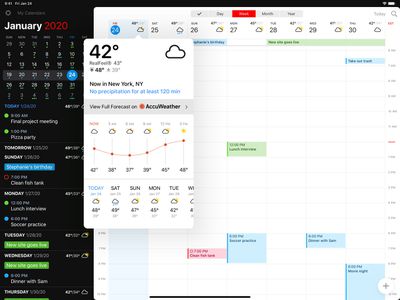
fantastical 3 weather

Fantastical for ‌iPad‌ with AccuWeather MinuteCast forecasts and RealFeel temperatures

- Calendar sets let you quickly manage your various calendars and tasks, allowing you to toggle multiple calendars with a single click and even change displayed calendars based on your location. Interesting Calendars is another new feature powered by SchedJoules that lets you subscribe to calendars for holidays, your favorite sports teams and TV shows, and more. Subscribing to a sports team, for example, will add entries for upcoming games to your calendar, and each game entry will update at its conclusion with box scores and even highlight links to let you easily follow your favorite team.
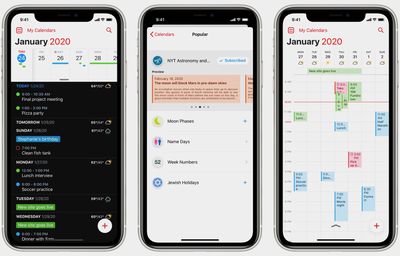
fantastical 3 iphone

Fantastical for ‌iPhone‌ with day ticker view, "interesting calendars", and week view

- Meeting proposals are particularly useful for groups, letting you specify multiple time options in a calendar event invitation and have each invitee choose times that work for them. Once a unanimous time has been selected, the event can be automatically scheduled in on users' calendars, or it can be manually set by the organizer.

- Tasks now have a prominent home alongside calendars in Fantastical, and integration with Todoist, Google Tasks, and iCloud helps keep everything in sync.
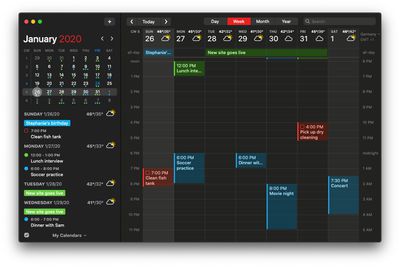
fantastical 3 mac

Fantastical for Mac dark mode

Other features in Fantastical 3 include one-click creation of Zoom or Google Hangout meetings right from events, the ability to attach files and photos to scheduled events, event templates for one-touch creation of frequent events, and custom alert sounds for events.

Fantastical has long been available across Apple's various platforms, but each app has been a standalone purchase, and that's changing with Fantastical 3.0's shift to a subscription model. Subscriptions have long been controversial with users, but Flexibits has made a strong effort to justify the change by unifying everything under a single subscription that unlocks all apps and keeping pricing to a reasonable $4.99 per month or $39.99 per year. With the new subscription model, Flexibits will be able to deploy new features on a more regular basis rather than holding them to bundle for the next major paid update.

For those who don't want to pay for a subscription, there is a new free mode available for Fantastical, but many users will find it limited enough that they'll want to consider a paid subscription, for which there's a 14-day free trial. All users will also need to set up a free Flexibits account if they wish to sync calendars.

Fantastical 2 users who don't wish to convert to a subscription won't find themselves completely out of luck, as they'll be able to download the new apps and maintain access to all of the features and functionality they've had under Fantastical 2 on the platforms where they previously purchased it, plus a few of the new features as well as ongoing bug fixes and technical support.

Fantastical version 3.0 is rolling out now as an updated version of the existing Fantastical 2 ‌iPhone‌ app [App Store], which is now a universal binary supporting ‌iPhone‌, ‌iPad‌, and Apple Watch. (If you're an existing user of Fantastical 2 for ‌iPad‌, you'll need to download the new universal version, as the iPad-only app is being discontinued, but the transition should be seamless.) The updated version of the Mac app can preferably be downloaded directly from Flexibits, but it's also available on the Mac App Store.

Popular Stories

MacBook Neo Feature Pastel 1

First MacBook Neo Benchmarks Are In: Here's How It Compares to the M1 MacBook Air

Thursday March 5, 2026 4:07 pm PST by
Benchmarks for the new MacBook Neo surfaced today, and unsurprisingly, CPU performance is almost identical to the iPhone 16 Pro. The MacBook Neo uses the same 6-core A18 Pro chip that was first introduced in the iPhone 16 Pro, but it has one fewer GPU core. The MacBook Neo earned a single-core score of 3461 and a multi-core score of 8668, along with a Metal score of 31286. Here's how the...

MacBook Neo Feature Pastel 1

Apple Announces $599 'MacBook Neo' With A18 Pro Chip

Wednesday March 4, 2026 6:15 am PST by
Apple today announced the "MacBook Neo," an all-new kind of low-cost Mac featuring the A18 Pro chip for $599. The MacBook Neo is the first Mac to be powered by an iPhone chip; the A18 Pro debuted in 2024's iPhone 16 Pro models. Apple says it is up to 50% faster for everyday tasks than the bestselling PC with the latest shipping Intel Core Ultra 5, up to 3x faster for on-device AI workloads,...
Multicolored Low Cost A18 Pro MacBook Feature

Apple Accidentally Leaks 'MacBook Neo'

Tuesday March 3, 2026 7:00 am PST by
Apple appears to have prematurely revealed the name of its rumored lower-cost MacBook model, which is expected to be announced this Wednesday. A regulatory document for a "MacBook Neo" (Model A3404) has appeared on Apple's website. Unfortunately, there are no further details or images available yet. While the PDF file does not contain the "MacBook Neo" name, it briefly appeared in a link...


Top Rated Comments

80 months ago
Great, another subscription for a mundane limited task app. I mean how many times was 2.0 REALLY updated with features to warrant paying $5 monthly or $40/year for a calendar? It's not like a calendar app can expand much over time to warrant a continuing cost. At least with email, I dont agree with the model, but get it that servers cost $$$ monthly and to have a business model you need to make constant money. But a calendar app? No thanks.

MAYBE if you want it on all device rather than paying the $60 total ($50 mac and $5 per iOS) it makes sense to pay the $40 for 1 year; that is assuming they update again in a year again and it would have cost another $60 in theory the $40 is cheaper.
Score: 40 Votes (Like | Disagree)
johannnn Avatar
80 months ago
A good calendar app can be sold for $9.99. Or even $19.99. I’d pay for that.

But $5 every month for the rest of my life? Let’s say the product life of “version 3” is around three years. That’s $120!

I know many say that $5 isn’t much. Just skip a coffee every month. Well dude, it’s not like a calendar app is the only app I have on my phone. With this new app pricing, I will soon need to get another job just to pay my app bills!

The feature I wanted the most was a month view. But even that was premium only. No thanks.
Score: 39 Votes (Like | Disagree)
zapnyc Avatar
80 months ago
uh....Disney+: $6.99. AppleTV+: $4.99. Calendar app at $4.99. My reaction: Priceless.

No.
Score: 22 Votes (Like | Disagree)
80 months ago

A good calendar app can be sold for $9.99. Or even $19.99. I’d pay for that.

But $5 every month for the rest of my life? Let’s say the product life of “version 3” is around three years. That’s $120!

I know many say that $5 isn’t much. Just skip a coffee every month. Well dude, it’s not like a calendar app is the only app I have on my phone. With this new app pricing, I will soon need to get another job just to pay my app bills!

The feature I wanted the most was a month view. But even that was premium only. No thanks.
Yup, everyone says but its only $x support your devs!! Until you found out you just paid over a $100 bill for an app over those years time.

Everything is subscription now, that forgo a coffee argument no longer works. The stock calendar app is still a pretty decent calendar app for free and does the same basic functions.
Score: 20 Votes (Like | Disagree)
80 months ago
So... what is the subscription pricing for? Are they hosting something? Or providing some sort of ongoing service?
Score: 20 Votes (Like | Disagree)
numbersyx Avatar
80 months ago
Staying with Version 2 until it becomes redundant and then will find another Calendar app. Subscription pricing makes no sense to me for this app.
Score: 19 Votes (Like | Disagree)







































