Anker's Made for iPhone Certified Flash Accessory Now Available for Preorder
Anker in late December debuted a new Made for iPhone (MFi) certified LED flash accessory that's meant to connect to the iPhone 11, 11 Pro, and 11 Pro Max through the Lightning port, and now it's available for preorder ahead of a late January launch.
Anker's iPhone LED Flash is the first Made for iPhone flash accessory that's available for purchase. With Made for iPhone integration, the flash accessory is recognized by Apple's new iPhones and can be triggered using the default Camera app and third-party camera apps.
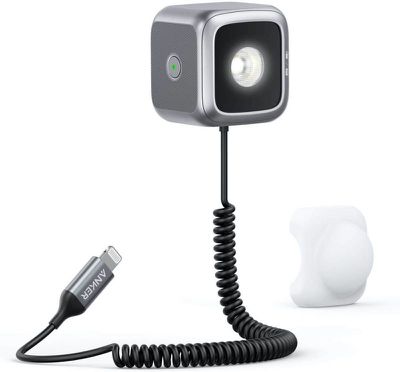
According to Anker, the iPhone LED Flash offers twice the range and four times the brightness of the built-in iPhone flash. It will last for approximately 10,000 shots before needing to be recharged, and it comes with a detachable diffuser.
iPhone flash accessories are not new and there are other options available on the market, but Anker's is the only one that is Apple certified and able to be synced with the iPhone's camera using the Lightning port.
Anker is charging $50 for the iPhone LED Flash, and it can be ordered from Amazon starting today. Orders will ship out on January 25.
Popular Stories
Apple today announced an upcoming product launch that will take place on Tuesday, October 13. We are expecting Apple's announcement to focus on new smart home products, including the long-rumored smart home hub, a new Apple TV 4K, and a refreshed HomePod mini.
Subscribe to the MacRumors YouTube channel for more videos.
The home hub is an all-new device that's like a cross between an iPad and...
Apple will introduce new OLED touchscreen MacBook Pro models and an OLED iPad mini "on or around" Tuesday, October 27, reports Bloomberg. The launch will also include an M6 14-inch MacBook Pro and an M6 iMac.
The October 27 follows Apple's October 13 debut of a new smart home hub, a revamped Apple TV 4K, and a refreshed HomePod mini. Earlier this month, MacRumors reported that Apple would do ...
Apple is planning to introduce new products on Tuesday, October 13, Apple marketing chief Greg Joswiak announced today. It won't be a traditional Apple event, but Apple has invited some members of the media to New York City to get some hands-on time with whatever's introduced.
Subscribe to the MacRumors YouTube channel for more videos.
Those of us not invited to the New York Experience are...





/https://forums.macrumors.com/attachments/887048/)


/https://forums.macrumors.com/attachments/887139/)













































