Everything New in iOS 13 Beta 5: iPad Home Screen Options, New Volume Levels, Updated Share Sheet and More

Apple today released the fifth beta of iOS 13 to developers, bringing new bug fixes and adding and refining various iOS 13 and iPadOS features.

In the fifth beta, changes and updates are getting more minor than changes made in earlier betas, but beta 5 still has some notable additions and feature removals worth highlighting.

- iPad Home Screen - in iPadOS, there's a new feature in the Settings menu that lets you customize the Home screen. You can set the app grid to be 4x5 or 6x5, which results in bigger or smaller icons. The "More" setting shows up to 30 smaller app icons, while the "Bigger" setting shows up to 20 larger app icons.
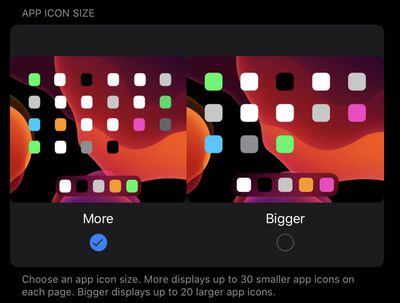
appiconsizeios13b5
- Share Sheet - The Share Sheet in iPadOS and iOS 13 has been updated adding sections for your Favorite shortcuts, the current app that's open, and "Other Actions." Each section is grouped together, making it easier to navigate the various options in the Share Sheet.
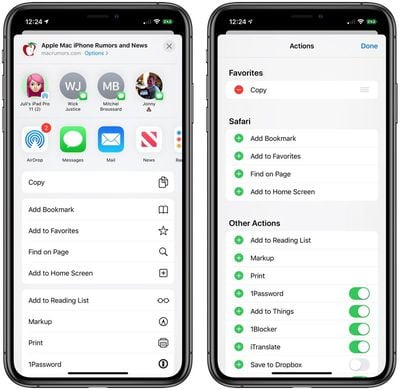
ios13b5sharesheet
- Share Sheet Shortcuts - As noted by MacStories' Federico Vittici, Shortcuts are now able to be added to the Favorites list in the Share Sheet.

- Home App Backgrounds - There are new backgrounds that you can use within the Home app on iOS devices.
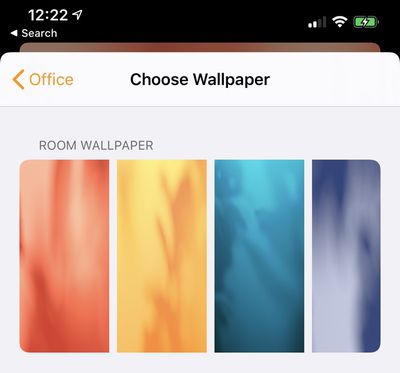
homeappwallpapers
- Shortcuts App - The Automations section has been removed from the Shortcuts app temporarily. It will be re-added in a later beta.
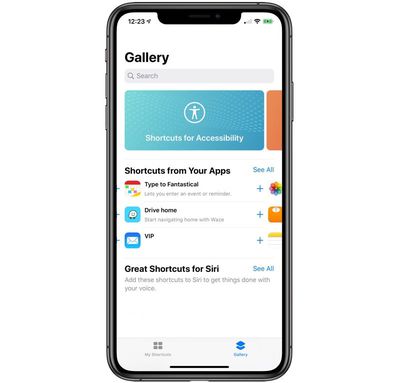
shortcutsapp
- Light/Dark Mode - After installing this beta, Apple will ask you if you want to enable Light Mode or Dark Mode. This is presumably something new users will see when installing iOS 13 for the first time once it launches. There's also a smoother, more streamlined animation when swapping between Light and Dark mode in the Settings app.

- Move Goals - There are new Move Goals awards in the Activity app for hitting your Move Goals 1250, 1500, 1750, and 2000 times.
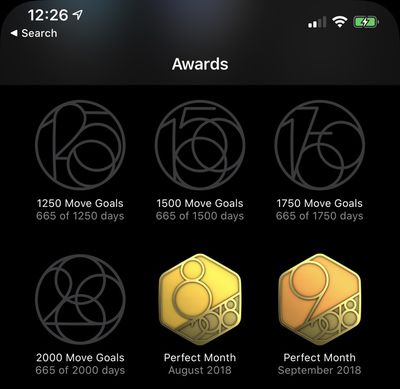
activityappmovegoals
- Open Tab Action - The "Open Tab" popup option when 3D Touching on a link in Safari has returned.
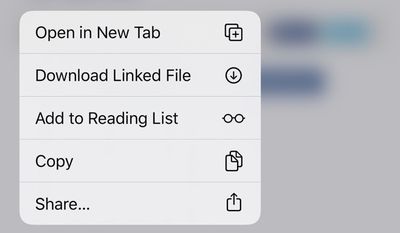
safariopeninnewtabios13b5
- LTE Icon - The LTE/4G/5GE icon on the iPhone is now larger and sized to match the other icons at the top right of the ‌iPhone‌'s display.

ios13b5lteicon
- Volume - You can adjust the volume on the ‌iPhone‌ and the iPad more finely following the beta 5 update. There are 34 levels of volume now, allowing for smaller adjustments to the sound. The volume slider also offers haptic feedback when maximizing or minimizing the volume, and it's skinnier.

Know of a feature that's new in iOS 13 beta 5 that we left out? Make sure to let us know in the comments and we'll update this article. For more on what's new in iOS 13, make sure to check out our iOS 13 roundup.

Related Forum: iOS 13

Popular Stories

AirPods Pro Firmware Feature

Apple Releases New Firmware for AirPods Pro 2, AirPods Pro 3, and AirPods 4

Thursday November 13, 2025 11:35 am PST by
Apple today released new firmware designed for the AirPods Pro 3, the AirPods 4, and the prior-generation AirPods Pro 2. The AirPods Pro 3 firmware is 8B25, while the AirPods Pro 2 and AirPods 4 firmware is 8B21, all up from the prior 8A358 firmware released in October. There's no word on what's include in the updated firmware, but the AirPods Pro 2, AirPods 4 with ANC, and AirPods Pro 3...
iOS 26

iOS 26.2 Available Next Month With These 8 New Features

Tuesday November 11, 2025 9:48 am PST by
Apple released the first iOS 26.2 beta last week. The upcoming update includes a handful of new features and changes on the iPhone, including a new Liquid Glass slider for the Lock Screen's clock, offline lyrics in Apple Music, and more. In a recent press release, Apple confirmed that iOS 26.2 will be released to all users in December, but it did not provide a specific release date....
CarPlay Pinned Messages

iOS 26.2 Adds New CarPlay Setting

Thursday November 13, 2025 6:48 am PST by
iOS 26 extended pinned conversations in the Messages app to CarPlay, for quick access to your most frequent chats. However, some drivers may prefer the classic view with a list of individual conversations only, and Apple now lets users choose. Apple released the second beta of iOS 26.2 this week, and it introduces a new CarPlay setting for turning off pinned conversations in the Messages...
homepod mini thumb feature

New HomePod Mini, Apple TV, and AirTag Were Expected This Year — Where Are They?

Wednesday November 12, 2025 11:42 am PST by
While it was rumored that Apple planned to release new versions of the HomePod mini, Apple TV, and AirTag this year, it is no longer clear if that will still happen. Back in January, Bloomberg's Mark Gurman said Apple planned to release new HomePod mini and Apple TV models "toward the end of the year," while he at one point expected a new AirTag to launch "around the middle of 2025." Yet,...
ios 26 digital id passport wallet

Apple Announces Launch of U.S. Passport Feature in iPhone's Wallet App

Wednesday November 12, 2025 9:15 am PST by
Apple today announced that iPhone users can now create a Digital ID in the Apple Wallet app based on information from their U.S. passport. To create and present a Digital ID based on a U.S. passport, you need: An iPhone 11 or later running iOS 26.1 or later, or an Apple Watch Series 6 or later running watchOS 26.1 or later Face ID or Touch ID and Bluetooth turned on An Apple Account ...
Tesla Charging

Tesla Working to Add Apple CarPlay Support to Vehicles

Thursday November 13, 2025 8:31 am PST by
Tesla is working to add support for Apple CarPlay in its vehicles, Bloomberg's Mark Gurman reports. Tesla vehicles rely on its own infotainment software system, which integrates vehicle functions, navigation, music, web browsing, and more. The automaker has been an outlier in foregoing support for Apple CarPlay, which has otherwise become an industry standard feature, allowing users to...
m1 chip slide

Five Years of Apple Silicon: M1 to M5 Performance Comparison

Monday November 10, 2025 1:08 pm PST by
Today marks the fifth anniversary of the Apple silicon chip that replaced Intel chips in Apple's Mac lineup. The first Apple silicon chip, the M1, was unveiled on November 10, 2020. The M1 debuted in the MacBook Air, Mac mini, and 13-inch MacBook Pro. The M1 chip was impressive when it launched, featuring the "world's fastest CPU core" and industry-leading performance per watt, and it's only ...
tvOS 26 Profiles

tvOS 26.2 Adds a Useful New Feature to Your Apple TV

Friday November 14, 2025 10:02 am PST by
Starting with the upcoming tvOS 26.2 update, currently in beta, additional profiles created on the Apple TV no longer require their own Apple Account. In the Settings app on the Apple TV, under Profiles and Accounts, anyone can create a new profile by simply entering a name and indicating whether the profile is for a kid. The profile will be associated with the primary user's Apple Account,...
iOS 26

Everything New in iOS 26.2 Beta 2

Wednesday November 12, 2025 3:29 pm PST by
Apple today provided developers with the second beta of iOS 26.2, which adds a few new features worth knowing about. Measure App Apple's Measure app now features a Liquid Glass design for the level, with two Liquid Glass bubbles instead of white circles. Games App There's now an option to sort games in the Games app Library by size, in addition to Name and Recent. CarPlay The...
apple intelligence erroneous support list

Apple Intelligence Apparently Too Smart for M1 Macs After Listing Error

Wednesday November 12, 2025 2:49 am PST by
Update: It took a day, but Apple has now corrected its Apple Intelligence device compatibility list to show support for the earliest Apple silicon Macs. The original article follows. Apple's website is causing some confusion among Mac owners, and for good reason – its device compatibility listing for Apple Intelligence appears to have dropped support for M1 Macs. The U.S. version...

Top Rated Comments

JackieTreehorn Avatar
82 months ago
Looks like I picked the wrong week to go back to iOS 12....
Score: 23 Votes (Like | Disagree)

coolfactor Avatar
82 months ago
it is INSANE how many things Apple has finally started to put in the iOS for their stuff after all the cool jailbreak options. Why fight a war you can't win with the jailbreak community when you can just listen to the users and give us what we want?

Sure, there are still other cool tweaks you simply can't get with a walled OS but more and more, they are bending the knee to the true winners of the war. If they just give us what we wish to see, there would be no need to jailbreak, for the most part.
Enjoyed this comment by someone that has NO idea about how software development works, especially when you have a billion-dollar business serving many market segments. It's easy to say that Apple is caving, but that's just how it looks from one vantage point.

It takes time, resources and money to design features that are reliable, easy to understand, don't conflict with existing and future features, etc.

Jailbreaking reduces the stability of a device. That is well known. Apple is not going to throw features in "just because". They are not trying to punish users by withholding features.

It's not a war. It's a process. Big difference.
Score: 19 Votes (Like | Disagree)
I7guy Avatar
82 months ago
It’s getting harder and harder to resist iOS 13.:mad:
Score: 15 Votes (Like | Disagree)
BlueCreek Avatar
82 months ago
Loving the dark mode, when can we see a dark mode macrumours :) and emoji support come to think of it...
Score: 14 Votes (Like | Disagree)
weez999 Avatar
82 months ago
it is INSANE how many things Apple has finally started to put in the iOS for their stuff after all the cool jailbreak options. Why fight a war you can't win with the jailbreak community when you can just listen to the users and give us what we want?

Sure, there are still other cool tweaks you simply can't get with a walled OS but more and more, they are bending the knee to the true winners of the war. If they just give us what we wish to see, there would be no need to jailbreak, for the most part.
Score: 10 Votes (Like | Disagree)
Mactendo Avatar
82 months ago
Finally some real evolution happening on iPad. That layout feature should’ve been added years ago.
Score: 8 Votes (Like | Disagree)