Demand for the Apple TV 4K has surged in the last few weeks as consumers seek ways to stream UHD content going into the holidays, claims a new report by Joshua Fruhlinger, publisher of data-driven site Thinknum.
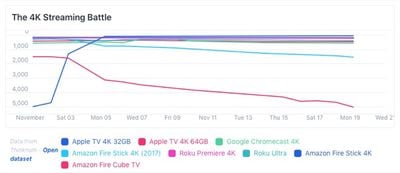
According to Best Buy sales rank data for streaming 4K devices in the month of November, the 32GB model of Apple's streaming set-top box has surpassed cheaper alternatives including the $40 Roku and Google's $70 Chromecast Ultra, placing the $180 Apple TV 4K a close second behind Amazon's market-leading $35 Fire Stick.
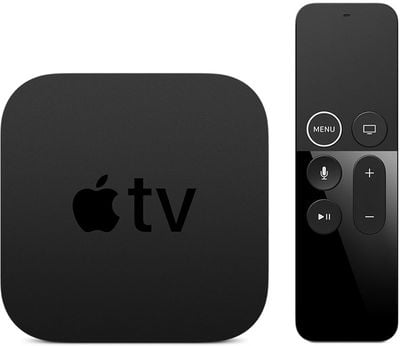
The launch of the fourth-generation Apple TV in 2015, bringing Siri integration and a full App Store, resulted in a big jump in Apple TV sales, but the device still ranked as only the fourth most popular streaming media player in the U.S., coming in behind Roku, Amazon, and Google. Since the launch of the fifth-generation Apple TV 4K last year, however, interest appears to have soared, as Fruhlinger notes:
It wasn't always this way — in fact, the Apple TV 4K has only been on the market for a little over a year. As the graph above shows, when zoomed out, the 4K race is has been a fluctuating affair. But now with the latest device revisions and 4K TV's market penetration, it appears sales are learning in Apple's direction.
Earlier this year, Apple TV Apple brought Dolby Atmos support to Apple TV 4K, and rumors have suggested Apple is planning to roll out a streaming service next year, perhaps as early as March.
On Wednesday, a report claimed Apple is considering creating a lower-cost Apple TV dongle that's similar to the Amazon Fire Stick or the Google Chromecast, a move that would aim to promote its upcoming streaming service and make it more accessible to potential buyers.
Saturday February 7, 2026 9:26 am PST by Joe Rossignol
Apple today shared an ad that shows how the upgraded Center Stage front camera on the latest iPhones improves the process of taking a group selfie.
"Watch how the new front facing camera on iPhone 17 Pro takes group selfies that automatically expand and rotate as more people come into frame," says Apple. While the ad is focused on the iPhone 17 Pro and iPhone 17 Pro Max, the regular iPhone...
Monday February 9, 2026 6:24 am PST by Joe Rossignol
In select U.S. states, residents can add their driver's license or state ID to the Apple Wallet app on the iPhone and Apple Watch, and then use it to display proof of identity or age at select airports and businesses, and in select apps.
The feature is currently available in 13 U.S. states and Puerto Rico, and it is expected to launch in at least seven more in the future.
To set up the...
Tuesday February 10, 2026 4:27 pm PST by Juli Clover
Apple is planning to launch new MacBook Pro models as soon as early March, but if you can, this is one generation you should skip because there's something much better in the works.
We're waiting on 14-inch and 16-inch MacBook Pro models with M5 Pro and M5 Max chips, with few changes other than the processor upgrade. There won't be any tweaks to the design or the display, but later this...
Tuesday February 10, 2026 6:33 am PST by Joe Rossignol
It has been a slow start to 2026 for Apple product launches, with only a new AirTag and a special Apple Watch band released so far. We are still waiting for MacBook Pro models with M5 Pro and M5 Max chips, the iPhone 17e, a lower-cost MacBook with an iPhone chip, long-rumored updates to the Apple TV and HomePod mini, and much more.
Apple is expected to release/update the following products...
New MacBook Pro models with the M5 Pro and M5 Max chips could arrive as soon as Monday, March 2, according to Bloomberg's Mark Gurman.
In today's "Power On" newsletter, Gurman said that the release of new MacBook Pro models is tied to the release of macOS Tahoe 26.3. The launch is said to be slated for as early as the week of March 2. He added that the M4 Pro and M4 Max models on sale today...
The remote is pretty much the only reason I don't want one. I bought a 4th gen and returned it after 2 weeks back when they first launched. I know you can use the old remote which is simple but Apple really needs to re-think the next remote. Still rocking 2x Apple TV 3rd gens, never have any issues!
The remote is pretty much the only reason I don't want one. I bought a 4th gen and returned it after 2 weeks back when they first launched. I know you can use the old remote which is simple but Apple really needs to re-think the next remote.
The remote is so terrible. The touchpad is hard to control and unintuitive. Normal buttons would have been fine.
A 3 year old can figure out how to use a Roku remote or the old Apple TV remote. Adult guests in my house just give up watching tv if they have to use the new Apple TV remote, it’s so terrible.
I have never tried traveling with one. Wonder if you baffled the TSA when they X-rayed the ATV in your luggage, especially, when it was in your carry-on
ATVs are not a problem for the TSA.
Actually, when ever my wife and I travel together, we bring a bunch of "marital aids" with us. I always put them in my wife's bag just in case some thing happens, which I would find it hilarious to watch her explain what they were. But, it has never happened.
I'm sure it looks funny on the X-ray though.
Traveling with an ATV can be a challenge. Mine has never worked right without an internet connection, and depending on the WiFi login method, won’t be possible in some locations since the ATV does not have a web browser. When it works it’s great, but it’s still cumbersome to travel with and set up. I tend to travel with a Lightning to HDMI adapter for that reason, since I can usually plug into the HDMI cable connecting to a TV, and just plug my iPhone directly in. I’d definitely be interested in a smaller more transportable ATV dongle, but I’d be surprised if it didn’t have the same limitations for connecting with WiFi networks that the current model does.
A lot of people don't know this, but you can connect your ATV to most hotels' Wifi, even if they have a browser login. You can also use AirPlay.
I am just copy and pasting a post I did a few days ago on a thread with a person with a similar issue:
I take my Apple TV with me when ever I travel, and I can always connect it to the corporate chains' Wifi.
Every hotel room I have stayed in at least the past 6 years has instructions in the room on how to connect to their Wifi, and they all have a phone number listed on their for help. Call the number, tell the person what you are trying to do. They will ask for your ATV's MAC address, and they enter it in their system. Then just select the network name on the ATV and it will connect.
Now, whether AirPlay will work, I am not sure if it will on every network, but I have used AirPlay in two place after having the Helpdesk connect my ATV, and it worked both times.
Anyways, try it out, it doesn't take long. Every time I have done it, it took longer to read out the MAC address than to get a hold of the Wifi support rep as a person almost always answer the line for me and I don't have to be put on hold.