Share Passwords With AirDrop From iOS 12's New Password Management System - MacRumors
Skip to Content

Share Passwords With AirDrop From iOS 12's New Password Management System

Password managers are a great way to keep your logins secure. Instead of using Post-It Notes or spreadsheets to keep track of your passwords, password managers like 1Password — and Apple's new password management options and API in iOS 12 — allow you to store unique and difficult to crack passwords like (jW2cBCJXXhF in a way that is easily accessible and secure.

But one of the downsides to making your NYTimes password BKtat8uW(aJb is the difficulty in sharing it with someone else. There are lots of reasons you might want to share a password, and Apple has made it much easier in the new iOS 12 Beta. Now, you can share passwords with other people directly from the iOS Password Manager via AirDrop.
passwordsios12
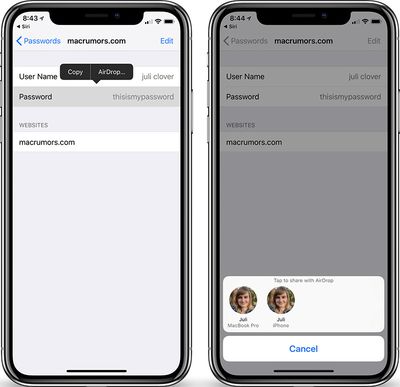
On an iOS 12 device, open the iOS Settings app and go to Website & App Passwords. Then, select a login, tap on the password field and an option to AirDrop the login will appear. The login can be AirDropped to any iOS 12 or macOS Mojave device. Users on both devices are required to authenticate via Touch ID or Face ID (or a regular old password, depending on which Mac you have) before the password can be sent or saved.

The new password management API (and this sharing system) is meant to streamline and simplify the way passwords work on iOS devices. Apple will automatically suggest strong, unique passwords, with iOS 12 offering the tools to create, store, and retrieve passwords no matter where an account is created. The new features work in both third-party apps like 1Password, as well as Safari. All of your passwords will be stored in iCloud Keychain no matter where they are created and they are synced across all of your devices.

For third-party password apps, such as 1Password or LastPass, Apple is adding a new Password Autofill Extension that will let these password management apps to supply autofill passwords in apps and Safari, making it much easier to enter a password stored in an app like 1Password or LastPass.

Also new in iOS 12 is a feature that lets you ask Siri to get your passwords. With a simple command like "Siri, show me my passwords," Siri will open up your iCloud Keychain after you authenticate your identity with a fingerprint, a Face ID scan, or a passcode.

iOS 12 is available now as a developer beta, with public betas expected later this month and a final public release expected in early fall.


Related Forum: iOS 12

Popular Stories

iPhone 18 Pro Deep Red Feature

iPhone 18 Pro Launching Later This Year With These 12 New Features

Wednesday March 18, 2026 7:39 am PDT by
While the iPhone 18 Pro and iPhone 18 Pro Max are not expected to launch for another six months or so, there are already plenty of rumors about the devices. It was initially reported that the iPhone 18 Pro models would have fully under-screen Face ID, with only a front camera visible in the top-left corner of the screen. However, the latest rumors indicate that only one Face ID component...
ios 26 4 yellow

Here Are Apple's Release Notes for iOS 26.4

Wednesday March 18, 2026 11:56 am PDT by
Apple provided developers and public beta testers with the release candidate versions of iOS 26.4 and iPadOS 26.4, which means we're going to see a public launch as soon as next week. The RC versions of the software include Apple's official release notes, giving us final details on what's included in the update. Apple Music - Playlist Playground (beta) generates a playlist from your...
Apple Logo Sketch Feature

Apple Has Now Unveiled Eight New Products This Month

Tuesday March 17, 2026 9:25 am PDT by
Apple has unveiled a whopping eight new products so far this March, including an iPhone 17e, iPad Air models with the M4 chip, MacBook Air models with the M5 chip, MacBook Pro models with M5 Pro and M5 Max chips, the all-new MacBook Neo, an updated Studio Display, a higher-end Studio Display XDR, and now the AirPods Max 2 this week. iPhone 17e features the same overall design as the iPhone...

Top Rated Comments

OldSchoolMacGuy Avatar
102 months ago
Share passwords?!
Is this being serious and credible about security?
You can either read your password out loud, or send it to them this way, in which it's encrypted. With this method, while they gain access, they never actually get the plaintext password. Much more secure than the alternative.

iOS already offers the ability to share wifi password access with someone else remotely. That way you don't need to give them your wifi password but can give them access to it.
Score: 15 Votes (Like | Disagree)
OldSchoolMacGuy Avatar
102 months ago
This thread will be filled with people complaining "What if someone steals your phone, gets into it, and then sends all your passwords to someone‽" Just like someone stealing your iPhone X, pointing it at your face, and unlocking it as they run away, it'll never happen but MacRumors members will worry about it and see it as a huge issue.
Score: 11 Votes (Like | Disagree)
102 months ago
unique and difficult to crack passwords like (jW2cBCJXXhF in a way that is easily accessible and secure.

But one of the downsides to making your NYTimes password BKtat8uW(aJb is the difficulty in sharing it with someone else.
Alright, since nobody else has, I'll just drop this here. There's no real reason to make your password "BKtat8uW(aJb" unless you're already using a password manager and will never have to type it — or you just hate yourself.

If you're wanting or needing to remember passwords or relate them to other humans, you can make memorable ones that are just fine (source ('https://xkcd.com/936/')):


Attachment Image
Score: 5 Votes (Like | Disagree)
69650 Avatar
102 months ago
Why can’t we login to apps and websites using Touch/Face ID rather than having to use a password?
Score: 5 Votes (Like | Disagree)
iapplelove Avatar
102 months ago
Why can’t we login to apps and websites using Touch/Face ID rather than having to use a password?
Never understood why we have to put in passwords so many times especially in iTunes when we have face or touch id
Score: 4 Votes (Like | Disagree)
102 months ago
I'd love for you to enlighten us as to why the Keychain is so secure.
No, I'd love for YOU to enlight us about why you think it's NOT safe. It's been a cornerstone of Mac security, protected by AES-256, and also part of iPhone security. And yes, there have been the occasional trojans out there that have masqueraded as other things, and tried to fool people into logging into keychain to steal passwords.

But as a technology, no, I haven't heard a thing about it being an insecure platform.
Score: 3 Votes (Like | Disagree)