

iOS 12 Makes Your iPhone More Secure With Easier Password Creation and Storage - MacRumors
Skip to Content

iOS 12 Makes Your iPhone More Secure With Easier Password Creation and Storage

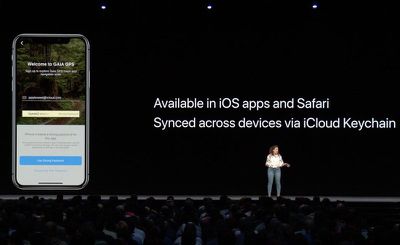
The new iOS 12 update includes several new password related features that are designed to make it easier for iPhone, iPad, and Mac users to create strong, secure, and unique passwords for each and every login. All of the features were outlined yesterday by Apple in the Platform State of the Union address for developers.

Apple is implementing new tools for creating, storing, and autofilling passwords to streamline and simplify the way passwords work on iOS devices.
applesecurepasswords
Apple will automatically suggest strong, unique passwords, with iOS 12 offering the tools to create, store, and retrieve passwords no matter where an account is created, with these new features working in both third-party apps and Safari alike. Many developers won't need to make changes to their apps to support these features, which means we should see widespread availability.

You will no longer open up an app and encounter an experience where you need to make up a password on the spot (which often leads to weak passwords) or exit an app to generate a secure password. Apple will now offer these tools right within apps.

All of your passwords will be stored in iCloud Keychain no matter where they are created and they are synced across all of your devices.

Also new in iOS 12 is a feature that lets you ask Siri to get your passwords. With a simple command like "Siri, show me my passwords," Siri will open up your iCloud Keychain after you authenticate your identity with a fingerprint, a Face ID scan, or a passcode.

Apple also plans to let users know when a password is weak or has been reused by flagging inadequate passwords. With flagged passwords, you'll be taken right to the website the password is for so you can update it with something more secure.

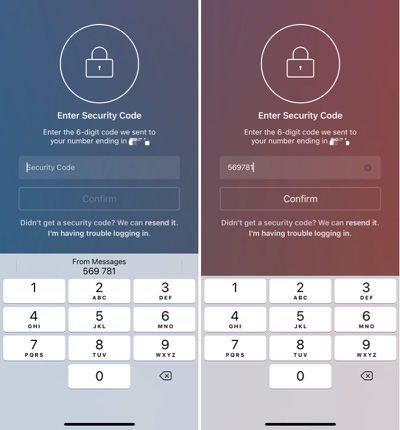
To streamline two-factor authentication functionality, a new security code autofill feature is being implemented. Incoming SMS security codes will appear in the Quick Tap bar of the keyboard when you need two-factor authentication to complete a login. The security code will show up as soon as it's texted to you so you can enter it with a tap. This unfortunately does not work for third-party two-factor authentication apps like Authy.
twofactorautofill
For third-party password apps, such as 1Password or LastPass, Apple is adding a new Password Autofill Extension that will let these password management apps to supply autofill passwords in apps and Safari, making it much easier to enter a password stored in an app like 1Password or LastPass. 1Password showed off this feature in a video shared yesterday and announced plans to support it. These passwords will be accessible from the QuickType bar in apps and in Safari.


You're also going to be able to share and receive passwords from nearby iOS devices, from an iOS device to a Mac, and from an iOS device to an Apple TV, cutting down on the number of times that you need to use a password.

All of these new password features will work across iOS devices, Macs, and the Apple TV to make it easier than ever to keep your products secure through strong passwords and two-factor authentication.


Related Forum: iOS 12

Popular Stories

Apple Acquires Award Winning App Play Feature

Apple Acquires Award-Winning App 'Play'

Monday June 29, 2026 7:39 am PDT by
In February, Apple notified the European Commission that it would be acquiring certain assets from and have the right to hire certain employees from Rabbit 3 Times, the company behind the award-winning app design tool Play. The notification was published on the European Commission's website this week, following a four-month waiting period. Play was a Mac and iPhone app that allowed designers ...
American Express Gold Apple Pay Feature

American Express Announces New Apple Pay Feature

Tuesday June 30, 2026 10:27 am PDT by
American Express today announced that you can now redeem Membership Rewards points when checking out with Apple Pay on the web and in apps on the iPhone and iPad. When checking out with Apple Pay on iOS 18 or iPadOS 18 or later, tap on your eligible American Express card (Platinum, Gold, Green, and others) and select the Membership Rewards points option. You can use points to cover all or...

iPhone 18 Pro Deep Red Feature

Apple 'Concerned' Over iPhone 18 Pro Data Leak From Supplier Tata

Monday June 29, 2026 11:46 am PDT by
Apple is "concerned" about a recent data leak from Tata Electronics, one of its manufacturing partners in India, reports Reuters. Tata Electronics was the target of a cyberattack, with confidential Apple documents stolen and shared on the dark web. Hackers were able to steal information about the iPhone 18 Pro and iPhone 18 Pro Max, including a list of suppliers, parts, and images of the...

Top Rated Comments

105 months ago
So do I need 1Password any more?
Score: 10 Votes (Like | Disagree)
69650 Avatar
105 months ago
I don’t want more password management options. I want to replace all my passwords with Touch ID and/or Face ID.
Score: 6 Votes (Like | Disagree)
105 months ago
This sounds nice. With 1Password removing support for perpetual licenses from the App Store (MAS for now but I won't be surprised if they continue that trend) this will make it easier for me to not give them more of my money.

Bad move Agilebits.
I would've been happy to pay a one time $35 fee for 1password but not $35 on annual basis. I'm already subscribed to way too many subscription services. Unless something is providing serious utility (Adobe CC, Netflix, Hulu, iCloud) I'd rather go without it.
Score: 5 Votes (Like | Disagree)
thisisnotmyname Avatar
105 months ago
This sounds nice. With 1Password removing support for perpetual licenses from the App Store (MAS for now but I won't be surprised if they continue that trend) this will make it easier for me to not give them more of my money.

Bad move Agilebits.
Score: 5 Votes (Like | Disagree)
nwcs Avatar
105 months ago
I really like the keyboard addition of the incoming text code. That’s very nice. I just want the ability to have that generated password to be stored in 1Password and not solely in iCloud Keychain.
[doublepost=1528222974][/doublepost]
So do I need 1Password any more?
If you use 1Password to store non-password info, need to use the travel mode, use a shared password library with your family, or want the new stronger checks of passwords then no. Otherwise iCloud Keychain is a really good option.

Score: 4 Votes (Like | Disagree)
105 months ago
I would've been happy to pay a one time $35 fee for 1password but not $35 on annual basis. I'm already subscribed to way too many subscription services. Unless something is providing serious utility (Adobe CC, Netflix, Hulu, iCloud) I'd rather go without it.

Subscriptions make my blood boil. Really poor form @1Password @Agilebits :-(
Score: 3 Votes (Like | Disagree)





































