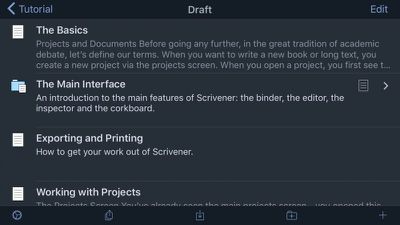
Popular writing suite Scrivener received its first major update for iOS today. Version 1.1 includes a number of enhancements under the hood, but the most obvious requested feature is a new Dark Mode.

The new Dark Mode can be enabled from within an open project by tapping the gear icon in the footer of the sidebar. This opens Project Settings, where users will see a toggle option for the new theme. All elements of Scrivener will switch to the Dark Mode, which should be useful for writers who often work in low light environments.
Scrivener
Elsewhere in version 1.1, the custom icons set now allows users to select emojis as document icons. To access the emojis, bring up the inspector icon for any binder document and press on the icon option. Along with the list of existing markers to choose from, users will notice a custom field where they can type any letter (or combination to associate a character point-of-view), or an emoji into that field.

In addition to bug fixes, the Scrivener team has updated the API used by Dropbox. Dropbox is moving to a new API at the end of June 2017, so the underlying sync code has been revised to make it ready for the transition.

Scrivener for iOS costs $19.99 and is available to download for iPhone and iPad on the App Store. [Direct Link]


Top Rated Comments

litnlat_kb Avatar
111 months ago
And what about adding iCloud Drive support?

It's a bit ridiculous they're still holding back on this, given their reasoning behind it now seems nullified.
Hello,

Why do you think the reason behind it has been nullified? I'd love to provide iCloud support (I'm the developer), but unfortunately iCloud just isn't compatible with Scrivener's file format (or Scrivener isn't compatible with iCloud if you prefer to put it that way). The problem is that Scrivener is a bit of a hybrid between a shoebox and a document-based app. So, each project is really a folder full of files. iCloud supports that to an extent, but not in the way Scrivener requires. When you open a project in Scrivener, not all of the project is loaded into memory - only the bits of the project (the documents in it) that you open at any one time. It works like this so that the memory footprint is low even for enormous projects and so that you can import massive amounts of research.

And that's the problem. Because a project is never fully open in memory, but only the parts currently in use, you could end up with a horribly corrupted project if parts of it synced in the background while other parts were open. Projects would become unusable. For instance, suppose Scrivener started to sync automatically but then lost its internet connection; it would have to tell you that you couldn't use the project until you found an internet connection and it was able to continue syncing. So it needs complete control over sync (thus an "archaic" manual sync), and iCloud doesn't allow for this. Of course, if you are only working on one device at a time and you have a constant internet connection on all devices, the potential for such problems is low. But I have to consider situations where a project has been edited on several devices with intermittent internet connections and the chaos that could cause if I had no control over which files in the project were uploaded or downloaded and when.

I have spoken to Apple about this, using their developer tech support system to look for some solution to implementing iCloud, but their suggestion was that Scrivener would need to download separate copies of your files to a separate, temporary container (doubling the space required for each project) and to move them into place when safe (still using a manual sync). So it would offer no benefits over Dropbox sync and would (temporarily) take up twice as much space.

(I know you mention iCloud Drive support rather than iCloud per se, but all of what I say here applies on the iOS end of things.)

iCloud is wonderful, but it works best with "flat" file formats, with individual files, or with package-based file formats that are opened in memory all in one go, and as yet there is, unfortunately, no magic solution for getting iCloud to work with Scrivener. I understand that Scrivener is unusual in this regard, and that some users find this an annoying limitation, but I'd pretty much have to rip out Scrivener's core features to implement iCloud support the way things stand. And I'd rather users complain about a lack of iCloud support than about losing data. :) That said, I am always watching developments in iCloud and would genuinely love to find a solution in the future.

All the best,
Keith

P.S. Many thanks to Tim for mentioning our 1.1 update on MacRumors!

P.P.S. If there's an experienced iCloud developer reading this who thinks I am speaking nonsense, please get in touch! :)
Score: 14 Votes (Like | Disagree)
T'hain Esh Kelch Avatar
111 months ago
Your open approach to your customers and very friendly attitude, is highly respected Keith.

Looking forward to the release of Scrivener 3 for macOS. Will be buying it on release day.
Score: 3 Votes (Like | Disagree)
Digital Skunk Avatar
111 months ago
Many thanks for the kind words all! I appreciate it.
Keith
No, thank you. It's developers such as yourself who make machines like the iPad Pro worth it. I've tried the Scrivener variants, and they are competent, functional, well-priced apps but I live in Scrivener on the Mac, and my experience changes little when I open a project on the iPad.

There are times I prefer to travel with the iPad and use it to write over my MBP.

Scrivener and Final Draft are 90% of what I do, and on the iPad, I'm soaring.
Score: 1 Votes (Like | Disagree)
litnlat_kb Avatar
110 months ago
After hearing what's going on with 1Password, and what's already happened to YNAB, Daylite, Adobe, Avid, and others, please please PLEASE don't go the subscription route.

I'd rather pay $45 for every significant update. Better yet, just raise the price.
We have no plans to go the subscription route, don't worry! The 3.0 macOS update will work the same as the 2.0 update, with a discounted update fee for existing users (although that might not be possible on the Mac App Store, which doesn't offer upgrade routes, unfortunately).
Score: 1 Votes (Like | Disagree)
LCPepper Avatar
111 months ago
And what about adding iCloud Drive support?

It's a bit ridiculous they're still holding back on this, given their reasoning behind it now seems nullified.
Score: 1 Votes (Like | Disagree)

Popular Stories

iOS 26

iOS 26.2 Coming Soon With These 8 New Features on Your iPhone

Thursday December 11, 2025 8:49 am PST by
Apple seeded the second iOS 26.2 Release Candidate to developers earlier this week, meaning the update will be released to the general public very soon. Apple confirmed iOS 26.2 would be released in December, but it did not provide a specific date. We expect the update to be released by early next week. iOS 26.2 includes a handful of new features and changes on the iPhone, such as a new...
AirPods Pro Firmware Feature

Apple Releases New Firmware for AirPods Pro 2 and AirPods Pro 3

Thursday December 11, 2025 11:28 am PST by
Apple today released new firmware designed for the AirPods Pro 3 and the prior-generation AirPods Pro 2. The AirPods Pro 3 firmware is 8B30, up from 8B25, while the AirPods Pro 2 firmware is 8B28, up from 8B21. There's no word on what's include in the updated firmware, but the AirPods Pro 2 and AirPods Pro 3 are getting expanded support for Live Translation in the European Union in iOS...
Google maps feaure

Google Maps Quietly Added This Long-Overdue Feature for Drivers

Wednesday December 10, 2025 2:52 am PST by
Google Maps on iOS quietly gained a new feature recently that automatically recognizes where you've parked your vehicle and saves the location for you. Announced on LinkedIn by Rio Akasaka, Google Maps' senior product manager, the new feature auto-detects your parked location even if you don't use the parking pin function, saves it for up to 48 hours, and then automatically removes it once...
iOS 26

iOS 26.4 and iOS 27 Features Revealed in New Leak

Friday December 12, 2025 10:56 am PST by
Macworld's Filipe Espósito today revealed a handful of features that Apple is allegedly planning for iOS 26.4, iOS 27, and even iOS 28. The report said the features are referenced within the code for a leaked internal build of iOS 26 that is not meant to be seen by the public. However, it appears that Espósito and/or his sources managed to gain access to it, providing us with a sneak peek...
Foldable iPhone 2023 Feature 1

Apple to Make More Foldable iPhones Than Expected [Updated]

Tuesday December 9, 2025 9:59 am PST by
Apple has ordered 22 million OLED panels from Samsung Display for the first foldable iPhone, signaling a significantly larger production target than the display industry had previously anticipated, ET News reports. In the now-seemingly deleted report, ET News claimed that Samsung plans to mass-produce 11 million inward-folding OLED displays for Apple next year, as well as 11 million...
iOS 26

Apple Releases iOS 26.2 With Alarms for Reminders, Lock Screen Changes, Enhanced Safety Alerts and More

Friday December 12, 2025 10:10 am PST by
Apple today released iOS 26.2, the second major update to the iOS 26 operating system that came out in September, iOS 26.2 comes a little over a month after iOS 26.1 launched. ‌iOS 26‌.2 is compatible with the ‌iPhone‌ 11 series and later, as well as the second-generation ‌iPhone‌ SE. The new software can be downloaded on eligible iPhones over-the-air by going to Settings >...
AirTag 2 Mock Feature

Apple AirTag 2: Four New Features Found in iOS 26 Code

Thursday December 11, 2025 10:31 am PST by
The AirTag 2 will include a handful of new features that will improve tracking capabilities, according to a new report from Macworld. The site says that it was able to access an internal build of iOS 26, which includes references to multiple unreleased products. Here's what's supposedly coming: An improved pairing process, though no details were provided. AirTag pairing is already...
iOS 26

15 New Things Your iPhone Can Do in iOS 26.2

Friday December 5, 2025 9:40 am PST by
Apple is about to release iOS 26.2, the second major point update for iPhones since iOS 26 was rolled out in September, and there are at least 15 notable changes and improvements worth checking out. We've rounded them up below. Apple is expected to roll out iOS 26.2 to compatible devices sometime between December 8 and December 16. When the update drops, you can check Apple's servers for the ...
maxresdefault

iOS 26 Code Leak Reveals Apple Smart Home Hub Details

Thursday December 11, 2025 4:02 pm PST by
Apple is working on a smart home hub that will rely heavily on the more capable version of Siri that's coming next year. We've heard quite a bit about the hub over the last two years, but a recent iOS 26 code leak provides additional insight into what we can expect and confirms rumored features. Subscribe to the MacRumors YouTube channel for more videos. Macworld claims to have access to an ...