

Skip to Content

Apple Migrating iOS 11 and macOS High Sierra Users With Two-Step Verification to Two-Factor Authentication

by

Apple recently emailed Apple ID users with two-step verification enabled to inform them that, upon installing iOS 11 or macOS High Sierra, they will be automatically updated to its newer two-factor authentication method.
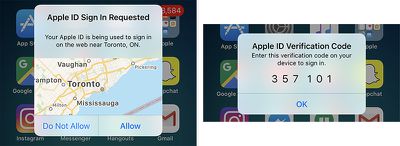
ios 11 two factor authentication
Apple introduced two-factor authentication in 2015 as an improved version of its two-step verification method for securing an Apple ID account with both a password and a secondary form of verification. Two-factor authentication requires an Apple device with iOS 9, OS X El Capitan, watchOS 2, any tvOS version, or later.

The two security methods are similar in many ways, but two-factor authentication automatically sends a six-digit verification code to all trusted devices registered to a given Apple ID, whereas two-step verification manually prompts users to send a four-digit code to any SMS-capable trusted device registered.

Two-factor authentication also displays a map on all trusted devices with an approximate location of where an Apple ID sign-in attempt occurred when a user is trying to access the account from an unknown device or on the web.
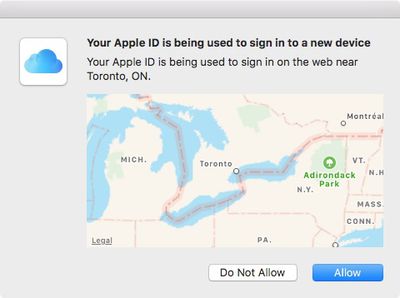
macos sign in 2fa
Apple's two-factor authentication method disables the Recovery Key by default, since offline verification codes can be generated on trusted devices in the Settings app. On iOS, users can still enable the Recovery Key as a backup method in Settings > Apple ID > Password & Security > Recovery Key.

The full text of the email is copied below:

If you install the iOS 11 or macOS High Sierra public betas this summer and meet the basic requirements, your Apple ID will be automatically updated to use two-factor authentication. This is our most advanced, easy-to-use account security, and it's required to use some of the latest features of iOS, macOS, and iCloud.

Once updated, you'll get the same extra layer of security you enjoy with two-step verification today, but with an even better user experience. Verification codes will be displayed on your trusted devices automatically whenever you sign in, and you will no longer need to keep a printed recovery key to make sure you can reset a forgotten password.

iOS 11 and macOS High Sierra public betas will be available in late June through the Apple Beta Software Program. The software updates will be available for all eligible iOS devices and Macs in the fall.


Related Forums: iOS 11, macOS High Sierra

Top Rated Comments

LordQ Avatar
114 months ago
So... does that mean that those of us who use our Apple IDs with devices that remain on older OS versions will no longer be able to authenticate on those older devices if we upgrade any of the others?
I have an iPad 1 and an Apple TV 3, In order to authenticate Apple will send you the 4-digit access code, you will then need to type your usual password followed by the 4 numbers. Easy (:
Score: 4 Votes (Like | Disagree)
Joe Rossignol Avatar
114 months ago
I got that email last week and it was not at all clear what they were saying or what the difference is between the two methods. Very un-Apple.

This article makes it clear. I hope it's based on an updated form of the mail.
They only sent the one email. I received it too, and did some research into it. Glad it helps!
Score: 4 Votes (Like | Disagree)
69650 Avatar
114 months ago
The location aspect is not very accurate. Everytime I login Apple thinks I'm London when I'm actually 200 miles away from London. Maybe it's the only UK city they know.
Score: 3 Votes (Like | Disagree)
Amazing Iceman Avatar
114 months ago
So... does that mean that those of us who use our Apple IDs with devices that remain on older OS versions will no longer be able to authenticate on those older devices if we upgrade any of the others?
There's a workaround for older devices. The instructions to authenticate are slightly different. Just pay attention at the prompt and make sure to understand it and then follow the instructions.
Score: 3 Votes (Like | Disagree)
114 months ago
I got that email last week and it was not at all clear what they were saying or what the difference is between the two methods. Very un-Apple.

This article makes it clear. I hope it's based on an updated form of the mail.
Score: 3 Votes (Like | Disagree)
114 months ago
I applaud Apple for implementing two-factor auth, but I wish they would use TOTP ('https://en.wikipedia.org/wiki/Time-based_One-time_Password_Algorithm') like all my other accounts (Microsoft, Google, Dropbox, and my employer). One program (Authy is my chosen app) rules them all.

Score: 2 Votes (Like | Disagree)

Popular Stories

Multicolored Low Cost A18 Pro MacBook Feature

Apple Accidentally Leaks 'MacBook Neo'

Tuesday March 3, 2026 7:00 am PST by
Apple appears to have prematurely revealed the name of its rumored lower-cost MacBook model, which is expected to be announced this Wednesday. A regulatory document for a "MacBook Neo" (Model A3404) has appeared on Apple's website. Unfortunately, there are no further details or images available yet. While the PDF file does not contain the "MacBook Neo" name, it briefly appeared in a link...

imac video apple feature

Apple Unveils Two New Products

Monday March 2, 2026 7:49 am PST by
Apple today introduced two new devices, including the iPhone 17e and an updated iPad Air. iPhone 17e features the same overall design as the iPhone 16e, but it gains Apple's A19 chip, MagSafe for magnetic wireless charging and magnetic accessories, Apple's second-generation C1X modem for faster 5G, and a doubled 256GB of base storage. In the U.S., the iPhone 17e starts at $599, just like the ...
MacBook Neo Feature Pastel 1

Apple Announces $599 'MacBook Neo' With A18 Pro Chip

Wednesday March 4, 2026 6:15 am PST by
Apple today announced the "MacBook Neo," an all-new kind of low-cost Mac featuring the A18 Pro chip for $599. The MacBook Neo is the first Mac to be powered by an iPhone chip; the A18 Pro debuted in 2024's iPhone 16 Pro models. Apple says it is up to 50% faster for everyday tasks than the bestselling PC with the latest shipping Intel Core Ultra 5, up to 3x faster for on-device AI workloads,...





































