Skip to Content

Images of New MacBook Pro With Magic Toolbar Leaked in macOS Sierra 10.12.1

macOS Sierra 10.12.1, released yesterday, includes hidden Apple Pay images that depict the brand new MacBook Pro with an OLED touch panel that's set to be announced by Apple on Thursday, October 27.

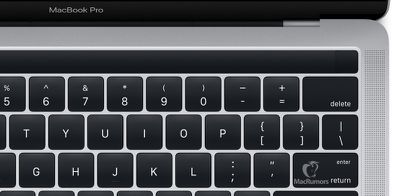
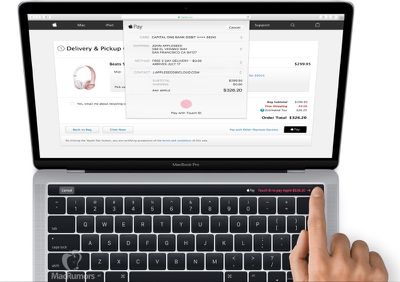
In addition to confirming that such a product is in the works, the images give us our first full look at the redesigned MacBook Pro ahead of its launch. An OLED touch panel is located on top of the keyboard, where the function keys would normally be placed, and it very clearly supports Touch ID, as it is seen used with Apple Pay.
macbook_pro_magic_mr
As has been rumored, the touch panel, which may be called the "Magic Toolbar," appears to be contextual, changing based on what's on the screen. In the images, Apple Pay dialog is depicted, asking a customer to confirm a purchase with a finger on the panel. It appears Touch ID is built into a nearly-invisible power button located next to the display.
macbook_pro_touch_id-mr
Aside from the OLED touch panel, the new MacBook Pro looks similar in design to the existing models. It looks like the 13-inch MacBook Pro is used in the images, suggesting the machine will gain speakers located at the side of the keyboard.

Thickness can't be determined from the orientation of the MacBook Pro in the images, but rumors suggest the new machine is thinner and lighter weight than existing models. A redesigned hinge can be seen in the images, suggesting it is indeed quite a bit thinner. Also visible are much flatter keys, similar in design to the keys of the Retina MacBook, which use a new butterfly mechanism.

Ports are not visible, but based on past part leaks, we're expecting four USB-C ports and a headphone jack, with the HDMI port, MagSafe port, and SD card slot being eliminated.

Apple will announce the new MacBook Pro on Thursday, October 27 at 10:00 a.m. A new MacBook Air model is also expected, and new iMacs are a possibility. MacRumors will provide live coverage of the event both on MacRumors.com and on the MacRumorsLive Twitter account.

(Thanks, Richard!)

Related Roundup: MacBook Pro
Buyer's Guide: MacBook Pro (Buy Now)
Related Forum: MacBook Pro

Popular Stories

Apple Event Logo

Apple Released Seven New Products Today

Wednesday March 11, 2026 7:05 am PDT by
Starting today, the seven new Apple products that were announced last week are available at Apple Stores and beginning to arrive to customers. The colorful MacBook Neo and all of the other new products are on display at most Apple Store locations around the world starting today. Apple Stores have inventory of the new products for both walk-in customers and Apple Store pickup, but...
ios 26 4 yellow

Everything New in iOS 26.4 Beta 4

Monday March 9, 2026 3:50 pm PDT by
Apple is continuing to test the iOS 26.4 beta, and the latest update is now available for developers and public beta testers. As testing goes on, there are fewer new features in each beta, but today’s release adds new emoji characters and a few other changes. New Emoji Apple added new emoji characters, including trombone, treasure chest, distorted face, hairy creature, fight cloud, orca,...
Apple MacBook Pro M4 hero

Apple Planning 'MacBook Ultra' With Touchscreen and Higher Price

Sunday March 8, 2026 8:05 am PDT by
Apple is planning to launch an all-new "MacBook Ultra" model this year, featuring an OLED display, touchscreen, and a higher price point, Bloomberg's Mark Gurman reports. Gurman revealed the information in his latest "Power On" newsletter. While Apple has been widely expected to launch new M6-series MacBook Pro models with OLED displays, touchscreen functionality, and a new, thinner design...

Top Rated Comments

TMRJIJ Avatar
122 months ago
Here's my card, Apple.

Score: 82 Votes (Like | Disagree)
Corrode Avatar
122 months ago
Wow. Don't have to go looking for hardware leaks in a pub anymore. Just look through Apple's own software.
Score: 61 Votes (Like | Disagree)
122 months ago
That is slick looking
Score: 48 Votes (Like | Disagree)
122 months ago
RIP my lovely esc button
Score: 41 Votes (Like | Disagree)
joshen Avatar
122 months ago
So how do you change the brightness while doing an Apple Pay payment? :(
You wait one second until the payment is complete.
Score: 38 Votes (Like | Disagree)
jfrancis04 Avatar
122 months ago
Yeah, that's definitely the rMB butterfly keyboard.

*sigh*
Score: 37 Votes (Like | Disagree)