

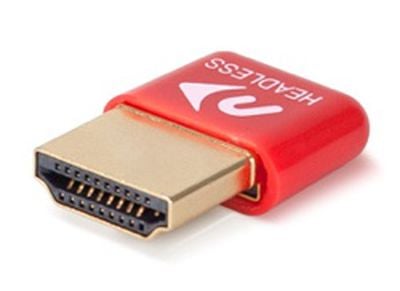
 NewerTech today announced the launch of its HDMI Headless Video Accelerator, an adapter that's designed to plug into the Mac mini's HDMI display port to fool it into thinking there's a display attached. With the adapter plugged in, the Mac mini's GPU is activated and video drivers are loaded, resulting in smoother performance.
When the Mac mini is used without a monitor, its GPU isn't used. As a result, the interface lags, resulting in choppy screens and slow video, animation, cursor movements, menu navigation, and typing. Plugging the NewerTech HDMI Headless Video Accelerator into the HDMI port of the Mac mini solves this problem, engaging the GPU so your remote interface works exactly how you'd expect.
Apple's small and portable Mac mini is often used sans display as a storage device or a media server, but without a display, the Mac mini does not take advantage of its GPU. Without an active GPU, certain tasks performed on the Mac mini can be choppy and laggy, such as visiting websites, as described in a Macminicolo blog post on the subject.
This kind of adaptation has been used by Macminicolo on video intensive servers for several years, but as the site says, even simple web browsing benefits from having active video drivers. Macminicolo even recommends a similar dummy dongle product directly on its site.
The NewerTech HDMI Headless Video Accelerator is designed to work with the following Mac mini models: Mac mini Mid 2010 (Macmini4,1), Mac mini Mid 2011 (Macmini5,1 / Macmini5,2 / Macmini5,3), Mac mini Late 2012 (Macmini6,1 / Macmini6,2), Mac mini Late 2014 (Macmini7,1). It works with OS X 10.6.8 and later.
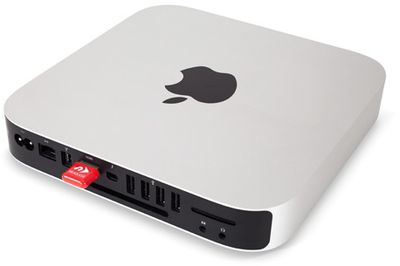
Mac mini owners interested in purchasing the NewerTech HDMI Headless Video Accelerator can do so from third-party retailers like OWC. The adapter is priced at $19.50.
















Top Rated Comments
http://blog.macminicolo.net/post/33839671756/build-a-dummy-dongle-for-a-headless-mac-mini
A must for VNC access on a headless Mac mini.
Since we did a lot of work with IBM big iron it seemed everything had a four word acronym so the MAVT was born. I even created a document with fancy diagrams to send to our customers.
Edit: ah remote desktop / vnc
If you connect remotely to the computer, it'll have a GUI still, it's just sent through the network instead of the display port/HDMI/etc...
If you rent hosting with a company, you'll get access to a computer, which a server only is as well, and usually you'll get command line access and access through an admin panel (a bunch of webpages), but if you get a VPS (virtual private server) for example, you get full access, including being able to install an OS of your choice, etc... In any case, that's when you'll often connect to the server using RDP or VNC, which will send the graphical interface to you.
Glassed Silver:mac