CES 2015: 'Schlage Sense' Smart Lock Allows Siri Voice Commands to Unlock Doors - MacRumors
Skip to Content

CES 2015: 'Schlage Sense' Smart Lock Allows Siri Voice Commands to Unlock Doors

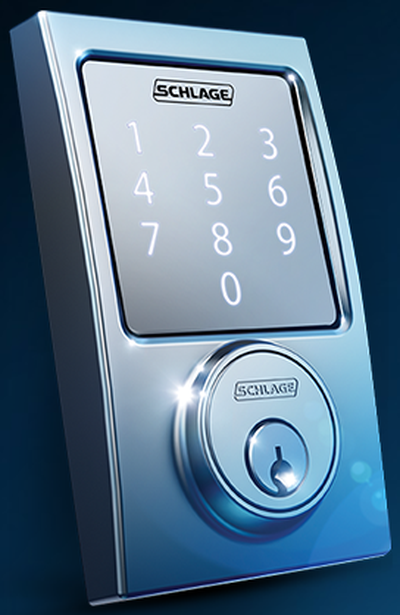
Screenshot (76)Schlage, a division of technology-focused safety and security company Allegion, has announced at CES this year the Schlage Sense, a touch-pad enabled smart lock for homeowners that most notably allows users to command Siri to unlock their doors thanks to integration with Apple's HomeKit.

The company's first Bluetooth-enabled lock, the Schlage Sense allows users to simply enter a code to gain access to their house using the back-lit touchpad or a smartphone with a free-to-download app. HomeKit integration also brings added security and end-to-end encryption and authentication when the Schlage Sense lock interacts with a user's smartphone via the app.

The Schlage Sense system has the ability to manage and schedule up to 30 codes at the same time through a dedicated, easy-to-use app, which offers an additional layer of key-free convenience. The Schlage Sense app allows individuals to create and delete access codes, check on lock status and view activity, as well as update settings and check battery life without requiring residents to connect to an existing home automation system or pay a monthly subscription charge.

The company also promises that, thanks to Built-in-Alarm Technology that sends out alerts any time it senses potential door attacks, the new lock provides the highest rating of security certified by the Builders Hardware Manufacturers Association.

Schlage Sense will become the latest in the brand's growing portfolio of keyless door locks, which also includes the Schlage Touch and Schlage Connect. The new lock will come in two styles - Camelot and Century - and a variety of finishes - Matte Black, Satin Nickel and Aged Bronze - that the company claims will match any home's aesthetic. Schlage Sense will be made available in select U.S. stores and online retailers "later in 2015."

Popular Stories

iPhone Handoff Feature

iOS 27 Introduces New 'iPhone Handoff' Feature

Wednesday September 2, 2026 12:35 pm PDT by
Apple has added a new "iPhone Handoff" feature to iOS 27 that will allow you to switch between two iPhones while using the same phone number on each device. This functionality was briefly mentioned during the WWDC 2026 keynote in June, on a slide that listed hundreds of new features coming in iOS 27 and corresponding software updates, but Apple never shared any further details at the time. ...
Apple Watch Ultra 2 Black Titanium

New Apple Watch Series 12 and Apple Watch Ultra 4 Features Revealed

Sunday August 30, 2026 7:54 am PDT by
Bloomberg's Mark Gurman today further outlined what to expect from the Apple Watch Series 12 and Apple Watch Ultra 4 set to be unveiled on September 9. While it was initially rumored that Touch ID may be coming to the Apple Watch this year, Gurman reiterated that he does not expect the Series 12 or Ultra 4 to have any major design changes compared to the current Series 11 and Ultra 3 models. ...
John Ternus and Rainbow Countour Apple Logo

Apple Just Made a Very Controversial Decision on New CEO's First Day

Wednesday September 2, 2026 6:31 am PDT by
Apple's former hardware engineering chief John Ternus became its CEO on Tuesday, and the company made a controversial decision on his very first day in charge. As of Tuesday, Apple Maps users in the U.S. see the name "Lake America" instead of Lake Ontario for the Great Lake that straddles the New York—Ontario border. Apple made this change after the U.S. Geographic Names Information...

Top Rated Comments

GrabASnookie Avatar
152 months ago
After seeing this:
//www.youtube.com/watch?v=sR-h64WwfW8&spfreload=10

I'm not sure I trust any of these new "smart" locks.

I spent 20 years working at the family hardware store and I can assure you that there are No Good locks - even if you purchase a great lock, they are "Never" installed correctly and the the wood on the door from is made of only 1/2 thick white pine (it's soft) - which means any door can be easily kicked in.

The only safe door, if it's about security, is a commercial made door with aluminum or harder framing. However, most of those doors are installed incorrectly and can easily be forced to open.

The new locks appeal to me because of the convenience. Scary though, our credit cards are on the iPhone, our door lock is on the iPhone, and soon you will be able to open your car door and start your car with the iPhone (many cars have proximity keys). Now if I can only figure out a way to turn on my wife with an iPhone!
Score: 14 Votes (Like | Disagree)
152 months ago
I can't wait until the day we determine all of this stuff is a bit too much.

I'm all for home automation in most ways -- but some things "aint broke"
Score: 12 Votes (Like | Disagree)
WildCowboy Avatar
152 months ago
@ the MacRumors staff: Do companies pay you for front-page stories about their product announcements?

Given all the posts about CES product announcements this week, I'm just curious about how you decide which ones get on the front page, vs the sub-sections, vs no post at all.

We do not accept payment for articles or placement. Our selection of stories is simply based on what we think is interesting...those with what we think is more widespread interest or novelty are more likely to end up on the front page, while other stuff goes on the blogs.

There's so much going on this week that we're bound to miss stuff, but we're doing our best. :)
Score: 9 Votes (Like | Disagree)
152 months ago
Am I the only one who wants my location services to be so good that the door just unlocks as I walk up to it? :cool:
Score: 9 Votes (Like | Disagree)
152 months ago
"Open the pod bay doors, Siri."
Score: 9 Votes (Like | Disagree)
ArtOfWarfare Avatar
152 months ago
Touch screens make sense when you'll want to change the layout of buttons.

When will this thing ever want to display any buttons other than a keypad? Why not just have physical buttons which will consume far less energy than a backlit touch screen?
Score: 9 Votes (Like | Disagree)