iOS 7 Beta 5 Tidbits: Icon Settings Redesign, New Control Center Options - MacRumors
Skip to Content

iOS 7 Beta 5 Tidbits: Icon Settings Redesign, New Control Center Options

Apple today released the fifth beta of iOS 7, which brings a number of improvements, changes, and bug fixes to the operating system, including newly redesigned Settings icons and a Control Center option that allows the feature to be disabled within apps.

iOS 7 beta 5 also offers a slew of minor interface tweaks and improvements that continue to make iOS 7 feel both faster and more polished. Our forum members have noted multiple enhancements that have been bundled into the release:

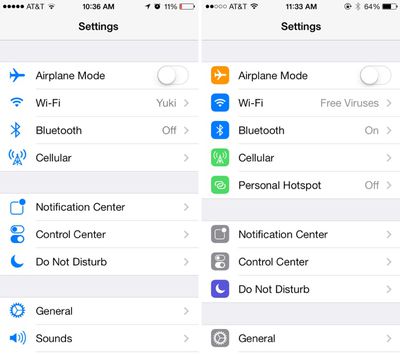
Settings - The icons in the Settings menu have seen a complete design, going from standard blue icons to a variety of square icons in various colors.
settings
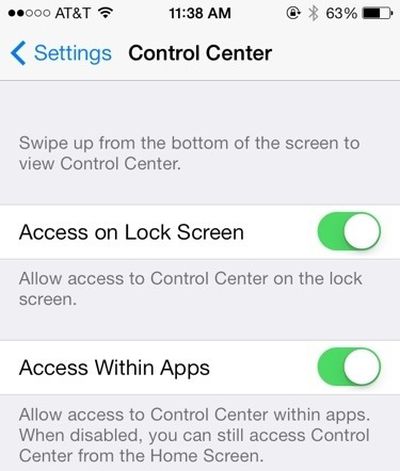
Control Center - Control Center’s settings now allow the function to be turned off while in apps, preventing Control Center from being accessed from the bottom of the screen while playing games or otherwise using apps.
controlcenteroptions
Power Off - The slider bar that displays when the iPhone is being powered off has been slightly altered.

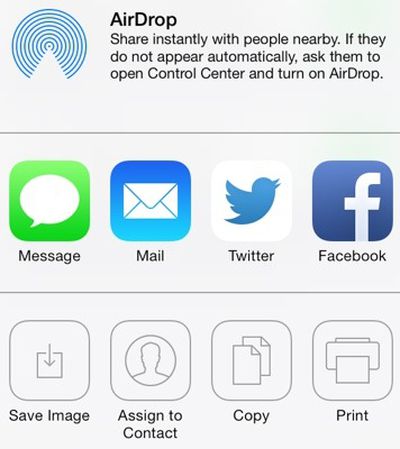
Twitter - The Twitter icon has been redesigned. Rather than a white bird on a blue background, it now depicts a blue bird on a white background.
twitternew
Notifications - Banner notifications can now be pulled down to access additional information.

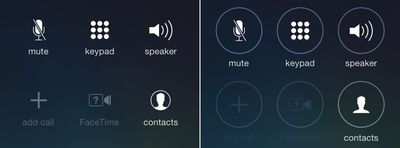
Phone - The icons that are displayed while a user is in a call have been slightly altered with the addition of circles around the icons. They also appear to be larger.
phone
Accessibility Options - There are now On/Off toggle options under the Accessibility menu.

Boot Screen - When installing iOS 7 beta 5, many iPhone 5 users noted that the color of the boot screen matched their devices, with a white screen used for white phones and a black screen used for black phones. This differentiation appears to be limited to the iPhone 5 at this point in time as iPad owners and older iPhone users have not noticed the change.

Messages - In iOS 7 beta 4, Apple changed Messages to default to displaying the first name and last initial of a contact in a conversation. With beta 5, only the first name is displayed by default, though other options can be selected in the Mail settings menu (which is linked to Messages). To access the feature, go to Settings / Mail Contacts and Calendars / Short Name (under Contacts).

Additional features in iOS 7 beta 5 will be added here as they are discovered. Apple is likely to continue pushing regular updates for iOS 7, bringing minor performance boosts and changes ahead of the operating system’s public release, which is expected to come in the fall.
Related Forum: iOS 7

Popular Stories

iPhone 18 Pro Rumored Colors

What's Coming in September: New iPhones, Apple Watches and More

Thursday August 13, 2026 4:20 pm PDT by
Apple will introduce at least five new devices at its iPhone-centric event next month, and it's also possible we'll get devices waiting on Siri AI like the Apple TV. iPhone 18 Pro The iPhone 18 Pro is going to look like the iPhone 17 Pro, but with a smaller Dynamic Island. It's getting some internal updates, including a new Wide camera with a variable aperture for more control over lighting ...
iPhone 17 One Year Later Thumb 1

Should You Buy an iPhone 17 Now or Wait for iPhone 18?

Friday August 14, 2026 12:15 pm PDT by
For the first time since Apple started selling standard and "Pro" iPhones, we're not going to get an entry-level iPhone model this fall. Apple doesn't plan to release an iPhone 18 in September, and will only launch the iPhone 18 Pro, iPhone 18 Pro Max, and foldable iPhone Ultra. The lower-cost iPhone 18 won't come out until spring 2027. Subscribe to the MacRumors YouTube channel for more ...
Everything New Your iPhone Can Do on iOS 27 Feature 1

30 New Things Your iPhone Can Do in iOS 27

Friday August 14, 2026 6:24 am PDT by
Apple will release iOS 27 in September, and despite the company's focus this year on refining its flagship operating system and nixing bugs, there are still many additional features on the way, not least of which is Apple's new context-aware Siri, re-tooled for the generative AI era. This year's major iPhone software update isn't all about AI, though, as the following feature list...

Top Rated Comments

170 months ago
Nice WiFi name on the right.
Score: 67 Votes (Like | Disagree)
JoshBoy Avatar
170 months ago
Much prefer the minimal look icons
Score: 42 Votes (Like | Disagree)
170 months ago
I'm not sure how, but Apple took the iOS personality and snuffed it. The UI is ultra-boring, just like bauhaus architecture: it looks great, but you wouldn't want to live in it.

Um, many people, including myself, would LOVE to live in a Bauhaus style home.

Score: 39 Votes (Like | Disagree)
ZacNicholson Avatar
170 months ago
I'm glad they are slowing adding color back into iOS 7. it has too much white
Score: 36 Votes (Like | Disagree)
170 months ago
boring

I'm not sure how, but Apple took the iOS personality and snuffed it. The UI is ultra-boring, just like bauhaus architecture: it looks great, but you wouldn't want to live in it.

The UI has moved from delightful to cool. Using it makes me want to throw my phone away. It's like Apple has sucked all the joy out of the UI and replaced it with futura.
Score: 34 Votes (Like | Disagree)
170 months ago
The settings icons are much better now. Having them all blue made it to hard to easily distinguish which was which. They almost melded into each other. This is a great change!
Score: 31 Votes (Like | Disagree)