

Settlement Reached in Lawsuit over Frayed MagSafe Connectors

Apple today posted a new support document outlining procedures users should follow if they experience strain relief problems with their "T" style MagSafe power cables on various notebook products. Long-standing issues with fraying on those cables resulted in Apple redesigning the MagSafe several years to adopt an "L" style connector that puts less strain on the cable.
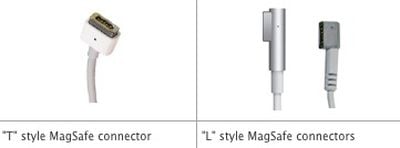
magsafe connector styles
While Apple has for several years offered a replacement program to users whose MagSafe adapters (as well as pre-MagSafe "barrel" style adapters) have exhibited signs of strain relief problems, the company has updated its support materials to reflect that a settlement has been reached in a court case over the design of the connectors.
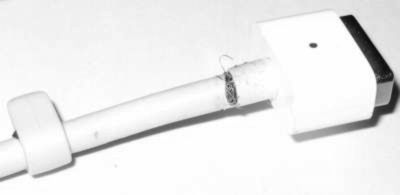
frayed magsafe
Frayed cable on "T" style MagSafe connector

According to the terms of the settlement, Apple will offer full or partial refunds to customers who purchased replacement adapters and will also continue to cover the cost of replacement adapters for users who have future problems with the issue. Apple will offer users who purchased a replacement adapter within one year of purchase of the original computer a $79 cash payment, with users who replaced their adapters in the second year receiving $50 and those who replaced in the third year $35.

The settlement will provide a cash payment if you are the original owner (by purchase or gift) of certain Apple MacBook or MacBook Pro computer models (“Subject Computer”) or separately purchased an Apple 60W or 85W MagSafe MPM-1 (“T”) Power Adapter (“Adapter”), your Adapter showed signs of Strain Relief Damage, and you purchased a Replacement Adapter within the first three years following the initial purchase of the Subject Computer or Adapter. If the court approves the settlement, you may be entitled to a cash payment in the following amounts depending on whether you purchased your Replacement Adapter during the first, second or third year following the initial retail purchase of the Subject Computer or Adapter: (a) first year, the actual amount you paid (excluding taxes and shipping/handling fees) up to a maximum of $79; (b) second year $50; (c) third year $35. There is a limit of three refunds per Subject Computer. You may also be able to obtain a Replacement Adapter at no charge from Apple if your Adapter shows signs of Strain Relief Damage now or in the future.

The settlement program is open to all purchasers of machines with T-style MagSafe power connectors who provide a valid claim form and proof of purchase for the replacement adapter. Users have until March 21, 2012 or three years from the date of original purchase, whichever is later, to file a claim for a previously-purchased replacement adapter. Apple will cover current and future replacements free of charge through December 31, 2012.


Popular Stories

iOS 26

iOS 26.4 and iOS 27 Features Revealed in New Leak

Friday December 12, 2025 10:56 am PST by
Macworld's Filipe Espósito today revealed a handful of features that Apple is allegedly planning for iOS 26.4, iOS 27, and even iOS 28. The report said the features are referenced within the code for a leaked internal build of iOS 26 that is not meant to be seen by the public. However, it appears that Espósito and/or his sources managed to gain access to it, providing us with a sneak peek...
iOS 26

iOS 26.2 Coming Soon With These 8 New Features on Your iPhone

Thursday December 11, 2025 8:49 am PST by
Apple seeded the second iOS 26.2 Release Candidate to developers earlier this week, meaning the update will be released to the general public very soon. Apple confirmed iOS 26.2 would be released in December, but it did not provide a specific date. We expect the update to be released by early next week. iOS 26.2 includes a handful of new features and changes on the iPhone, such as a new...
iOS 26

Apple Releases iOS 26.2 With Alarms for Reminders, Lock Screen Changes, Enhanced Safety Alerts and More

Friday December 12, 2025 10:10 am PST by
Apple today released iOS 26.2, the second major update to the iOS 26 operating system that came out in September, iOS 26.2 comes a little over a month after iOS 26.1 launched. ‌iOS 26‌.2 is compatible with the ‌iPhone‌ 11 series and later, as well as the second-generation ‌iPhone‌ SE. The new software can be downloaded on eligible iPhones over-the-air by going to Settings >...
AirPods Pro Firmware Feature

Apple Releases New Firmware for AirPods Pro 2 and AirPods Pro 3

Thursday December 11, 2025 11:28 am PST by
Apple today released new firmware designed for the AirPods Pro 3 and the prior-generation AirPods Pro 2. The AirPods Pro 3 firmware is 8B30, up from 8B25, while the AirPods Pro 2 firmware is 8B28, up from 8B21. There's no word on what's include in the updated firmware, but the AirPods Pro 2 and AirPods Pro 3 are getting expanded support for Live Translation in the European Union in iOS...
macOS Tahoe 26 Thumb

Apple Releases macOS Tahoe 26.2 With Edge Light

Friday December 12, 2025 10:08 am PST by
Apple today released macOS Tahoe 26.2, the second major update to the macOS Tahoe operating system that came out in September. macOS Tahoe 26.2 comes five weeks after Apple released macOS Tahoe 26.1. Mac users can download the macOS Tahoe update by using the Software Update section of System Settings. macOS Tahoe 26.2 includes Edge Light, a feature that illuminates your face with soft...
AirTag 2 Mock Feature

Apple AirTag 2: Four New Features Found in iOS 26 Code

Thursday December 11, 2025 10:31 am PST by
The AirTag 2 will include a handful of new features that will improve tracking capabilities, according to a new report from Macworld. The site says that it was able to access an internal build of iOS 26, which includes references to multiple unreleased products. Here's what's supposedly coming: An improved pairing process, though no details were provided. AirTag pairing is already...
ipados 26 1 slide over

Apple Releases iPadOS 26.2 With Multitasking Improvements

Friday December 12, 2025 10:09 am PST by
Apple today released iPadOS 26.2, the second major update to the iPadOS 26 operating system released in September. iPadOS 26.2 comes a month after iPadOS 26.1. The new software can be downloaded on eligible iPads over-the-air by going to Settings > General > Software Update. iPadOS 26.2 continues with the multitasking improvements that were added with iPadOS 26.1. You can now drag and...
bug security vulnerability issue fix larry

Update Now: iOS 26.2 Fixes 20+ Security Vulnerabilities

Friday December 12, 2025 11:11 am PST by
Apple today released iOS 26.2, iPadOS 26.2, and macOS 26.2, all of which introduce new features, bug fixes, and security improvements. Apple says that the updates address over 20 vulnerabilities, including two bugs that are known to have been actively exploited. There are a pair of WebKit vulnerabilities that could allow maliciously crafted web content to execute code or cause memory...

Top Rated Comments

myrtlebee Avatar
184 months ago
Interesting to know. I am on my original from 2006 still, as well as a 2008 varient on this MBP.

I can't say that I like the L-Style connector though, it either points out back, or forward blocking a couple ports.
Same here. What are people doing that they keep fraying- especially the poster who stated he went through SEVENTEEN MagSafe adapters. That's abnormal and the problem does not seem to be the cords, but the way he's using them.

I also much prefer my T-Style. Much better for my outlet location and the way I work with my MacBook.
Score: 17 Votes (Like | Disagree)
Vanillian Avatar
184 months ago
My 2008 Macbook had the "T" style, and after a good year or two frayed out and stopped working. Being cheap, I had the repair done by my father, an electrical engineer. The housing of the connector had to be removed and a 2x4 lego was a perfect fit. A little hot glue, some super glue, and a small hole later I had a perfect charger.


Score: 13 Votes (Like | Disagree)
Slurpy2k8 Avatar
184 months ago
what about the L style adaptors as we have same problem with the L style adaptors went through like 10 of the T Style then one day I went in and gave us the L style but have still gone through at least 7 of the L style so they aint any better then the T style.

HOW THE **** do you go through at least 17 ****ing cables, then have the gall to blame it on Apple? I mean, do you think that just MAYBE, you're doing something absolutely ridiculous to the cable? In 4 years of owning macbooks and both types of cables, with daily usage, I haven't frayed one. As for the L style, I don't see how its possible to even fray, let alone 7 TIMES. So I'm actually curious to what you're doing to the cable, because you're probably the only human being on the planet that has gone through that many. That, or you're just flat out lying.
Score: 10 Votes (Like | Disagree)
840quadra Avatar
184 months ago
Interesting to know. I am on my original from 2006 still, as well as a 2008 varient on this MBP.

I can't say that I like the L-Style connector though, it either points out back, or forward blocking a couple ports.
Score: 9 Votes (Like | Disagree)
iRCL Avatar
184 months ago
I have never seen the 2nd pictured L style connector. What does that come with? It looks hideous
Score: 9 Votes (Like | Disagree)
chrisfromalbany Avatar
184 months ago
what they really need to replace is the USB cable that goes from the iphone/ipad to Macbook.


Score: 6 Votes (Like | Disagree)














