Back in July, Adobe entered the Mac App Store for the first time with the release of Adobe Photoshop Elements 9 Editor, a slightly scaled-down version of the company's consumer image editing application. When the company released Photoshop Elements 10 in boxed form in mid-September, we asked Adobe about a Mac App Store release for the new version and were told that it was in the works but under a different timeline given that it is a separate application.
Like the earlier Photoshop Elements release for the Mac App Store, the new releases do not include the Elements Organizer functionality found in their non-Mac App Store counterparts, and do not support case-sensitive HFS+ (HFSX) volumes. Premiere Elements 10 Editor also does not support the SmartSound capabilities found in the full version.
Current users of Photoshop Elements 9 Editor from the Mac App Store should note that the new Version 10 is a separate application and thus not available as a free upgrade.
Friday October 2, 2026 12:59 pm PDT by Joe Rossignol
In a post on its developer news website today, Apple announced that it will be introducing "additional controls" for the "Full Disk Access" setting on macOS due to new risks posed by AI agents. This announcement comes amid the rise of always-on AI agents like Meta's Muse and OpenAI's Dots, which have prompted privacy concerns.
"Some developers are using Full Disk Access in ways that could...
Thursday October 1, 2026 1:37 pm PDT by Joe Rossignol
Apple on Instagram today shared a curated gallery of six photos shot on the iPhone Duo. The photos were shot by American photographers Jake Michaels and Jason Nocito, as part of a project commissioned by Apple.
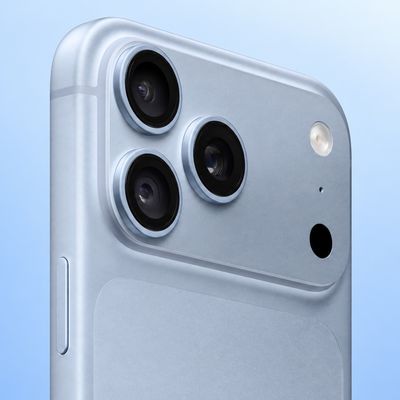
iPhone Duo is equipped with four cameras:A rear 48-megapixel Fusion Main camera
A rear 48-megapixel Ultra Wide camera
A front 12-megapixel Center Stage camera in the outer display
A...
Apple today confirmed that a "small number" of iPhone 18 Pro Max users on the AT&T network have experienced an issue that causes the device to lose cellular service, thereby preventing phone calls, text messages, and data from working. Thousands of users complained about the issue across the Apple Support Community and other platforms.
Apple said it released iOS 27.0.1 earlier this week and...
I come to a site called MacRumors to hear authoritative news and information about iPhones and other iOS devices along with Android and Window phones, not to hear rumors about Macs and Mac related software. Stop clogging up the front page!
Update: My first down vote! :D
Ha... your sarcasm seems to have been missed by many.... :)
I come to a site called MacRumors to hear authoritative news and information about iPhones and other iOS devices along with Android and Window phones, not to hear rumors about Macs and Mac related software. Stop clogging up the front page!
I got a chuckle out of it, at least. People's sarcasm detectors must be broken… Unless you were serious, in which case mine is broken.
Why does it seem that half the third party software for OS X doesn't support case sensitive volumes? Has Adobe looked at a calendar lately? Mine says it's 2011, not 1981. This is inexcusable in the 21st century.
Possibly because 95% of the desktops and laptops sold have case-preserving filesystems?
Is there a specific reason why Adobe is putting this limitation on these two products?
OT: what is a case-sensitive HFS volume under OSX anyway? My filesystems are HFS journaled (not case-sensitive) and they perfectly allow for filenames and directories with upper- and lowercase or mixed names. They show up as such in Finder, as well as on the UNIX shell.
So, how does a case-sensitive HFS+ filesystem differ from a standard HFS+ filesystem? And what is the big deal if a program doesn't support it?
I understand that 95% of desktop file systems have case-insensitive file systems, and probably 90%+ of OS X installations are case-insensitive. Still, I would think that if you're going to spend the time writing your software to support an OS, that you would take the time to support ALL users of that OS. It's this lack of interest that bothers me, since it requires that not just the developers, but also QA and management, be ok with not supporting it. This to me says that Adobe isn't really committed to the Mac platform.
I'm a developer, and the majority of my work is in Linux/Unix, so I support case-insensitive file systems all the time. It's not that difficult compared to the other challenges developers face. To me it just seems lazy not to put the effort forward.
I guess I can understand the lack of commitment, considering they're having to compete with iPhoto on the low end, and Aperture on the high end. Still, if you're not going to be fully committed to a product on the OS, then why bother in the first place?
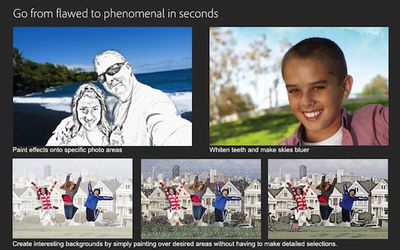
Bluer skies? Seriously? Just stop polluting the air in the real world. Right?
Three points.
First, the "blue skies" filter will likely NOT make "brown" skies blue. It will make super-pale-blue skies more dramatically blue. If you want brown skies blue then make a selection of the sky and change the color hue however you feel the need, just like always.
Second, assuming it is Used As Designed, it allows a photograph to more accurately capture what the human eye sees when we look out. We see blue skies which are a far "richer" blue than what the camera tends to capture, as we see in a far greater dynamic range than digital sensors capture. Even if the sensors capture the blue contrast in the sky, it is overwhelmed by the contrast at ground level and the photo doesn't reliably capture what the person standing there (whose brain does quite well at capturing the various hues of blue in the sky as well as the colors on the ground) sees. This kind of post processing is rather standard, often done using dodge/burn techniques to underexpose the bright sky while keeping the foreground subjects properly exposed.
Third, assuming this is built to the same level as other marquee Photoshop Elements "features", it will sorely disappoint most people wanting to use it in any way which is not the straight-down-the-center/what-the-example-on-the-front-of-the-box-depicts way Adobe crippled it into being able to support. If you want to do what it sounds like you *should* be able to do, spend the much larger $$ on Photoshop itself (or wait a year or two for the same feature to be in Pixelmator / Acorn / etc, or figure out how to do it in three clicks instead of one in any number of image editors).
Personally, the crashiness of Photoshop Elements 6 and then 8 and then 9 (yes, I *am* "that sucker") have turned me off PSE altogether. For a moment I was excited to see that there was a new version out there. Then I saw that they are still charging an arm and a leg for it, and I remembered how awful the experience of the last couple of versions was. I'm trying Pixelmator out for my non-Aperture photo edits now; haven't had it crash and haven't been disappointed in the depth of its features yet.
----------
It's not the full product though for either version. The Amazon versions give you Smart Sound and the organizer. If you don't need those features, save $10, but it's not really cheaper. It's less product. A lot of people use the organizer. iPhoto isn't exactly the joy it used to be. I welcome alternatives to iPhoto, which gets more bogged down with each release.
??? Um, they only usually offer an upgrade discount on the full blown Photo Shop program. So no one is going to complain about something Adobe has never done. Years ago, you may have seen a copy at Sam's Club with a $20 mail in rebate if you owned product A, B, or C, but that was about it.
Actually I bought PSE 6, and "upgraded" with a $20 discount to PSE 8 and then PSE 9. This was a year or two ago, but hardly what "years ago" would imply.
Links to support? $80 has always been around the price of any version of Elements except when nearing a new release. Then you sometimes see a discount offer. Hardly the same thing.
Right after the release, registered owners of the previous versions would get an email touting the new features and offering a $20 discount off the MSRP for the new version if bought directly from Adobe.
I have also seen PSE 9 for $15 under Adobe's price at Costco about a month after release.
Sorry, can't provide links to my email box nor to the recording of me walking through Costco and thinking "well, at least my discounted 'upgrade' was $5 better than a non-upgrader walking into Costco!" Which of course might exist on a security camera archive somewhere, but is unlikely to be annotated with my thoughts as I looked at the box :)
Apple's first foldable iPhone, with a book-style design featuring a 5.4-inch outer display and a 7.6-inch inner display with a minimal crease down the middle.