

 Folding@home is a distributed computing project for disease research that simulates protein folding, computational drug design, and other types of molecular dynamics.
In addition to cancer, Alzheimer's, Huntington's, and Parkinson's, Folding@home has announced that it is tackling a disease that has been dominating the headlines: COVID-19.
The project is joining researchers around the world who are working to better understand the Coronavirus to accelerate the open science effort to develop new life-saving therapies.
By downloading Folding@Home on your Mac, you can donate your unused computational resources to the Folding@home Consortium, where researchers are working to advance our understanding of the structures of potential drug targets for COVID-19 that could aid in the design of new therapies.
Help us in the fight against COVID-19! Download the app at: https://t.co/andJ4PDzVl #Coronavirus #2019nCov #COVID19 #SARSCoV2 https://t.co/BSmiV8phh1 — Folding@home (@foldingathome) February 27, 2020
The following steps show you how to get started with the Mac app. Before you install the Folding@home client, be aware that it can consume a lot of CPU cycles, so depending on what you use your Mac for, you may be better off running it only during times when your Mac is otherwise idle.
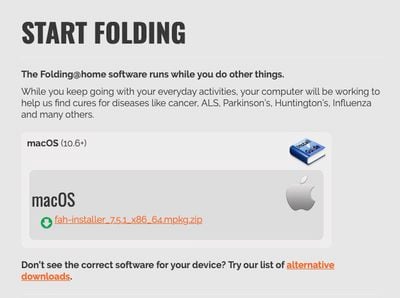
- Open a browser tab and visit https://foldingathome.org/start-folding/.
- Click on fah-installer_7.5.1_x86_64.mpkg.zip link to download the Folding@Home installer.

- Run the installer and enter your admin user name and password when prompted.
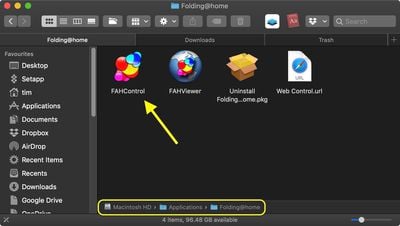
- When the installer has completed, ignore the webpage that it opens for now, and launch the FAHControl app from the Applications/Folding@home folder.
- You'll see a prompt warning you that the client hasn't been assigned an identity. Click Fold Anonymously or Configure Identity. The latter option ensures that the points you earn will be credited to you, but you'll need to enter a username. (You can also join a team – MacRumors' Team ID is 3446.)
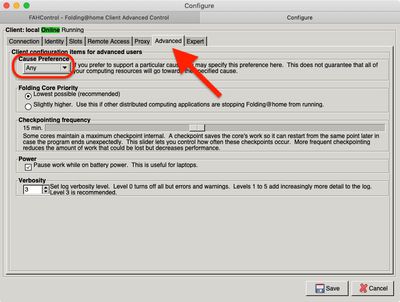
- To ensure your CPU cycles are contributing to COVID-19, click the Configure button, then select the Advanced tab and choose Any in the Cause Preference dropdown menu. (The project is prioritizing coronavirus among the Any category.)
- Click Save.
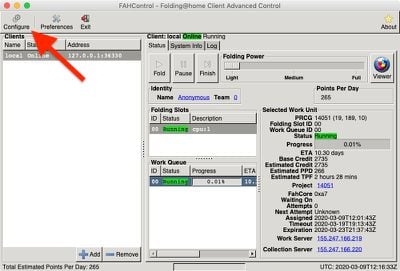
You can view a visual representation of the molecules your Mac is analyzing in real time by clicking the Viewer button. You can also access the web client at https://client.foldingathome.org for a better visual rendering.
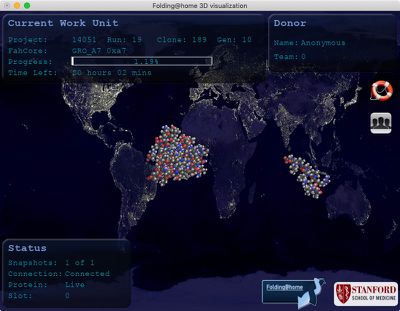
Since this is a power-hungry endeavor, the Folding@home client will automatically pause whenever your Mac laptop switches to battery power. You can control this setting in Configure -> Advanced -> Power.













































Top Rated Comments
My understanding is that these things are quite useful. Will they solve all of our problems? No. Will they help us find aliens as the good 'ol SETI@Home (man, I loved it!), probably not. However, they will certainly help in reducing computing expenses and they will also help in lowering calculation times.
Masks are nothing more than a visual placebo.