

iOS 15: How to Allow Time Sensitive Notifications to Bypass Focus Mode - MacRumors
Skip to Content

iOS 15: How to Allow Time Sensitive Notifications to Bypass Focus Mode

by

With Focus in iOS 15, you can set an activity that you're doing, such as working, exercising, reading, or spending time with family, and block out the notifications that are unrelated to those tasks. It's like Do Not Disturb, but with more options for refining what you see and what you don't see.
iOS 15 Focus Feature
If there's something pressing coming up or an event you're expecting that you don't want to miss, you can still use Focus to block out distractions while still allowing any important notifications to come through to your iPhone, thanks to time sensitive notifications.
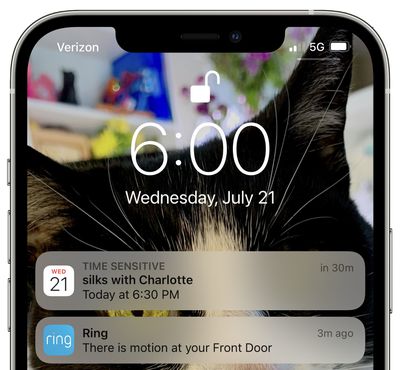
time sensitive notifications focus mode
Time sensitive notifications are a new notification class in ‌iOS 15‌, and a notification marked as time sensitive can be allowed to bypass Focus mode. Notifications that are classed as time sensitive are those that are immediately important, such as someone at the door, a food delivery, a ride pickup, and more.

You can control whether time sensitive notifications can be received during specific Focus modes by following the steps below.

  1. Launch the Settings app on your iPhone, then tap Focus.
  2. Select the Focus mode that you want to allow time-sensitive notifications to bypass.
  3. Toggle the switch labeled Time-Sensitive Notifications to the green ON position.
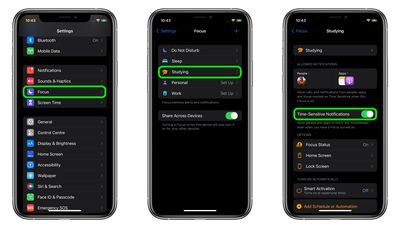
focus

That's all there is to it. Now you won't miss that important alert on your device, even when you're focusing on something in particular.


Related Forum: iOS 15

Popular Stories

apple wallet drivers license feature iPhone 15 pro

Apple Says iPhone Driver's Licenses Will Expand to These 6 U.S. States

Thursday July 9, 2026 7:29 am PDT by
In select U.S. states, residents can add their driver's license or state ID to the Apple Wallet app on the iPhone and Apple Watch, and then use it to display proof of identity or age at select airports and businesses, and in select apps. To set up the feature, open the Wallet app on the iPhone and tap on the plus sign in the top-right corner. Next, tap on Driver's License and ID Cards,...


apple silicon 1 feature

Apple Silicon is Taking an Unexpected Turn

Friday July 10, 2026 7:24 am PDT by
Ever since the Mac switched from Intel processors to Apple silicon starting in 2020, each generation of M-series chips has included higher-end Pro and Max variants. If a recent report proves to be accurate, though, that streak will be coming to an end. According to Bloomberg's Mark Gurman, Apple will be releasing a regular M6 chip, but it has no plans to offer higher-end M6 Pro and M6 Max...
iphone 16 teal

'Siri AI' Lawsuit Update: Apple to Pay Owners of These iPhone Models

Thursday July 9, 2026 7:08 am PDT by
In May, Apple agreed to pay $250 million to settle a U.S. class action lawsuit over Siri AI's delayed launch, and eligible iPhone users could receive up to a $95 payout. This week, the California court overseeing the case held a hearing regarding preliminary approval of the settlement, but the judge has not yet issued a ruling. It will likely be at least a few more months before eligible...






































