

Apple has introduced expanded charging limit options for iPhone 15 and iPhone 16 models in iOS 18, offering users more control over their device's battery health. This feature, which previously capped charging at 80%, now includes new 85%, 90%, and 95% options.
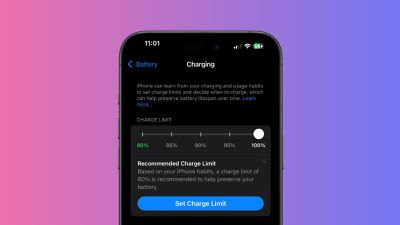
The system Apple has applied aims to improve battery longevity by reducing the time your iPhone spends fully charged. Apple says the feature can be particularly beneficial for users who frequently keep their devices plugged in for extended periods.
Here's how to use these new settings to potentially extend your iPhone's battery lifespan.
- Open the Settings app on your iPhone.
- Tap Battery.
- Select Charging.
- Choose your preferred charging limit from the available options: 80%, 85%, 90%, and 95%.
When deciding on a charging limit, consider your daily usage patterns. If you often have access to charging throughout the day, a lower limit like 80% or 85% might suffice. For those who need more battery life between charges, the 90% or 95% options could be more suitable.
Remember, you can always adjust these settings as your needs change. If you're planning a long day away from power sources, you might temporarily disable the limit to get a full charge – and if you do, iOS 18 will offer you the option to keep the 100% setting on until tomorrow, or permanently.
Charging Recommendations
In addition, iOS 18 takes this feature a step further by proactively recommending a specific charging limit based on your usage habits. If you have an iPhone 15 or iPhone 16, expect to receive a notification after a while suggesting an optimal charging limit for your device. The recommendation will also appear in the Settings app under Battery → Charging.
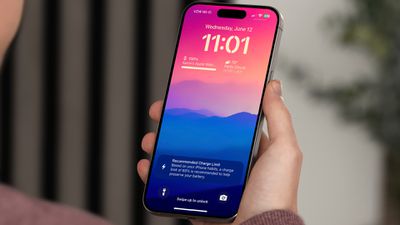
It's worth noting that this iOS 18 feature remains exclusive to the iPhone 15 lineup and the upcoming iPhone 16 lineup. Users of iPhone 14 Pro or older models will not find these options in their settings.
Slow Charger Warning
In addition to giving users more charging limits and recommendations, iOS 18 will warn you if you have been using a slow charger.
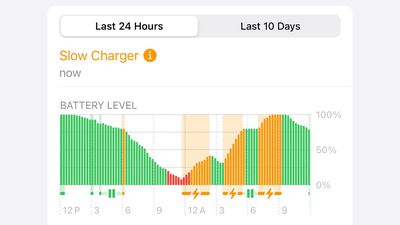
In the Settings ➝ Battery menu, the battery level graph now shows an orange color where slow charging has occurred over the last 24 hours. If the duration of the charge reaches a certain threshold, a "Slow Charger" warning will appear above the graph. Apple has yet to explain what charging speed triggers the warning, nevertheless it should be a handy detail for users that may still be using old chargers that are no longer up to the task.
Many wireless chargers advertise MagSafe compatibility but only offer Qi speeds or slower. This feature could help iPhone users identify why their devices aren't charging at full speed. However, there's no option to receive an alert when using a slower charger, which would have arguably been a more useful feature, as the battery settings are somewhat buried in the menu.
















































