

Apple's Audio Sharing feature on iPhone and iPad lets you share your device's Bluetooth audio with a second pair of wireless headphones, allowing two of you to listen to the same music together while running, or enjoy a movie on a plane without disturbing those around you, for example.
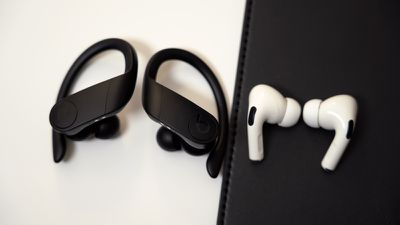
Compatibility Check
To get started with Audio Sharing, first make sure that the headphones and iOS device that you plan to use are compatible with the feature. According to Apple, Audio Sharing is supported by the following models:
- AirPods (first, second, and third-generation)
- AirPods Pro
- AirPods Max
- Powerbeats Pro
- Powerbeats 3
- Beats Solo Pro
- Beats Solo 3 Wireless
- Beats Studio 3 Wireless
- BeatsX
- Beats Flex
- Beats Fit Pro
Next, check that the iOS device that will be hosting the audio is running iOS 13.1 or later. You can check that your device is up-to-date by launching the Settings app and going to General -> Software Update. Once you've done that, you're ready to start audio sharing. Here's how it works.
How to Use Audio Sharing in iOS
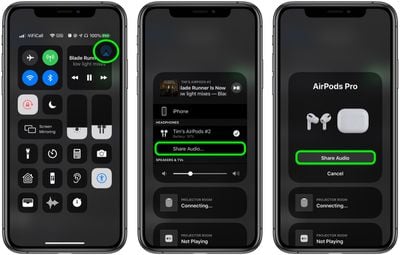
- With your AirPods on, start playing audio on your iPhone or iPad.
- Launch Control Center by swiping down from the top-right corner of the screen.
- In Control Center's audio playback controls, tap the icon with the triangle and three circles.
- Now, bring your friend's AirPods, inside their case, close to your device, and flip the lid open.
- You should see a prompt on your device's screen offering to Share Audio with the second pair of AirPods.
When you've successfully connected, the iPhone or iPad hosting the audio controls the volume level on both pairs of headphones, but both people listening can also use any headphone controls they may have to change volume independently.

























![Apple Pulls Keynote, Pages and Numbers From App Store [Update: Back]](https://images.macrumors.com/t/Okb7kitB_gNr6qe5Pex9nQIysD8=/112x112/article-new/2026/01/Apple-Creator-Studio-iWork-suite.jpg)

















