Turn Several Live Photos into a Single Video on iPhone - MacRumors
Skip to Content

Turn Several Live Photos into a Single Video on iPhone

by

Did you know it's possible to take multiple Live Photos from your iPhone's photo library and turn them into a single continuous video? Keep reading to learn how it's done.

ios 26 photos app
On iPhone and iPad, Live Photos bring your pictures to life by adding a few seconds of video before and after the shot, creating a living memory rather than a static image.

While Live Photos are great on their own, it's also possible to weave several together to create a video montage. This process transforms a collection of moments into a cohesive narrative, and offers an easier way to share and relive your memories.

Whether it's a series of shots from a special event, a day out with friends, or a compilation of everyday moments, the following steps show you how to turn several Live Photos into a video that can encapsulate their essence in a way that a single photo or traditional video might not.

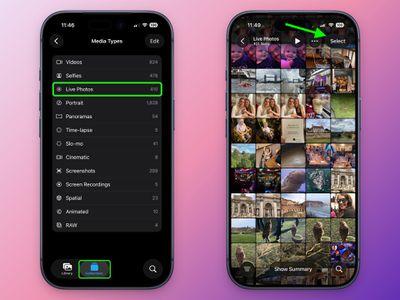
  1. In the Photos app, tap the Collections icon at the bottom of the screen.
  2. Scroll down to "Media Types," and tap Live Photos.
  3. Tap Select in the top-right corner, then tap the Live Photos you want to include in your video so that a little checkmark appears on each one.
    photos

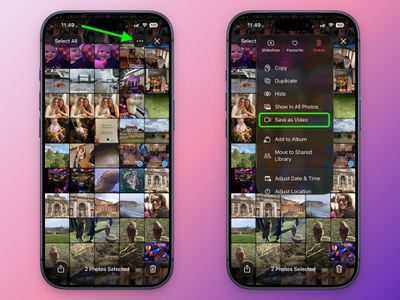
  4. Tap the button with three dots in the top-right corner.
  5. Choose Save as Video in the pop-up menu.
    photos

That's all there is to it. To watch your newly created video, return to the Library view or find it in the Videos category under Media Types.

Note that the video will be dated to when the Live Photos were originally taken, so unless you have the Sort by Recently Added option checked, they may not show as the latest video in your collection.


Top Rated Comments

21 weeks ago
And yet we can’t turn several videos into one video.
Score: 6 Votes (Like | Disagree)
Astuces iOS Avatar
21 weeks ago

And yet we can’t turn several videos into one video.
I introduce you iMovie !
Score: 4 Votes (Like | Disagree)
lazyrighteye Avatar
21 weeks ago

They should include an app on every iPhone that turns several videos into one video. And, it should be a free app, no subscription.
And it should be called Photos.

Seriously, why they haven’t included even basic iMovie-like editing directly in Photos is beyond. I mean, yeah, here is this master collection of billions of photos and movies
I captured. Sitting there. Doing nothing. Why not give us tools to do something with these assets, to create - you know, like you used to. We can still have iMovie. But adding basic editing features directly in Photos isn’t the worst idea.
Score: 3 Votes (Like | Disagree)
21 weeks ago

And it should be called Photos.

Seriously, why they haven’t included even basic iMovie-like editing directly in Photos is beyond. I mean, yeah, here is this master collection of billions of photos and movies
I captured. Sitting there. Doing nothing. Why not give us tools to do something with these assets, to create - you know, like you used to. We can still have iMovie. But adding basic editing features directly in Photos isn’t the worst idea.
Fully agree. And while they're at it, let me reverse play a vid.
Score: 2 Votes (Like | Disagree)
21 weeks ago

They should include an app on every iPhone that turns several videos into one video. And, it should be a free app, no subscription.
They do. It's called iMovie
Score: 2 Votes (Like | Disagree)
20 weeks ago

That’s weird! I just did it, and mine came out the correct order on the video!
figured it out! need to have the live photos collection sorted by oldest first. then it was perfect. kind of odd
Score: 1 Votes (Like | Disagree)

Popular Stories

sweeping AI driven upgrades feature

First Look at AI Camera and Photos Features in iOS 27 Revealed

Thursday May 28, 2026 6:32 am PDT by
Apple is planning sweeping AI-driven upgrades to its Camera and Photos apps in iOS 27, Bloomberg's Mark Gurman reports. Image via Bloomberg. The report offers a first look at the appearance of several major iOS 27 features that Apple plans to announce at its Worldwide Developers Conference on June 8. The images are based on information viewed by Bloomberg and people said to be familiar with ...
apple intelligence photos tools

Apple to Bring AI Reframing and Editing Tools to Photos App

Monday June 8, 2026 11:16 am PDT by
Apple today announced new AI-powered photo editing tools coming to the Photos app as part of Apple Intelligence, including an upgraded Clean Up tool, a new Extend tool, and a new Spatial Reframing feature. Spatial Reframing allows users to reposition the virtual camera angle of a photo after it has already been taken. By touching and dragging, users can adjust the framing and perspective of...
iOS 26 Glass Photos Feature

Apple Photos Finally Gets a Slideshow Maker

Monday June 8, 2026 5:04 pm PDT by
Apple today announced new slideshow features coming to the Photos app, allowing users to play any set of photos and videos as a slideshow. There are options to set the slide duration, transition style, and music. iOS 27 also lets users save any slideshow directly as a video to their Photos library for easy playback later. Additional new features include the ability to save individual...