How to Turn Off HomePod Mini Proximity Notifications and Vibrations on iPhone - MacRumors
Skip to Content

How to Turn Off HomePod Mini Proximity Notifications and Vibrations on iPhone

by

With the launch of iOS 14.4, Apple added a new feature for the HomePod mini that's designed to provide haptic feedback when your iPhone 11 or 12 is near the speaker to facilitate the simpler handing off of songs from one device to another.
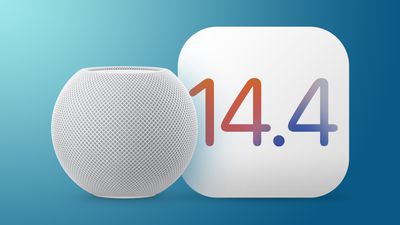
HomePod mini iOS 14
When moving your iPhone closer to a ‌HomePod mini‌ after installing the iOS 14.4 update, the iPhone vibrates quicker and quicker as it gets closer to the speaker, and ‌HomePod mini‌ controls pop up on the screen. If you happen to keep your ‌HomePod mini‌ on a desk or another location where it's often close to your iPhone, the proximity notifications can get frustrating fast.

If you've run into this problem and want the popups and vibrations to stop, follow these directions:

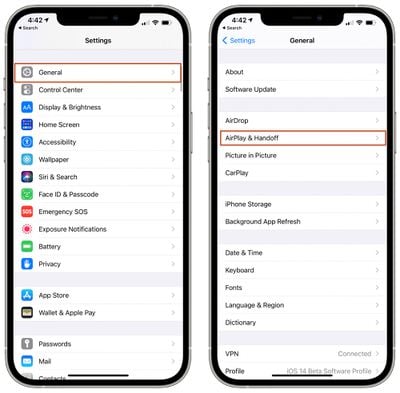
  1. Open the Settings app.
  2. Tap on "General." homepod mini handoff settings
  3. Tap on "AirPlay & Handoff."
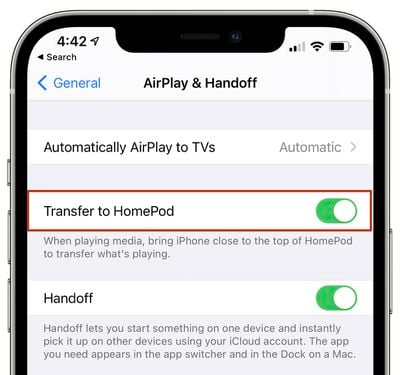
  4. Toggle off "Transfer to HomePod." disable homepod transfer

With this feature, your iPhone will no longer attempt to transfer music or media to your ‌HomePod mini‌ when it's near the speaker, preventing the haptic feedback and song transfer interface from showing up. The haptic vibrations and transfer features are limited to the ‌HomePod mini‌ and the iPhone 11 and iPhone 12 models, but the option can also be disabled on other iPhones to prevent the standard transfer interface from coming up.


Related Roundup: HomePod mini

Top Rated Comments

Populus Avatar
71 months ago

This might sound like a stupid/insane question, but is anyone using a HomePod (mini or otherwise) without Siri? I like the idea of a good AirPlay speaker but my wife and I just don't particularly care to have Siri on all the time.

I asked something similar in the past. Some said ”if you don’t want a smartspeaker why are you buying a smartspeaker?”, but there was a useful answer among all of them. Someone told me: “You just ask Siri to stop listening”. I hope this answers your question.
Score: 4 Votes (Like | Disagree)
Populus Avatar
71 months ago
I like how, with iOS 14, Apple is releasing, step by step, new features on each update, instead of cramming all of them into the release build like they did with previous releases (we all remember the disaster of iOS 13 on its launch). This way they can keep polishing the operating system while they add, slowly, some of the remaining features along the year.
Score: 4 Votes (Like | Disagree)
ProfessionalFan Avatar
71 months ago
I had to turn it off because I have my mini on my desk and it was happening constantly.
Score: 4 Votes (Like | Disagree)
Apple_Robert Avatar
71 months ago
My phone vibrates every time when placing it on my Mac desk. Ir doesn't really bother me. I think it should only vibrate when there is an actual hand off possibility, instead of vibrating just because the phone is close. Maybe Apple will change that aspect.
Score: 4 Votes (Like | Disagree)
Mr Lizard Avatar
71 months ago

On the other hand why do you buy an apple smartspeaker if you don’t want Siri?
Some people might want the superb sound quality that the HomePod provides, but without the shuttle wreck of a digital assistant that is Siri.
Score: 3 Votes (Like | Disagree)
haruhiko Avatar
71 months ago

Never said I wanted a "smart" speaker. I do, however, want a high quality speaker with AirPlay and good integration with other Apple products. Since Apple doesn't make one, I asked this question.
The big HomePod is a good choice, especially with two of them paired together.
Score: 2 Votes (Like | Disagree)

Popular Stories

apple price hike

Apple Just Increased Prices on MacBooks, iPads, and More

Thursday June 25, 2026 5:44 am PDT by
Apple today dramatically increased device prices across multiple product lines. Subscribe to the MacRumors YouTube channel for more videos. After temporarily taking it down earlier today, Apple's online store is back up with a series of product price increases. The changes are as follows: HomePod mini: $129, up from $99 (+$30) HomePod: $349, up from $299 (+$50) Apple TV: $199, up from...
HomePod mini and Apple TV Sage

Apple TV and HomePod Just Went Up in Price Amid Wait for New Models

Thursday June 25, 2026 8:04 am PDT by
While the Apple TV, HomePod, and HomePod mini have not been updated in several years, all three products received price increases worldwide today. Here is a summary of the price changes for these products in the United States:Apple TV (Wi-Fi): $129 → $199 Apple TV (Wi-Fi + Ethernet): $149 → $249 HomePod: $299 → $349 HomePod mini: $99 → $129Apple also raised prices on Macs, iPads, and more,...
apple back to school sans airpods 2

Apple's 2026 Back to School Offer is Coming Soon

Sunday July 12, 2026 7:29 am PDT by
Apple's stores will be rolling out Back to School marketing materials this week, according to Bloomberg's Mark Gurman. This suggests that the offer will begin in the U.S. in the next few days. Last year, college students and educational staff could receive a free accessory like AirPods 4 or an Apple Pencil Pro with the purchase of a qualifying Mac or iPad model. The Back to School offer is in...