iOS 15: How to Translate Text in Photos - MacRumors
Skip to Content

iOS 15: How to Translate Text in Photos

by

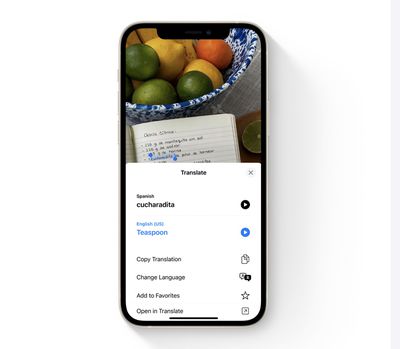
Apple entered the translation game in iOS 14 with native Safari browser translation and a dedicated translation app. Now, in iOS 15 and iPadOS 15, translation has gone systemwide, which means you can take advantage of Apple's new Live Text feature to translate other languages that appear in your photos.
live text translate
The following steps show you how it's done in the Photos app. Note that by using largely the same procedure as described below, you can also translate text whenever it appears in the viewfinders of Apple's stock Camera app.

  1. Launch the Photos app on an iPhone or iPad running iOS 15, then select a photo in your library that contains text in a language that you want to translate.
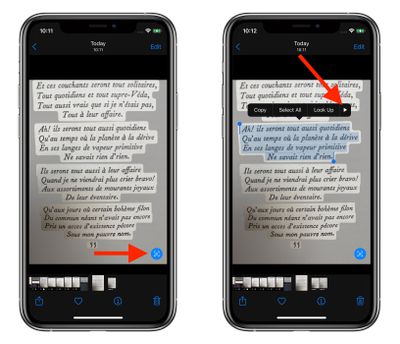
  2. Tap the text capture icon that appears in the lower right corner of the picture.
  3. Now tap a portion of the captured text and drag the selection tool to highlight the words that you want to translate.
  4. Tap the rightmost arrow in the popup menu to reveal more options.
    photos

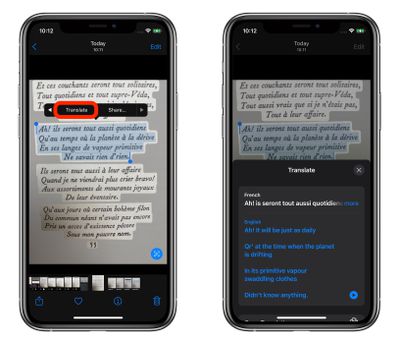
  5. Tap the revealed Translate option in the popup menu.
photos
A card will scroll up from the bottom of the screen showing the translation below the selected text. You can also choose to copy the translation in the Actions menu that appears below that for pasting elsewhere, change the translation to another language, and hear the translation spoken out loud.


Related Forum: iOS 15

Popular Stories

General iCloud App Feature

iCloud, Photos, Find My and More Experiencing Issues

Tuesday August 18, 2026 1:56 pm PDT by
Several iCloud services are experiencing issues, according to Apple's system status page. Find My, Game Center, Photos, iCloud Calendar, iCloud Mail, iCloud Contacts, iCloud Web Apps, and iWork for iCloud are all experiencing service interruptions. Apple says only some users may run into problems. The issue started at 3:33 p.m. Eastern Time and is...

General iCloud App Feature

iOS 27 Shared Albums Go Full Res at the Cost of Your iCloud Storage

Thursday August 20, 2026 5:48 am PDT by
In iOS 27, new Shared Albums you create in the Photos app retain full-resolution quality for the first time, but they now eat into your iCloud storage – and that includes any items added by other people invited to contribute. Currently, photos in a Shared Album are automatically reduced to 2,048 pixels on the long edge (except for panoramic photos, which can be up to 5,400 pixels wide)....
Four iPhone 18 Pro Colors Mock Feature

iPhone 18 Pro: Pre-Orders and Release Date

Thursday August 20, 2026 8:00 am PDT by
Apple has yet to reveal when the iPhone 18 Pro and iPhone Ultra will be announced and released, but the dates usually follow a familiar pattern. As usual, the iPhone event is expected to take place in the first half of September. Labor Day falls on September 7 this year. The last time the holiday was on that day was in 2020, but the iPhone event that year was delayed until October due to...