In iOS 15.1, Apple has brought several enhancements to FaceTime, which means you can do more than just ‌‌FaceTime‌‌ call your friends and family.


Thanks to a new screen sharing feature called SharePlay, you can now share your screen with other people on a call, which is great for choosing a movie, browsing through a photo album, or anything else that's enhanced by group discussion.

Here's how the new screen sharing feature works:

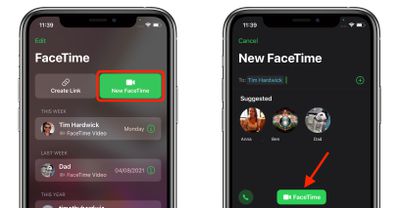
  1. Launch FaceTime on your iPhone or iPad.
  2. Tap New FaceTime and add the contacts that you want to share your screen with, then tap the FaceTime button. Alternately, select a recent contact to initiate a video call.
    FaceTime

  3. When the call has connected, tap the SharePlay button at the top-right corner of the screen in the new control panel.
  4. Tap Share My Screen in the dropdown. After a three-second countdown, screen sharing should initialize.
    FaceTime

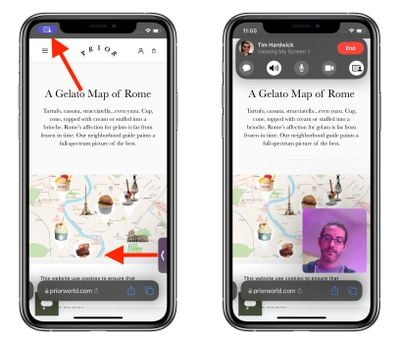
Once ‌FaceTime‌ screen sharing has started, you can navigate to any app that you want to share with the callers. A sharing icon will remain in the top-left corner of the screen to indicate that ‌FaceTime‌ screen sharing is active, and you can tap it to reveal the ‌FaceTime‌ control panel.

FaceTime
You can swipe away the active caller's face for more screen space, and swipe them back into view just as easily. If you're viewing someone else's shared screen, you'll see their name just below the top-left icon, alongside buttons to send them a message, Love what they're sharing, or share it with someone else.

If you like, you can also listen to music or watch movies and TV together using the SharePlay interface. You can stream movies or TV shows and everyone on the call will see the same synced playback and controls. For more on what's new with ‌FaceTime‌ in iOS 15, we have a dedicated guide that highlights all of the available features.

Related Forum: iOS 15

Top Rated Comments

b11051973 Avatar
58 months ago
I look forward to this. Will be very helpful since I'm tech support for family members that are hundreds of miles away.
Score: 23 Votes (Like | Disagree)
farewelwilliams Avatar
58 months ago
cutting mom-tech-support from 4 hours to 10 minutes.
Score: 14 Votes (Like | Disagree)
TheYayAreaLiving ?️ Avatar
58 months ago
It looks pretty neat. This one is definitely going to be very useful.
Score: 4 Votes (Like | Disagree)
_Spinn_ Avatar
58 months ago
This will be very useful when having to help family members.
Score: 3 Votes (Like | Disagree)
profets Avatar
58 months ago
This is going to be such a useful feature.
Score: 3 Votes (Like | Disagree)
bushman4 Avatar
58 months ago

So if I'm sharing, for example, my Netflix app, can they tap on a movie to watch, or do they have to ask me to tap for them?

In other words, are they able to just view my screen, or can they interact with it themselves?
They can view your screen only not interact
Score: 2 Votes (Like | Disagree)

Popular Stories

Apple Creator Studio

Apple Introduces New 'Creator Studio' Bundle of Apps for $129 Per Year

Tuesday January 13, 2026 6:11 am PST by
Apple today introduced a new Apple Creator Studio bundle that offers access to six creative apps, as well as exclusive AI features and content, as part of a single subscription. In the U.S., pricing is set at $12.99 per month or $129 per year. Here are the six apps included with an Apple Creator Studio subscription:Final Cut Pro on the Mac and iPad Logic Pro on the Mac and iPad Pixelmator...
Verizon New

Verizon is Down: iPhones Show 'SOS' Mode Due to Network Outage [Resolved]

Wednesday January 14, 2026 10:18 am PST by
Verizon is experiencing a major outage across the U.S. today, with hundreds of thousands of customers reporting issues with the network on the website Downdetector. There are also complaints across Reddit and other social media platforms. iPhone users and others with Verizon service are generally unable to make phone calls, send text messages, or use data over 5G or LTE due to the outage....
iPhone Top Left Hole Punch Face ID Feature Purple

New Leak Reveals iPhone 18 Pro Display Sizes, Under-Screen Face ID, and More

Wednesday January 14, 2026 7:09 am PST by
While the iPhone 18 Pro models are still around eight months away, a leaker has shared some alleged details about the devices. In a post on Chinese social media platform Weibo this week, the account Digital Chat Station said the iPhone 18 Pro and iPhone 18 Pro Max will have the same 6.3-inch and 6.9-inch display sizes as the iPhone 17 Pro and iPhone 17 Pro Max. Consistent with previous...
iOS 26

Here's What's New in iOS 26.3 So Far

Monday January 12, 2026 1:15 pm PST by
Apple today seeded the second beta of iOS 26.3, nearly a month after the first beta. So far, the update includes a couple of new features for iPhones. iOS 15.3 through iOS 18.3 were all released in late January over the years, so it is thereby likely that iOS 26.3 will be released towards the end of this month as well. The update is compatible with the iPhone 11 series and newer. Below,...
iPhone Top Left Hole Punch Face ID Feature Purple

iPhone 18 Pro Launching Later This Year With These 12 New Features

Thursday January 15, 2026 10:56 am PST by
While the iPhone 18 Pro and iPhone 18 Pro Max are not expected to launch for another eight months, there are already plenty of rumors about the devices. Below, we have recapped 12 features rumored for the iPhone 18 Pro models, as of January 2026: The same overall design is expected, with 6.3-inch and 6.9-inch display sizes, and a "plateau" housing three rear cameras Under-screen Face ID...