How to Set a Schooltime Schedule on Apple Watch - MacRumors
Skip to Content

How to Set a Schooltime Schedule on Apple Watch

by

In watchOS 7, Apple introduced Family Setup, a new feature that allows users to pair additional watches to their iPhone for children or older members of their household who don't have their own iPhones.
familysetupschooltime
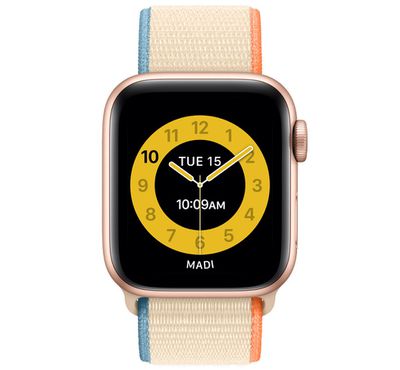
An associated feature of Family Setup, called "Schooltime," allows parents and guardians to remotely turn on Do Not Disturb on kids' watches and display a special watch face with restricted interaction. In other words, it lets you lock down an Apple Watch during school hours to encourage kids to focus on their schoolwork.

Schooltime can be activated when you first initialize ‌Family Setup‌, but you can also access and edit Schooltime features in the Apple Watch app on ‌iPhone‌. As with ‌Family Setup‌, using Schooltime requires watchOS 7 or later. Here's how it works.

How to set a Schooltime schedule

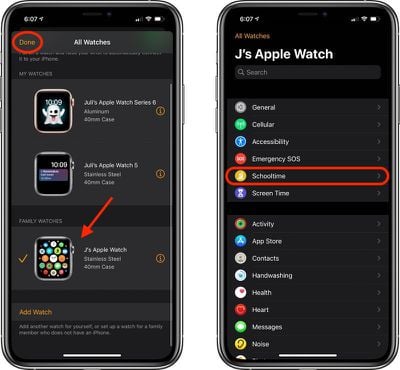
  1. Launch the Watch app on your iPhone.
  2. Tap All Watches, then tap your child's watch.
  3. Tap Done, then tap Schooltime.
    schooltime

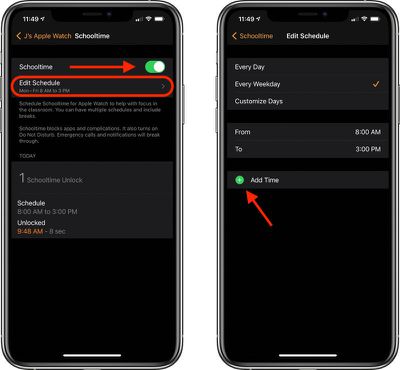
  4. Make sure the Schooltime switch is in the green ON position. If not, tap the switch to activate it.
  5. Tap Edit Schedule.
  6. Chose the days and times when you want Schooltime to be active.
  7. Tap Add Time if you want to set up more than one schedule in a day. You could set up one schedule for morning classes and another for after lunch, for instance.schooltime

To change your child's Schooltime schedule at a later time, simply launch the Watch app on your iPhone, then tap the info ("i") button next to the managed watch. Tap Schooltime, then tap Edit Schedule.

How to Exit Schooltime Temporarily

Note that Schooltime is different from Screen Time, in that a child can exit Schooltime temporarily to do things like check messages. To exit Schooltime, they can turn the Digital Crown, then tap Exit to confirm. If a Schooltime schedule is active, Schooltime mode will resume automatically.

Related Roundup: watchOS 26
Related Forum: Apple Watch

Popular Stories

watchos 26 gradient light

watchOS 26.4 Now Available With Workout Update and New Emoji

Tuesday March 24, 2026 10:02 am PDT by
Apple today released watchOS 26.4, the fourth major update to the watchOS 26 operating system that came out in September. watchOS 26.4 comes a month and a half after Apple released watchOS 26.3. watchOS 26.4 can be downloaded for free on an iPhone running iOS 26.4 by opening up the Apple Watch app and going to General > Software Update, or initiating an update in the Settings app on the...

apple watch se red

Apple Releases watchOS 5 and watchOS 8 Updates to Keep FaceTime and iMessage Running on Older Apple Watches

Tuesday March 24, 2026 3:30 pm PDT by
Apple today released watchOS 5.3.10 and watchOS 8.8.2 for older Apple Watch models that are not able to run the current watchOS 26 update. watchOS 5.3.10 is available for the Apple Watch Series 1, Series 2, Series 3, and Series 4, while watchOS 8.8.2 is available for the Apple Watch Series 3, Series 4, Series 5, Series 6, Series 7, and original Apple Watch SE. According to Apple's release...
General visionOS watchOS and tvOS Betas Feature Redux

Apple Releases First watchOS 26.5, tvOS 26.5 and visionOS 26.5 Betas

Monday March 30, 2026 10:38 am PDT by
Apple today provided developers with the first betas of upcoming watchOS 26.5, tvOS 26.5, and visionOS 26.5 betas for testing purposes. The software comes a week after Apple launched the 26.4 versions of each platform. The software updates are available through the Settings app on each device, and because these are developer betas, a free developer account is required. There's no word on...