iPhone 14 Pro: How to Turn Off Dynamic Island Content - MacRumors
Skip to Content

iPhone 14 Pro: How to Turn Off Dynamic Island Content

by

When Apple unveiled its latest iPhone 14 Pro models, many people were surprised by its innovative integration of software functions with the pill-shaped cutout at the top of the screen, which Apple calls the "Dynamic Island."
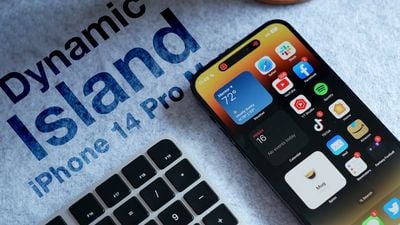
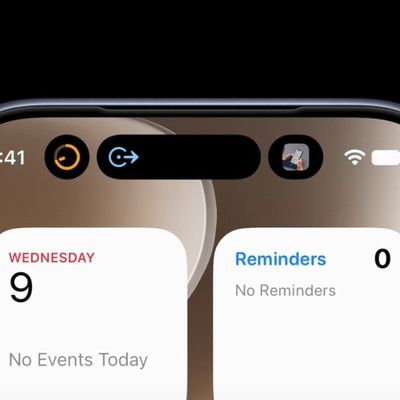
Dynamic Island Thumb Alt
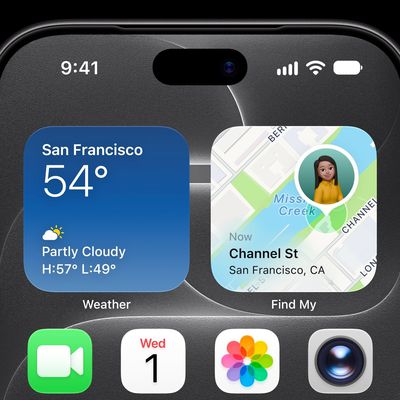
Display pixels around the ‌Dynamic Island‌ merge it into one pill-shaped area that changes size and shape to accommodate various types of alerts, notifications, and interactions, turning it into a kind of front-and-center information hub.

But what if you find content that appears in ‌Dynamic Island‌ distracting, especially when you're trying to focus on something else on your iPhone's screen?

Unfortunately, there's currently no way to outright disable ‌Dynamic Island‌ content, as its behavior is baked into iOS 16. However, if you're distracted by its animations you can dismiss them by swiping left or right across the Dynamic Island, without affecting any related background activity.

For example, if an album in Apple Music is playing and you dismiss the audio waveform and artwork in the ‌Dynamic Island‌, the music will continue to play in the background. The same goes for when you dismiss a timer – it will still count down in the background even though it is no longer visible on the screen.
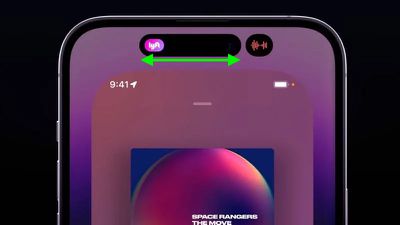
dynamic island dismiss content
If the ‌Dynamic Island‌ is split into two background activities and you want to get rid of one or both, use the same swipe gesture on the larger segment to make it disappear. Then, in the same way, swipe across the remaining activity that extends across the pill.

If you dismiss all activity in ‌Dynamic Island‌, it will return the pill-shape to its previous inert status, leaving you to focus entirely on what else is on the screen.
Related Forum: iPhone

Top Rated Comments

50 months ago
the amount of praise for this nonsense is unreal.

Score: 23 Votes (Like | Disagree)
maktaba Avatar
50 months ago
Dynamic Island is a good example of “putting lipstick on a pig”.
Score: 21 Votes (Like | Disagree)
50 months ago
Am i the only person who gives absolutely no f***s about dynamic island?
Score: 20 Votes (Like | Disagree)
deuxani Avatar
50 months ago
I think the content of this article perfectly describes the current state of Apple’s OS’s. It’s getting so complex with no logical cues, manuals or explanations for users, that we have to read articles online to figure out basic functionality like this.

The amount of time it takes to explain some (older) people that left swipe from the top brings the Notification Center and right swipe brings Control Center or TouchID is not pressing the button but laying your finger on it…
Score: 16 Votes (Like | Disagree)
50 months ago
Phase 1: “A seamless fusion of hardware and software, birthing an iconic new interaction method that’s fun as well as functional? Take my money!”

Phase 2: “Looks cool and my friends think so too but… is there a way to disable it?”

Phase 3: “The results are in: this was a design mistake. It wasn’t broken before, what was Apple thinking? At least the next version won’t have it!”

Case in point: MBP Touch Bar.

Dynamic island is now approaching phase 2.

IPadOS Stage Manager: about to land in phase 1. 😉
Score: 14 Votes (Like | Disagree)
Royksöpp Avatar
50 months ago
Why would you turn it off? Isn't that the whole point of buying this phone?
Score: 11 Votes (Like | Disagree)

Popular Stories

ios 27 siri animation

Siri Uses Pill Shape to Hide the Dynamic Island in iOS 27, But iPhone 18 Could Make It a Circle

Tuesday June 16, 2026 5:10 am PDT by
In iOS 27, Siri now appears as a glowing pill-shaped orb that expands directly from the Dynamic Island, but may give way to a circle on next-generation iPhones. Instead of the glowing light effect that previously traced the edges of the display, a swirling Siri orb expands from the Dynamic Island in iOS 27, with the design hiding its true cutouts, just like other Dynamic Island animations. ...
apple wallet drivers license feature iPhone 15 pro

Apple Says iPhone Driver's Licenses Will Expand to These 6 U.S. States

Thursday July 9, 2026 7:29 am PDT by
In select U.S. states, residents can add their driver's license or state ID to the Apple Wallet app on the iPhone and Apple Watch, and then use it to display proof of identity or age at select airports and businesses, and in select apps. To set up the feature, open the Wallet app on the iPhone and tap on the plus sign in the top-right corner. Next, tap on Driver's License and ID Cards,...
apple silicon 1 feature

Apple Silicon is Taking an Unexpected Turn

Friday July 10, 2026 7:24 am PDT by
Ever since the Mac switched from Intel processors to Apple silicon starting in 2020, each generation of M-series chips has included higher-end Pro and Max variants. If a recent report proves to be accurate, though, that streak will be coming to an end. According to Bloomberg's Mark Gurman, Apple will be releasing a regular M6 chip, but it has no plans to offer higher-end M6 Pro and M6 Max...