

iOS 17: How to Find Messages Faster Using Search Filters - MacRumors
Skip to Content

iOS 17: How to Find Messages Faster Using Search Filters

by

In iOS 17, iPadOS 17, and macOS Sonoma, Apple has improved the search function in its stock Messages app, which now allows you to combine search queries and narrow down results to quickly find the messages that you're looking for. This article explains how it works.
iOS 17 Messages Feature
Previously in iOS 16, you could type a word or phrase in the search field of Apple's Messages app and it would return matching results, but there was no way to filter messages to more easily find what you were looking for.

For example, if you were looking for a message from a friend called "John" that had the word "dinner" in it, you would have to search for "dinner" and then scroll through a bunch of messages from anybody and everybody containing that word.

Thankfully, that's changed in iOS 17, and now you can combine multiple filters. If you're looking for images from a certain person, for example, you can type in "photos" and then the person's name, tapping to select each search filter to narrow down your search results.
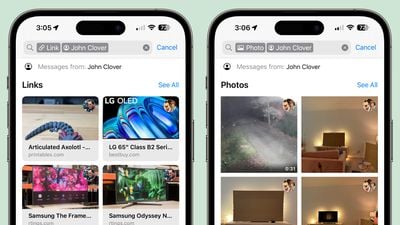
ios 17 messages search
It's simple tweaks like this that make the Messages app in iOS 17 a lot more convenient to use. For other features improvements Apple has made to the Messages app in its latest software update, be sure to check out our dedicated Messages roundup.


Popular Stories

Aston Martin CarPlay Ultra Screen

Apple Says CarPlay Ultra is Coming to These Vehicle Brands

Thursday May 21, 2026 11:53 am PDT by
Last year, Apple launched CarPlay Ultra, the long-awaited next-generation version of its CarPlay software system for vehicles. Nearly a year later, CarPlay Ultra is still limited to Aston Martin's latest luxury vehicles, but that should change fairly soon. In May 2025, Apple said many other vehicle brands planned to offer CarPlay Ultra, including Hyundai, Kia, and Genesis. CarPlay Ultra...
ios 26 iphone 16 pro lock screen notifications feature 1

iOS 27 Notifications Will Slide in From Left Side of Your iPhone's Screen

Friday June 5, 2026 7:24 am PDT by
Bloomberg's Mark Gurman today revealed another iOS 27 change: notifications will slide in from the left side of the screen instead of from the top. In addition, accessing Notification Center on iOS 27 will require swiping down on the top-left corner of the screen. If you swipe down on the Dynamic Island area, a new "Search or Ask" interface tied to the revamped Siri will appear, instead of...
WWDC26 Mock Feature 2

Will Apple Launch New Hardware at WWDC Next Week?

Friday June 5, 2026 7:56 am PDT by
Apple has several hardware releases in the pipeline, but will we see any of them unveiled at this year's Worldwide Developers Conference? WWDC is primarily a software event where new versions of iOS, iPadOS, macOS, watchOS, tvOS, and visionOS take center stage, but it's not unusual for Apple to introduce new hardware during the developer conference. Take WWDC 2017, for example, where Apple...















