WhatsApp messenger recently rolled out its long-awaited Dark Mode theme for iPhone, which is good news for anyone who uses the chat app in bed when they just can't sleep.
With Dark Mode enabled, users will benefit from no more bright white splash screen blinding them upon opening WhatsApp, a less harsh app interface, new dark themes for chat threads, and potentially less battery drain.
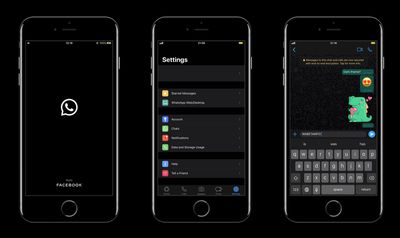
If you've been wondering where the Dark Mode setting is within WhatsApp, there isn't one. WhatsApp uses Apple APIs and responds automatically to the system setting – so if you've not got iOS Dark Mode enabled, you won't be able to use WhatsApp in Dark Mode either.
Of course, that means the dark theme isn't available for users running iOS versions earlier than iOS 13. In other words, you'll need an iPhone 6s or later to be able to use WhatsApp's Dark Mode. If you haven't activated system-wide Dark Mode on your iPhone, simply follow these steps.
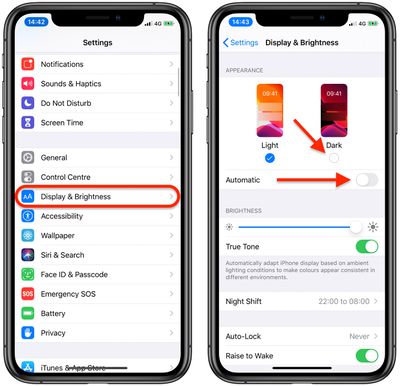
- Launch the Settings app on your iPhone.
- Tap Display & Brightness.
- In the Appearance section, tap the circle under Dark to enable it.

- If you want your device to switch between Light and Dark modes based on the time of day, tap the switch next to Automatic to the green ON position.
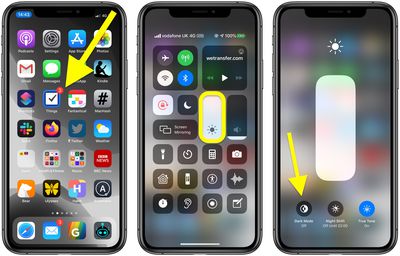
You can also control your iPhone's appearance settings from the Control Center, like so:
- Launch Control Center, either by swiping upwards from the bottom of the Home screen if your iPhone has a Home button, or swiping diagonally from the top-right "ear" of the screen if you have a newer iPhone with Face ID.
- Press and hold the Brightness slider until it expands.
- Tap the Dark Mode button to turn it on.
In chat threads, WhatsApp will show dark chat bubbles and a dark version of the chosen wallpaper – this part's also dynamic, so if you switch modes, the wallpaper style changes too. WhatsApp has also done some extensive work on a raft of Dark Mode-friendly solid colors, so be sure to check them out.