Skip to Content

How to Customize the Noise Control Button on AirPods Max

by

Apple's AirPods Max over-ear headphones include a single noise control button atop the right-hand earcup that allows you to cycle between Active Noise Cancelation mode, Transparency mode, or turn off both modes. Noise Cancellation blocks out external sounds, while Transparency lets in sounds from the outside world.
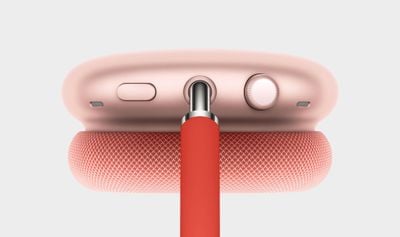
airpods max digital crown
Depending on how and when you use your ‌AirPods Max‌, you may prefer one mode over the other. If you wear ‌AirPods Max‌ on a sit-down commute, for example, you might use Noise Cancellation exclusively, in which case you may want to customize the noise control button to just turn Noise Cancellation on and off, instead of having to always cycle through the different modes using several presses.

Fortunately, iOS 14 and later has options built in that allow you to customize what the noise button does on ‌AirPods Max‌. The following steps show you how to change it to control only the modes you use.

  1. Make sure the ‌AirPods Max‌ headphones are connected to your iOS device.
  2. Launch the Settings app on your iPhone or iPad.
  3. Tap Bluetooth.
  4. Tap the Info (i) button next to the name of your Airpods Max headphones.
  5. Under "Button Cycles Between," select what you want to cycle through with each press of the noise control button. The available options are Noise Cancellation, Transparency, and Off (turns off noise cancellation and transparency). A tick appears beside each currently selected option.

The changes you make should take immediate effect, so that the next time you press the noise control button, you'll get your ‌AirPods Max‌ in just the mode you want them to be in.
Related Roundup: AirPods Max
Buyer's Guide: AirPods Max (Neutral)
Related Forum: AirPods

Popular Stories

MacBook Neo Feature Pastel 1

First MacBook Neo Benchmarks Are In: Here's How It Compares to the M1 MacBook Air

Thursday March 5, 2026 4:07 pm PST by
Benchmarks for the new MacBook Neo surfaced today, and unsurprisingly, CPU performance is almost identical to the iPhone 16 Pro. The MacBook Neo uses the same 6-core A18 Pro chip that was first introduced in the iPhone 16 Pro, but it has one fewer GPU core. The MacBook Neo earned a single-core score of 3461 and a multi-core score of 8668, along with a Metal score of 31286. Here's how the...
HomePod mini and Apple TV Sage

New Apple TV and HomePod Mini Are Still Missing, Here's Why

Thursday March 5, 2026 6:11 am PST by
Apple this week unveiled seven products, ranging from the iPhone 17e to the MacBook Neo, but new Apple TV and HomePod mini models were not among them. Given that there have been rumors about the next-generation Apple TV and HomePod mini since all the way back in late 2024, some customers are wondering why the devices have yet to launch, and the answer likely relates to Siri. In September, ...
MacBook Neo Feature Pastel 1

Apple Announces $599 'MacBook Neo' With A18 Pro Chip

Wednesday March 4, 2026 6:15 am PST by
Apple today announced the "MacBook Neo," an all-new kind of low-cost Mac featuring the A18 Pro chip for $599. The MacBook Neo is the first Mac to be powered by an iPhone chip; the A18 Pro debuted in 2024's iPhone 16 Pro models. Apple says it is up to 50% faster for everyday tasks than the bestselling PC with the latest shipping Intel Core Ultra 5, up to 3x faster for on-device AI workloads,...