

Regular users of Apple's Photos app will be undoubtedly familiar with the People album, which tries to identify faces in your pictures so that you can label people with their proper names and use that label as an organizing element in your library or as a discoverable tag.

Most Photos app users will also know that Apple's on-device face recognition isn't always totally accurate, and there can be occasions where someone's face gets misidentified and matched with a different person.
To tackle this in iOS 15, the "People" album features improved recognition for the various individuals that are in your photos. In addition, Apple has acknowledged that mistakes will still occasionally happen, and has also introduced a new workflow for correcting naming mistakes. Here's how to use it.
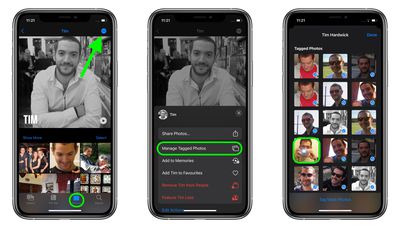
- Open the Photos app on your iPhone or iPad and select the Albums tab.
- Under "People & Places," tap People, then select a person.
- Tap the ellipsis icon in the top-right corner of the screen.
- Select Manage Tagged Photos.
- Tap to uncheck any photos that have been misidentified as that person.
- To add untagged photos that include the person, tap Tag More Photos at the bottom.
- Tap Done when you're finished to save your changes.
Photos in iOS 15 has many more improvements and new features worth checking out. You can find out more information in our dedicated Photos guide.
























![Apple Pulls Keynote, Pages and Numbers From App Store [Update: Back]](https://images.macrumors.com/t/Okb7kitB_gNr6qe5Pex9nQIysD8=/112x112/article-new/2026/01/Apple-Creator-Studio-iWork-suite.jpg)





















