

In iOS 15, unit and currency conversions are handled by Spotlight, but in iOS 16 you can perform these and many other unit conversions anywhere in the operating system that you can select text. Keep reading to learn how it works.
Apple hasn't publicized this handy feature, but iOS 16 is capable of performing a range of unit conversions that appear in inline text on the fly. The built-in ability is on call across a range of stock apps like Messages, Mail, Calendar, Notes, Reminders, and more, and is available at a touch of the screen.
For example, say you're in the U.S. and you're chatting via Messages with someone in the United Kingdom, and they mention the temperature where they are in degrees Celsius.
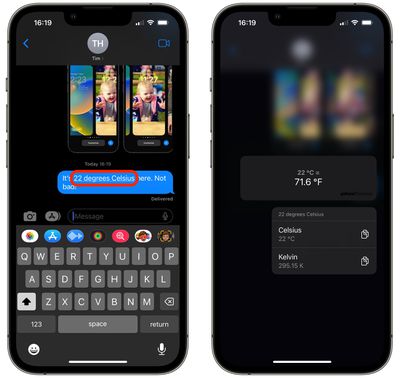
There's no need to exit the app or even ask Siri to convert it to Fahrenheit for you – simply long press the underlined temperature in the chat bubble, and you'll see a pop-over that gives you the conversion (along with Kelvin, in case you were wondering) along with the option to copy it to the clipboard.
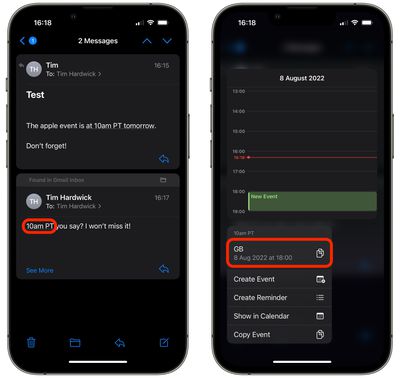
Here's another example. Let's say you receive an email in the Mail app from someone based in the U.S. country, informing you of a product event announcement that is due to take place at 10:00 a.m. PT. All you have to do is long press on the underlined time and iOS will provide you with the equivalent time in the time zone that your iPhone is set to, along with the option to add a Calendar event.
In fact, iOS 16 can work its conversion magic on a range of units including the following:
- Currency
- Distance
- Temperature
- Time Zones
- Volume
- Weight
So whenever you see underlined units in Apple's latest mobile OS, remember that a long press will very likely give you the conversion that makes most sense to you. (Credit goes to MacStories editor in chief Federico Viticci for spotting the feature.)














































