ipad home hub homekitOne of the main benefits of using Apple's HomeKit framework is the ability to control your HomeKit-compatible devices when you're away from home.

For instance, if you are about to leave the office, you can use the Home app or ask Siri on your iPhone to increase the temperature of a connected thermostat at home so that it's nice and cozy when you arrive.

Before you can trigger actions when you're away from home, you need to designate a device as a home hub, which remains powered on and connected at your home when you're away. Click on one of the links below to learn how to set up an Apple device as a home hub.

Controlling HomeKit Accessories Remotely

Once you've set up your home hub, you'll need to enable two-factor authentication on your iCloud account, otherwise you won't be able to remotely access your ‌HomeKit‌ accessories.

Once you've done that, you're ready to start controlling your ‌HomeKit‌ accessories when you're away from home. You can do this wherever you've got a data connection on your ‌iPhone‌. Siri can be used to remotely access your accessories, as can the Home app. You can also set particular HomeKit scenes and accessories as "Favorites" so that you can access them quickly and easily from the app's Home tab and in Control Center on your ‌iPhone‌ or iPad.

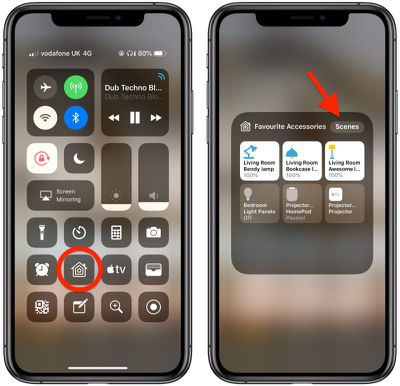
Once you've set up your favorites, you can access them from the Control Center like so.

  1. To open Control Center on an ‌iPad‌ with a Home button, double-tap the Home button; on ‌iPhone‌ 8 or earlier, swipe up from the bottom of the screen; and on a 2018 iPad Pro or ‌iPhone‌ X/XR/XS/XS Max, swipe down from the upper right of the screen.
    how to set homekit favorites 3

  2. Press and hold the Home icon.
  3. You can switch between Favorite Accessories and Favorite Scenes using the relevant button at the top of this panel.
When you have a lot of ‌HomeKit‌ products, the built-in Favorites option is a great way to put the devices that you need to access most right on the main page of the Home app, such as lights and smart plugs.
Popular Stories

iPhone Top Left Hole Punch Face ID Feature Purple

iPhone 18 Pro Launching Later This Year With These 12 New Features

Thursday January 15, 2026 10:56 am PST by
While the iPhone 18 Pro and iPhone 18 Pro Max are not expected to launch for another eight months, there are already plenty of rumors about the devices. Below, we have recapped 12 features rumored for the iPhone 18 Pro models, as of January 2026: The same overall design is expected, with 6.3-inch and 6.9-inch display sizes, and a "plateau" housing three rear cameras Under-screen Face ID...
iPhone Top Left Hole Punch Face ID Feature Purple

New Leak Reveals iPhone 18 Pro Display Sizes, Under-Screen Face ID, and More

Wednesday January 14, 2026 7:09 am PST by
While the iPhone 18 Pro models are still around eight months away, a leaker has shared some alleged details about the devices. In a post on Chinese social media platform Weibo this week, the account Digital Chat Station said the iPhone 18 Pro and iPhone 18 Pro Max will have the same 6.3-inch and 6.9-inch display sizes as the iPhone 17 Pro and iPhone 17 Pro Max. Consistent with previous...
2024 iPhone Boxes Feature

Apple Adjusts Trade-In Values for iPhones, Macs, and More

Thursday January 15, 2026 11:19 am PST by
Apple today updated its trade-in values for select iPhone, iPad, Mac, and Apple Watch models. Trade-ins can be completed on Apple's website, or at an Apple Store. The charts below provide an overview of Apple's current and previous trade-in values in the United States, according to the company's website. Most of the values declined slightly, but some of the Mac values increased. iPhone ...
Apple MacBook Pro M4 hero

These 5 Apple Products Will Reportedly Be Upgraded With OLED Displays

Friday January 16, 2026 7:07 pm PST by
Apple plans to upgrade the iPad mini, MacBook Pro, iPad Air, iMac, and MacBook Air with OLED displays between 2026 and 2028, according to DigiTimes. Bloomberg's Mark Gurman previously reported that the iPad mini and MacBook Pro will receive an OLED display as early as this year, but he does not expect the MacBook Air to adopt the technology until 2028 at the earliest. A new iPad Air is...
Apple Wallet ID Illinois

Apple Plans to Expand iPhone Driver's Licenses to These 7 U.S. States

Friday January 16, 2026 12:12 pm PST by
In select U.S. states, residents can add their driver's license or state ID to the Apple Wallet app on the iPhone and Apple Watch, and then use it to display proof of identity or age at select airports and businesses, and in select apps. The feature is currently available in 13 U.S. states and Puerto Rico, and it is expected to launch in at least seven more in the future. To set up the...