How to Change the Wallpaper in the Home App - MacRumors
Skip to Content

How to Change the Wallpaper in the Home App

by

Like the home screen on your iPhone and iPad and the desktop on your Mac, you can customize the background of the Home app. The default image of a fence draped in red leafy vines is nice, but you may want an image with some personal meaning or a different aesthetic. Making a change is easy.

In the Home app on an iPhone or iPad:

  1. Click on the home icon in the top left corner.
  2. Scroll down to the Home Wallpaper section.
  3. Select Take Photo if you want to capture an image with the device's camera to use as the background.
  4. Or tap on Choose from Existing to select a photo from your photo library.
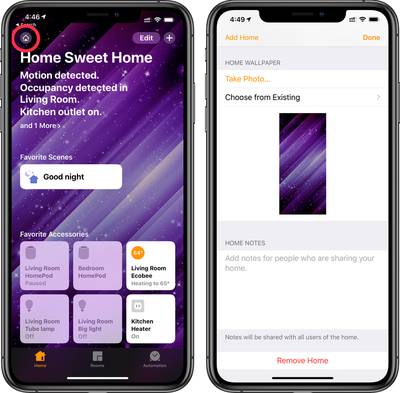
homekit change wallpaper

On a Mac:

  1. Open the Home app then click the Edit menu.
  2. Click Edit Home.
  3. Scroll down to Home Wallpaper.
  4. Choose one of the available wallpapers shown.

To use an image you already have on your Mac, just drag and drop the image into the open Home app and it will replace the existing wallpaper.

Note that the Home app wallpaper does not sync across your devices so you can set them individually by device.

Popular Stories

MacBook Pro Low Angle Wide Lens

Apple to Launch 'MacBook Ultra' With These Six New Features

Friday April 24, 2026 10:32 am PDT by
While the 14-inch and 16-inch MacBook Pro were just updated with M5 Pro and M5 Max chips last month, bigger changes are reportedly around the corner. According to Bloomberg's Mark Gurman, the higher-end MacBook Pro models will be receiving a major redesign by early 2027, and he said that Apple might use "MacBook Ultra" branding for them. If so, the MacBook Ultra would likely be a...
Apple TV Thumb 3

Here's What's Coming in the 2026 Apple TV

Thursday April 23, 2026 12:08 pm PDT by
There are a lot of folks waiting for a new version of the Apple TV because the set-top box hasn't been updated since 2022. There is an update coming this year, but people will need to wait a bit longer because Apple is holding the next Apple TV until the new version of Siri comes out this fall. Design Apple TV design updates don't happen often, and that's not changing in 2026. The next...
Apple Maps General

Tim Cook Calls Apple Maps Launch His 'First Really Big Mistake' as CEO

Thursday April 23, 2026 5:29 am PDT by
Outgoing Apple CEO Tim Cook has named the botched 2012 launch of Apple Maps as his "first really big mistake" in the role, according to a Bloomberg report covering the town hall meeting that was held Tuesday with his recently announced successor, John Ternus. The Maps app launched with mislabeled landmarks, faulty directions, and a user experience that fell well short of Google Maps at the...